ADJ LED RC2

SKU: ADJ1226200027

£14.00 inc VAT
£11.67 ex VAT

8 in stock (more available subject to additional lead time)

Order in 19h 27m 23s for delivery by Thu 2nd JulClick & Collect available Wed 1st Jul from us in London ›
VisaMastercardAmerican ExpressApple PayGoogle PayPayPalPayPal Credit
1 Year Manufacturer Warranty Included

About this Product

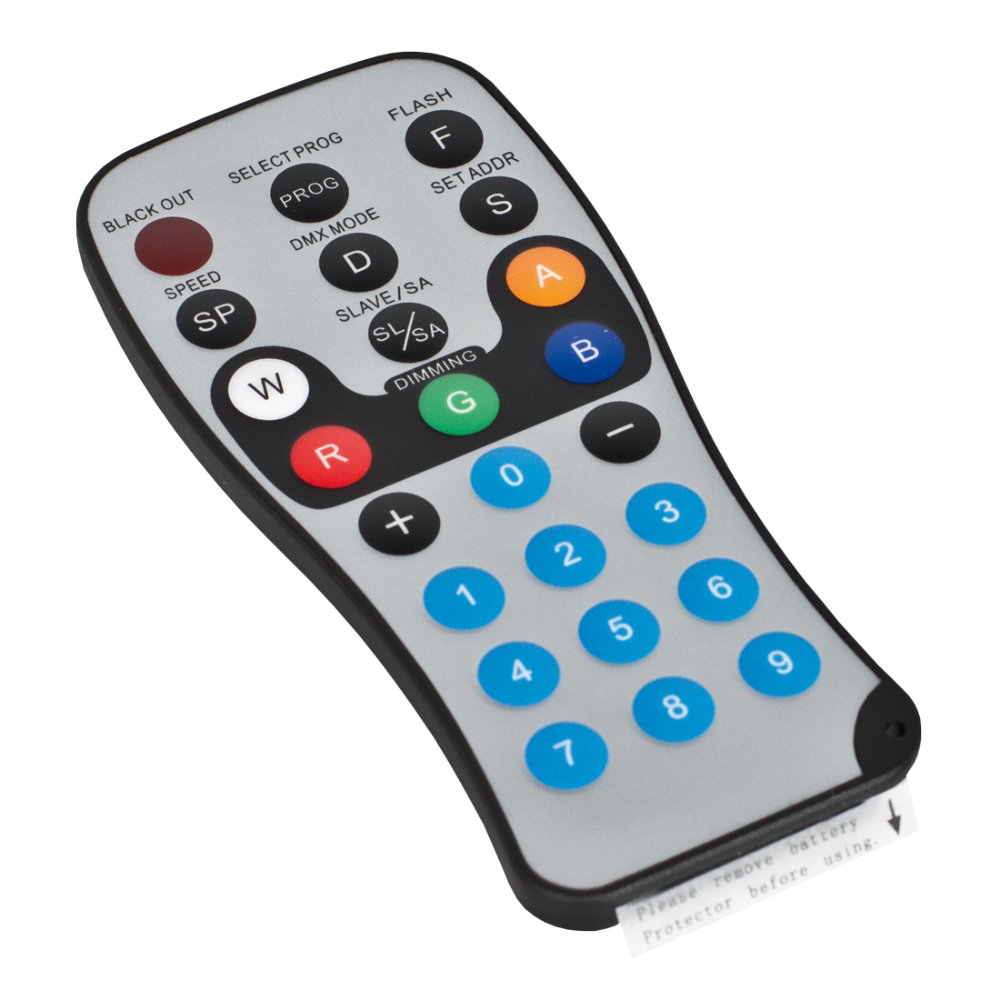
The ADJ LED RC2 (part 1226200027) is an infrared remote control for a wide range of ADJ LED PAR and wash fixtures, including the Flat PAR QA, QWH and CWWW series, Mega Par Profile Plus range and Pinpoint Go Colour. It provides direct control of dimming, colour, programs, strobe, speed and sound active modes.

Key Features
Infrared remote control
Blackout and full on control
R, G, B, A and W intensity adjustment
Program, speed and DMX mode selection
Flash, sound active and slave buttons
Set DMX address directly from the remote

More Information

Blackout - Pressing this button will blackout the fixture.

PROGRAM SELECTION - This button has multiple functions depending on the fixture used. It can activate Auto Run, or activate/shut off the LCD Display of the fixture, scroll through the preset colours and programs.
FLASH - This button will activate the strobe effect. You can control the flash rate by pressing the
“+” and “-” buttons. Press this button again to exit strobe mode.
SPEED - Press this button and use the “+” & “-” buttons to adjust the speed of the Auto run.
DMX MODE - This button will let you select which DMX mode you want to use. Some fixtures will
come with different DMX channel modes. This button will switch between the different
modes. Please see your corresponding fixture in this user manual to find out
about your DMX modes, values, and traits.
SOUND ACTIVE - This button activates sound active mode. Sound active mode will not work for
outdoor LED lights.
SLAVE - This designates the fixture as a Secondary fixture in a Primary/Secondary configuration.
SET ADDRESS - Press this button to set the DMX address. Press this button first, then press the
numbers to set the address. Example: DMX Address 1 Press “S001”
DMX Address 245 Press “S245”
R G B A W- Press either one of these buttons, and then press the “+” and “-” to adjust the brightness.
“+” and “-” - Use these buttons to adjust the flash rate, speed of the Auto Run, dimming, and program
selection.

Popular Now

Frequently Asked Questions

Stage Supply is the retail arm of Moventra Group. We’re a working touring and events production company founded in 2020 by sound engineers with many years of experience. 

We’re very selective about the products we sell. Everything we supply we use ourselves on our tours, events and productions. This means we can offer a level of buying advice and aftersales support that can’t be beaten.

We’re official dealers of brands such as Allen & Heath, Audio Technica and sE Electronics. We also stock other leading brands including Shure, Sennheiser, Martin Audio and Chauvet Professional.

We accept Debit & Credit Cards, Apple Pay, Android Pay and Paypal. We also offer finance through Paypal Credit and Klarna.

Business Customers can choose to receive a Proforma Invoice on checkout to pay by bank transfer.

Yes. We run a AV Production business (Moventra) and have AV Engineers on hand to provide advice and technical support during our operating hours.

The quickest way to contact us for advice and support is through WhatsApp or Email.

Stage Supply is a division of Moventra, which is a AV Production Company. We share staff and our premises with Moventra which allows us to keep our costs down.

As AV Engineers ourselves, our mission is to provide high quality equipment to other AV Professionals at reasonable prices.

Please see our Returns page for information on our returns policy and to start a return online.

Generally if you change your mind you can return your item for a full refund within 14 days of purchase - as long as the product is unopened and unused. 

If an item is faulty or damaged we will arrange collection free of charge and repair/replace it as quickly as possible.

Estimated delivery times are shown on the product page. For items in stock we aim to get your order to you within 1 - 3 working days.

Some items are ordered directly from the manufacturer. These may have longer lead times which will be estimated on the product page. Please contact us for a more accurate lead time.

Yes. You can collect from our Production Space in Brent Cross, North West London. Please note that only a small range of our products are stored here, items showing as in stock may need to be transferred from our warehouse. If the item is in stock it will usually be ready to collect the same or next working day.

Yes. Through Moventra we can install across the UK. 

We've been involved in installation projects ranging from large capacity Music Venues to Coffee Shops, Churches and Council Offices.

Please click here to contact us to learn more about our installation service.