

Home » Guides » Wireless Mics & In-Ear Monitoring »
Wireless Microphone Systems: The UK Buying Guide
How to choose a wireless microphone system that actually works on the night: transmitter formats, capsules, digital versus analogue, channel counts, antennas and power, with UK band planning in mind throughout.
12 min read · Updated July 2026 · Stage Supply technical team
In this guide: System anatomy · Handheld vs bodypack vs headset · Capsule choice · Digital vs analogue · Channel counts · Antennas · Racking · Batteries · Band planning · Common mistakes · FAQ
A wireless microphone system is one of the easiest purchases to get wrong in pro audio. The microphone is only half the decision: the other half is radio, and radio does not care how good the capsule sounds if the frequency plan is a mess or the antennas are buried behind a metal rack lid. This guide covers the hardware choices, from a single handheld up to a multi-channel rack with antenna distribution. For the legal side, which frequencies you may use in the UK and which need a licence, see our companion guide to UK wireless microphone licensing and Channel 38.
System anatomy: what you are actually buying
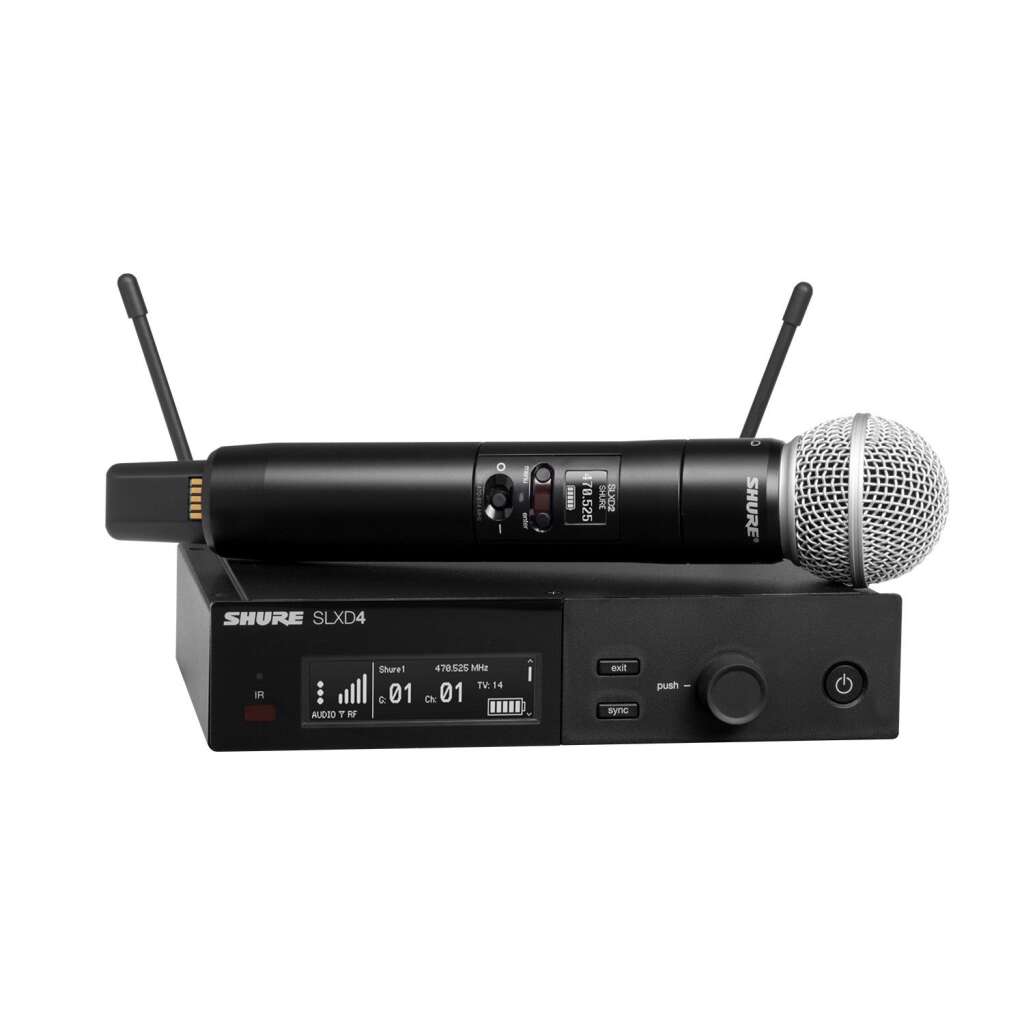
Every wireless microphone system has two halves. The transmitter is the part the performer carries: either a handheld microphone with the transmitter built into the body, or a bodypack worn on a belt or waistband with a small microphone plugged into it. The receiver sits at the mixing position or in a rack, picks the signal out of the air and hands it to your console as a normal mic or line level output.
Transmitter and receiver are sold matched to a frequency band and series. A transmitter from one band cannot talk to a receiver in another, and cross-brand pairing is generally not possible even within the same band. Buy the two halves as a system, or make sure any separates share the same series and band code.
True diversity versus single antenna
Radio signals bounce off walls, trusses and people. Where a direct and a reflected signal meet out of phase, they cancel, and the receiver hears a dropout even though the transmitter is only a few metres away. Diversity reception is the standard defence:
- True diversity: the receiver has two antennas feeding two independent receiver circuits, and continuously switches to whichever is getting the cleaner signal. Because the antennas are physically separated, it is very unlikely both sit in a cancellation null at the same moment. This is the professional standard and worth insisting on for anything beyond casual use.
- Antenna (switching) diversity: two antennas but only one receiver circuit, which switches between antennas. Cheaper and still better than nothing, but less robust than true diversity.
- Single antenna (non-diversity): one antenna, one circuit. Found on budget systems. Fine on a kitchen table demo, prone to dropouts in a real room full of reflective surfaces and moving bodies.
Manufacturers state the diversity type in the specifications. If a system does not mention diversity at all, assume it has none.
Handheld, bodypack with lavalier, or headset
The transmitter format is dictated by the job, not by preference. Most working inventories end up with a mix.
Choose a handheld if
- The user is a vocalist or front person who works the mic: distance and angle to the capsule are part of their technique.
- The mic is shared or passed around: awards, Q&A sessions, karaoke, conference roving mics. A handheld needs no fitting and no clothing to clip to.
- You want the best gain before feedback on loud stages. A handheld sits close to the mouth and its capsule options are strongest.
Choose a bodypack with lavalier if
- The user is a presenter, lecturer or interviewee who needs both hands free and where the mic should be visually discreet.
- You are doing camera work or streaming where a visible handheld is unwanted.
- Levels are moderate. A lavalier sits on the chest, well away from the mouth, so it picks up more room and offers less gain before feedback than a handheld or headset. On a quiet corporate stage that trade is fine; in front of a loud PA it is not.
Choose a bodypack with headset if
- The user moves hard while speaking or singing: fitness and spin instructors, dance-heavy theatre, worship leaders, auctioneers.
- You need consistent level regardless of head movement. A headset keeps the capsule a fixed couple of centimetres from the mouth, so the level never changes when the head turns, which a lavalier cannot promise.
- Musical theatre: headsets and skin-tone earworn mics are the norm because they combine hands-free wear with usable gain before feedback under a full band.
The bodypack itself is common to the last two: lavaliers and headsets both terminate in the brand’s bodypack connector (Sennheiser uses a 3.5 mm locking jack on most series, Shure a TA4F 4-pin mini XLR on most series, among others). Check the connector when buying mics and packs separately. Browse body worn microphones for lavalier and headset options.
| Format | Best for | Gain before feedback | Watch out for |
|---|---|---|---|
| Handheld | Vocalists, shared or roving mics | Best | Handling noise with untrained users |
| Bodypack + lavalier | Presenters, conference, camera | Lowest | Clothing rustle, level drop when head turns |
| Bodypack + headset | Fitness, theatre, active singers | Good | Fit and sweat resistance matter, buy quality |
Capsule choice on handhelds
On most professional handhelds the capsule, the actual microphone head, unscrews from the transmitter body. That gives you two decisions instead of one.
Dynamic versus condenser
- Dynamic capsules (the SM58 wireless capsule is the archetype) are rugged, tolerant of rough handling and plosives, and forgiving on loud stages. For general vocal work, function bands and hire stock, dynamic is the default.
- Condenser capsules resolve more detail and extend further at the top end, which suits controlled vocals, acoustic acts and broadcast. They are typically less tolerant of abuse and can be more feedback-prone in the wrong room, so they reward an operator who knows the system.
Polar pattern matters as much as the transducer type: cardioid is the general-purpose choice, supercardioid rejects more from the sides for louder stages but has a rear lobe you must keep off the monitor wedges.
Interchangeable capsule ecosystems
Because the thread interface is standardised within (and sometimes across) brands, you can put a better capsule on a mid-range transmitter. Shure’s wireless capsule thread is supported by many third-party manufacturers, and Sennheiser’s evolution wireless series have their own standard fitting that third parties also make for: sE Electronics sells the same V7 head in a Shure-thread version and a Sennheiser-fit version, for example. This is one of the strongest arguments for buying into an established system rather than a sealed budget unit: the transmitter becomes a platform you can upgrade, and touring vocalists can bring their preferred capsule to your rack. Browse wireless capsules and handheld transmitters to mix and match.
Digital versus analogue UHF
Both digital and analogue systems in this market transmit on UHF radio frequencies; the difference is what rides on the carrier.
Analogue FM systems squeeze the microphone’s wide dynamic range through the transmitter using a compander: compressed on the way in, expanded again in the receiver. Done well it is transparent; done cheaply it breathes and pumps audibly. Analogue’s latency is effectively zero, and the failure mode is gradual, with hiss rising as the signal weakens.
Digital systems convert the audio to data and skip companding entirely, so dynamic range and frequency response are typically flatter and cleaner at a given price. The costs are a small amount of latency, generally in the low single-digit milliseconds on current stage systems, and a harder failure mode: digital holds clean to the edge of range, then mutes rather than degrading gracefully. A few milliseconds is inaudible for speech and front-of-house vocals; it only starts to matter when it stacks with console and in-ear latency for a performer hearing themselves, worth totting up if you also run wireless IEMs (see our in-ear monitor systems guide).
Digital also tends to be more spectrally efficient: current digital systems can pack more usable channels into the same slice of spectrum, and some (Sennheiser’s EW-D family, for example) use an equidistant channel grid that removes most of the intermodulation arithmetic described below. With UK spectrum for wireless microphones tighter than it once was, that efficiency is a genuine buying criterion, not a spec-sheet footnote.
Neither technology is simply better. Analogue UHF remains dependable, latency-free and widely serviceable; digital buys cleaner audio, encryption on some models, and more channels per megahertz. What matters far more than the label is diversity reception, band choice and build quality.
How many wireless mics? Channel counts and intermodulation
Every simultaneous wireless microphone needs its own frequency. The trap is assuming that frequencies are like console channels, where adding one more is free. They are not, because of intermodulation.
When two transmitters operate close together, their signals mix in any nearby non-linear circuit and generate phantom signals at mathematically related frequencies: the strongest, the third-order products, land at twice one frequency minus the other. Each added mic multiplies the number of products, and every one is a spot on the dial where you must not park another receiver. This is why “just add another mic on any free-looking frequency” works with two or three channels and then abruptly stops working: the new mic lands on an intermod product of the others and takes hits whenever certain transmitters key up together.
Practical consequences for buying:
- Buy for the channel count you will actually run, plus sensible headroom, and confirm the manufacturer states that many compatible channels in your band. Manufacturers publish preset frequency banks that are already intermod-calculated: staying inside one bank is the easy path.
- Keep multi-channel systems in one ecosystem where you can. One brand’s scan-and-sync tools will coordinate its own receivers; coordinating mixed fleets means manual planning or third-party software.
- Above roughly eight channels, plan on proper frequency coordination software and antenna distribution rather than ad hoc additions.
- Systems with equidistant digital tuning grids sidestep much of this, which is a real advantage for growing installs.
Channel count is a spectrum question, not just a budget question
The UK shared licence band, Channel 38, is 8 MHz wide. How many systems fit depends on the equipment’s channel spacing and intermod behaviour, and licence-free Channel 70 fits far fewer still. Before committing to a 12-way rack, read our UK wireless licensing guide and confirm the band you plan to buy supports the count you need.
Antenna basics: placement, paddles and distribution
More wireless problems are antenna problems than anything else. The rules are simple and routinely ignored.
Placement
- Line of sight: UHF does not enjoy going through bodies, walls or steel. Antennas should see the performance area directly.
- Height: get antennas above head height so an audience cannot stand in the signal path.
- Away from metal: never leave receiver whips inside a closed metal rack or pressed against a rack rail. The rack acts as a screen. Front-mount the antennas on the rack panel or remote them on cable.
- Separation: keep the two diversity antennas apart and angled apart (a wide V is the convention) so they sample genuinely different signal paths.
- Distance from other transmitters: keep receive antennas away from IEM transmit antennas and anything else that radiates.
Paddles (directional antennas)
The stock quarter-wave whips on a receiver are omnidirectional and rely on the receiver chassis as their ground plane, so they only work properly mounted on the unit. Once you remote your antennas, use proper wideband antennas: either omnidirectional remote types or, more usually, directional paddles (log-periodic types). A paddle adds forward gain, typically a few dB, and just as usefully rejects interference arriving from behind it. Aim a pair at the stage from front of house or the wings and you have solved most coverage problems in one move. For long coaxial runs, in-line boosters compensate cable loss; use low-loss 50 ohm cable and keep runs short.
Antenna distribution: when you need it
Every receiver wants two antennas, so four receivers means eight whips crammed within centimetres of each other in a rack, which is both an eyesore and an RF mess. An antenna distribution amplifier (splitter) takes one pair of antennas and feeds four receivers, with most models cascadable to eight or more, and typically powers the receivers too. The working rule: at three or four receivers and up, antenna distribution stops being optional. It gives you one properly placed antenna pair instead of a thicket of compromised whips, and it is the prerequisite for remoting paddles. Browse antennas and distribution for paddles, splitters, boosters and cabling.
Racking receivers
Half-rack receivers pair side by side into 1U with the manufacturer’s rack kit; full-rack and quad receivers (four channels in 1U) mount directly. A tidy wireless rack is worth planning rather than accreting:
- Antennas out front or remoted: use front-mount bulkhead kits to bring antenna connections to the rack face, or run coax out to paddles. Never behind, inside, or under a lid.
- Distribution at the top: splitter feeds down to the receivers with short equal-length jumpers.
- One mains feed: distribution amps that power their receivers, or a rack power strip, beat a bag of wall warts.
- Leave expansion space: an extra 1U and spare splitter ports save re-racking later.
- Label everything: channel number, performer, frequency.
For higher channel counts, quad receivers earn their keep: a single 1U quad with one antenna pair via distribution replaces four separate boxes and eight whips.
Batteries versus rechargeable docks
Transmitter power is an operating cost and a reliability question, and it deserves a deliberate decision at purchase time.
- Disposable AA alkalines are the traditional answer: available anywhere, predictable, fresh cells every show. Across a busy hire or venue calendar the cost and waste add up fast, and battery metering calibrated for alkaline voltage curves can misread other chemistries.
- Manufacturer lithium-ion packs and charging docks (Shure’s SB903 packs and SBC203 dock for SLX-D, for example) cost more up front but pay back quickly with regular use. They report accurate remaining runtime to the receiver rather than a vague bar graph, drop into a dock between shows and are the professional norm for installs, theatres and busy hire stock.
- Generic rechargeable AAs sit in between: cheap and reusable, but metering accuracy varies by system, so establish real-world runtime yourself and change cells on schedule rather than trusting the display.
Whatever you choose, standardise. One chemistry, one charging routine, spares in every kit.
Band planning: buy the right frequencies
Wireless systems are manufactured in fixed band variants, and the band is printed in the model code (Sennheiser’s GB variants and Shure’s K-series codes cover the UK shared licence band, for example). The band you buy determines what you may legally use, where, and with what licence: Channel 38 (606 to 614 MHz) under the UK shared licence is the standard professional choice, the licence-free Channel 70 slice suits one or two channels, and other bands need coordinated licences. The full picture, including which licence covers what and how to apply, is in the dedicated UK wireless microphone licensing guide. Read it before you order, because the band variant is the one thing you cannot change after purchase.
Common mistakes to avoid
- Buying random-band kit abroad or second-hand. A bargain system in an overseas band may be illegal to operate in the UK and can sit on spectrum now assigned to mobile networks. Check the band code against UK allocations before money changes hands.
- Antennas inside or behind a metal rack. The most common self-inflicted dropout. Front-mount or remote them.
- Mixing brands and bands with no frequency plan. Each system scanned “a clear channel” on its own and nobody calculated intermods across the fleet. It works in soundcheck with one transmitter on, then falls over during the show when they all key up.
- No diversity. Single-antenna receivers in a reflective room produce dropouts no amount of repositioning will fully cure.
- Ignoring gain before feedback. Specifying lavaliers for a loud stage because they look tidy, then wondering why the vocal cannot get above the band. Match the format to the acoustic job.
- No spare batteries or a charging routine. Most mid-show wireless failures are flat cells, not RF.
- Skipping the walk test. Always walk the full performance area with the transmitter live, listening at the desk, before doors. Dead spots found at 6 pm are staging notes; dead spots found at 8 pm are incidents.
Popular picks from the shop
A few of the wireless systems and components our customers buy most.
Shure SLXD24+/SM58 (K55) Wireless Vocal System View product → Sennheiser SK100 G4 Bodypack Transmitter (GB) View product → Audio Technica ATW-1102 System 10 Handheld System View product → Shure SLXD4Q+ 4-Channel Wireless Receiver View product →
Frequently asked questions
What is the difference between true diversity and diversity?
True diversity uses two antennas feeding two complete receiver circuits and switches to the cleaner one; plain antenna diversity switches two antennas into a single circuit. True diversity is meaningfully more dropout-resistant and is the professional standard.
Handheld or lavalier for a conference presenter?
If the presenter needs hands free for slides or props, a bodypack with a lavalier or discreet headset. If mics are shared between multiple speakers or panellists, handhelds are faster, more hygienic to manage and give better gain before feedback.
How many wireless microphones can I use at once?
It depends on the band and the equipment. Each simultaneous mic needs its own frequency, and intermodulation between transmitters rules out many otherwise free frequencies. Stick to the manufacturer’s preset compatible-channel banks, and check the stated maximum channel count for your band before buying. The available spectrum itself is covered in our UK licensing guide.
Do digital wireless systems have noticeable latency?
Current professional digital systems run in the low milliseconds, which is inaudible for speech and front-of-house vocals. It only becomes worth budgeting when it stacks with console and in-ear monitor latency for performers monitoring themselves.
When do I need antenna distribution?
From around three or four receivers. A distribution amplifier feeds one well-placed antenna pair to four or more receivers, removes the thicket of rack-top whips, and lets you remote directional paddles for better coverage.
Can I use a wireless system I bought abroad in the UK?
Only if its band matches UK allocations and you hold any licence that band requires. Many overseas bands are illegal to operate here or now sit under mobile network traffic. Check the band code before buying; see our UK licensing guide for what is and is not usable.
Can I put a different capsule on my handheld transmitter?
Usually, if the transmitter has an interchangeable capsule thread. Shure-thread bodies accept a wide range of first and third-party capsules, and Sennheiser evolution wireless bodies have their own standard fitting that third parties also support. Confirm the fitting for your exact transmitter series before ordering.
Are rechargeable batteries reliable in wireless mics?
Manufacturer lithium-ion packs with their matching docks are extremely reliable and report accurate runtime to the receiver. Generic rechargeable AAs work in most systems but battery meters calibrated for alkalines may misread them, so test real-world runtime and change on schedule.
Shop this guide
Everything covered above is stocked and supported from the UK, with advice on band planning and channel counts before you buy. Questions about a specific rig? Get in touch.
Wireless Systems Handheld Transmitters Body Worn Microphones Antennas & Distribution Capsules



