

Home » Guides » Wireless Mics & In-Ear Monitoring »
Planning a Multi-Channel Wireless System: Quad Receivers, Frequency Coordination and Antenna Distribution
How to plan 4 to 16 or more radio mics without dropouts: how many channels fit, when Channel 38 stops being enough, which quad receivers to rack, how to coordinate frequencies with Shure and Sennheiser software, and how to feed every receiver from one pair of antennas.
~11 min read · Updated October 2026 · By the Stage Supply team
In this guide: The short answer · How many channels fit · Licensing · Choosing receivers · Frequency coordination · Antenna distribution · Rack, power and network · Example plans · Checklist · Popular picks · FAQ
The short answer
Plan a multi-channel system in this order: count the channels, check the spectrum and licence, pick receivers that share antennas, coordinate every frequency together in the maker’s software, then distribute the antennas. Buying the receivers first and hoping the frequencies work out is how intermodulation problems start.
- Up to about 10 channels in one place can typically fit in Channel 38 on the shared UK Wireless Microphone Licence. Ofcom says users can typically achieve 10 radio mics there at the same time, though it differs case by case.
- Beyond that, or where interference is not acceptable, plan on extra frequencies from an Ofcom Standard Licence, coordinated for your site and dates.
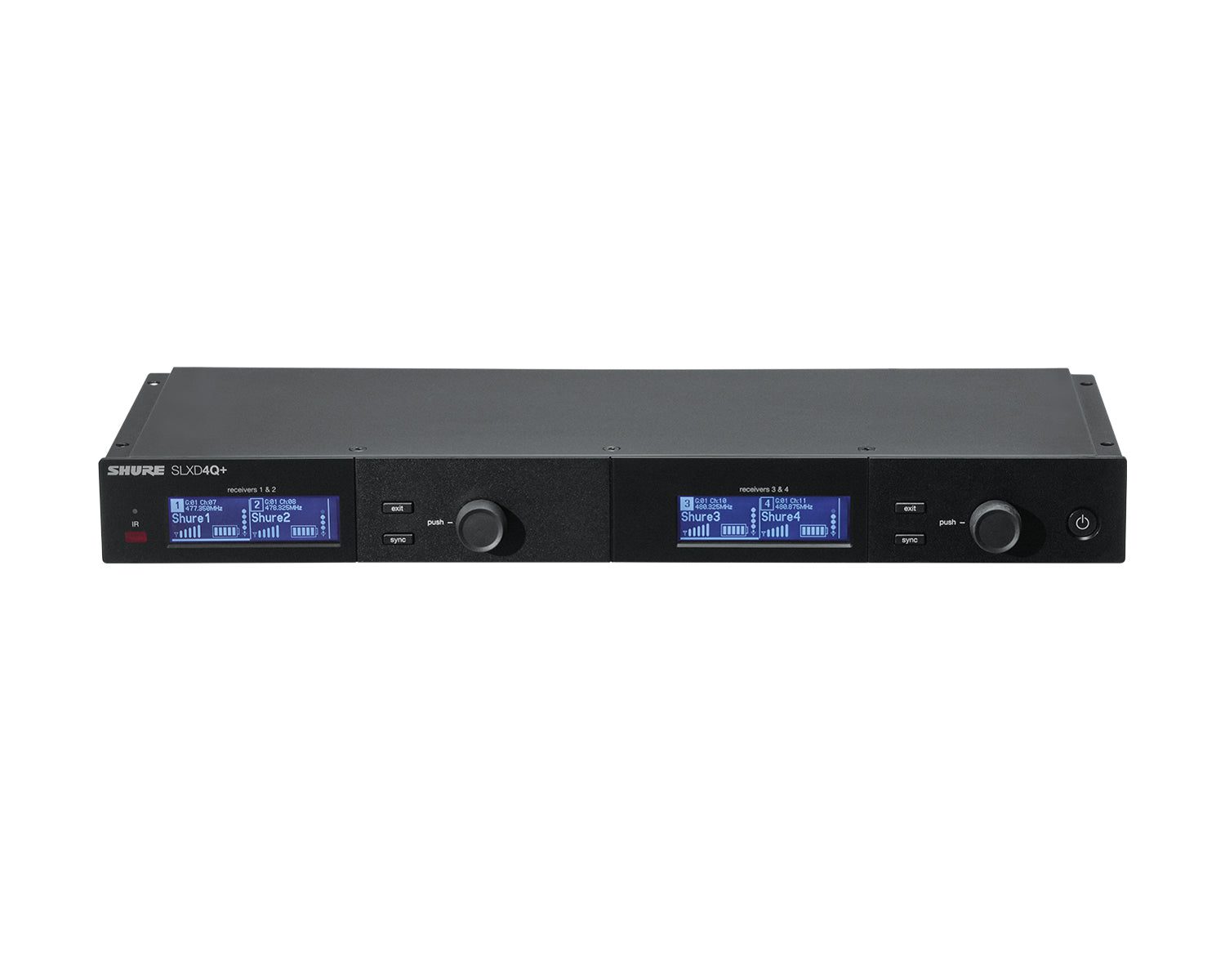
- Quad receivers save rack space and antennas. The Shure SLXD4Q+ cascades its antennas through up to three quads (12 channels). The Sennheiser EW-DX EM 4 Dante cascades through up to four (16 channels).
- Coordinate in software: Shure Wireless Workbench, or Sennheiser Wireless Systems Manager or Control Cockpit for EW-DX. Network the receivers so they scan and deploy as one system.
- Beyond the built-in cascade, use an active distribution amplifier such as the Shure UA844+SWB or Sennheiser EW-D ASA.
Step 1: how many channels will fit?
Start with a list: every handheld, headset, lavalier and instrument pack, plus spares, and any in-ear monitors, intercom or wireless video on the same site. The in-ear and intercom transmitters share the spectrum and must be coordinated alongside the mics. In-ear planning is covered in our in-ear monitor systems guide.
Manufacturers quote how many of their own systems fit in one TV channel. UK TV channels are 8 MHz wide, but the Channel 38 licence covers only 606.500 to 613.500 MHz (7 MHz), so treat 8 MHz figures as a ceiling, not a promise.
| System | Maker’s channel count | Notes |
|---|---|---|
| Shure SLX-D+ | Up to 14 per 8 MHz TV band | 138 MHz tuning range (region dependent) |
| Shure QLX-D | 22 per 8 MHz TV band | More than 60 compatible channels across one band |
| Shure ULX-D | 22 per 8 MHz (user guide; 23 on Shure's product page); 63 in High Density mode | High Density runs at 1 mW, with up to 30 m of range |
| Shure Axient Digital | Up to 63 per 8 MHz in High Density mode | Ask us about Axient Digital |
| Sennheiser EW-DX | Tuning grid of 146 channels (standard) or 293 (Link Density mode) across up to 88 MHz | Grid positions to choose from; Sennheiser does not publish a per-TV-channel count |
| Channel 38 (Ofcom) | Typically 10 radio mics in the same place | Ofcom’s figure; differs case by case |
The Ofcom figure is the one to plan around for a single venue on the shared licence. Its suggested 10-frequency plan for Channel 38 was chosen so the frequencies can work together in one location. Ofcom notes that frequencies can still interact when equipment is used close together. That interaction is intermodulation, and it is the reason to coordinate the whole system rather than tune each receiver on its own.
Step 2: licensing for multi-channel systems
All the bands we stock for these receivers include Channel 38: Shure K55 (606 to 694 MHz) and K51 (606 to 670 MHz), Sennheiser EW-DX S1-10 (606.2 to 693.8 MHz) and EW-D S1-7 (606.2 to 662 MHz). Anything outside 606.500 to 613.500 MHz in those ranges needs its own licence. The basics are in our Channel 38 licensing guide. The planning points are:
- UK Wireless Microphone Licence (Channel 38). One or two years, UK-wide, indoor or outdoor, on a shared non-protected basis. You can retune to any usable frequency within the range, but because it is shared, other licensees can be on the same frequencies and Ofcom says you must be prepared to retune if you get interference from other local users.
- Standard Licence. For frequencies coordinated with other users, or checked against local TV transmitters. You book by location and date, for anything from 15 minutes to a year. Ofcom says the risk of interference is minimal because of the coordination, and it will support you if interference does happen. Long-term or fixed-site access is usually only for the site’s permanent resident or owner.
- Booking online. Ofcom’s portal takes short and long-stay bookings for wireless mics and personal monitors in 470 to 790 MHz, except at congested major events and subject to frequency availability. You give the location with postcode, dates, equipment type and the full tuning range. You pay before frequencies are assigned.
A wide-tuning receiver is an advantage here, because Ofcom can only assign frequencies your equipment can tune to. Fixed-site, shared and event licences are compared in our guide to Ofcom licensing beyond Channel 38.
Step 3: choosing the receivers
For more than a handful of channels, a four-channel rack receiver usually beats a stack of singles: one rack space, one antenna pair, one power lead and one network connection for four mics. The table shows what each maker publishes about the stocked options.
| Receiver | Channels | Rack space | Networking and Dante | Antenna sharing built in |
|---|---|---|---|---|
| Shure SLXD4Q+ | 4 | Full-rack quad, 42 mm high; rack hardware supplied | Two Ethernet ports for Wireless Workbench control; no Dante | RF cascade through up to three quads (12 channels) |
| Shure SLXD4QDAN+ | 4 | As SLXD4Q+ | Dante audio plus control; switched, redundant or split network modes | As SLXD4Q+ |
| Shure ULXD4Q | 4 | 1U (44 x 482 x 274 mm), internal power supply | Dual-port Dante; redundant audio mode | Cascade to one more receiver |
| Shure ULXD4D | 2 | 1U (44 x 482 x 274 mm), internal power supply | Dual-port Dante | Cascade to one more receiver |
| Shure AD4Q (Axient Digital) | 4 | 1U (44 x 483 x 333 mm) | Dante, AES67 and AES3 outputs | Cascade to one more receiver |
| Sennheiser EW-DX EM 4 Dante | 4 | 19-inch, 44 mm high, integrated power supply | Dante (48 or 96 kHz) on primary and secondary ports, plus control | Built-in splitter; cascade up to four units (16 channels) |
| Sennheiser EW-DX EM 2 / EM 2 Dante | 2 | Half-rack (9.5-inch); external PSU or PoE | Ethernet control; Dante on the EM 2 Dante | No; use an EW-D ASA |
| Shure SLXD4D+ | 2 | Half-rack | Ethernet control | No; cascading is quad-only |
| Shure QLXD4 | 1 | Half-rack | Ethernet control and networked channel scanning | No |
Three points decide most choices:
- Ecosystem first. Transmitters generally only talk to receivers from the same system (Shure's exceptions include SLX-D with SLX-D+, and QLX-D with ULX-D with encryption off), so the receiver choice fixes the transmitters too. For range-level differences see Shure wireless ranges compared, SLX-D vs SLX-D+ and EW-D vs EW-DX.
- EW-D or EW-DX? Sennheiser’s EW-D receiver, the EW-D EM, is single-channel and managed with the Smart Assist app, which Sennheiser rates for installations up to 16 channels. The dual and quad receivers, network control in Control Cockpit, and Link Density mode are all EW-DX.
- Dante or analogue outs. If the desk has Dante, a Dante quad puts four channels on one network cable. If not, the standard quad’s XLR outputs do the same job, and the non-Dante SLXD4Q+ still networks for coordination and control.
Step 4: coordinate frequencies with the maker’s tools
Coordination means scanning what is already on air, excluding the busy frequencies, and calculating a set that works together, including against intermodulation. Every maker below can do this. The difference is how much control you get.
Shure: group scan on the receiver, or Wireless Workbench
Shure organises each band into groups of compatible frequencies. Its SLX-D+ manual says all receivers in the same band should be set to the same group, and that multi-receiver systems must be networked over Ethernet for proper coordination. Once networked, the receiver’s Initialize My System scan finds and deploys frequencies across the system, pushing them to transmitters linked by ShowLink Ease.
For larger or mixed systems, Shure’s Wireless Workbench is free for Windows and Mac. It coordinates all Shure wireless plus in-ear, intercom and radio mic systems from other makers, so a Sennheiser IEM rig can be coordinated with Shure mics. It can split equipment into RF zones and coordinate subsets of channels. It also plans offline from saved scan files and a database of local TV channels, and assigns the least frequency-agile equipment first. Shure advises keeping ULX-D High Density channels in a separate frequency range or RF zone from other devices.
Sennheiser: AutoScan, Wireless Systems Manager and Control Cockpit
EW-DX receivers have AutoScan, which Sennheiser says deploys frequencies on an equidistant grid. For networked control, the EW-DX EM 4 Dante manual names Wireless Systems Manager (WSM) and Sennheiser Control Cockpit. Sennheiser’s help pages describe WSM as handling the full process: scan, mark usable frequencies, coordinate, allocate to receivers, then re-sync the transmitters. Sennheiser lists WSM as compatible with EW-DX, Digital 6000 and 9000, and ew 300-500 G3 and G4, among others. Control Cockpit is Sennheiser’s central software for EW-DX and SpeechLine Digital Wireless: monitoring and setting many devices at once, with firmware updates. It runs on Windows only.
Coordinate everything together
Scan in the venue, then coordinate mics, IEMs and anything else on site as one list. Every added transmitter creates new intermodulation products, so a frequency slotted in later without recalculating the whole set can clash with one that was already working.
Step 5: antenna distribution
Each receiver needs two antennas for diversity. Eight receivers with their own whip antennas means sixteen antennas in a rack. Sennheiser’s EM 4 Dante manual recommends remote antennas, and possibly an antenna splitter, whenever more than one receiver is used. The aim is one pair of antennas feeding every receiver. The theory, cable types and boosters are in our antennas and RF distribution guide. Here is what the quads and distribution units do.
Built-in cascade
- SLXD4Q+ / SLXD4QDAN+: two RF cascade ports. Shure says you can cascade up to three receivers (12 channels) without a distribution system. All must be on the same band.
- ULXD4Q, ULXD4D and AD4Q: cascade to one additional receiver.
- EW-DX EM 4 Dante: built-in antenna splitter, cascadable to four receivers, so 16 channels run from two antennas or antenna boosters.
Active distribution amplifiers
- Shure UA844+SWB (470 to 960 MHz): splits one antenna pair to up to five receivers and amplifies to make up for the splitting loss. Up to five UA844+ units can run in a two-tier system. It supplies 15 V DC bias to active antennas, and powers receivers such as the QLXD4 and ULXD4 by DC cord.
- Shure UA845UWB: four receivers plus a fifth, or a second UA845UWB, from the cascade ports. One of five frequency ranges between 174 and 1805 MHz is selected on the front panel.
- Sennheiser EW-D ASA: runs up to four EW-D EM or EW-DX EM 2 receivers, configured as 2 x 1:4 or 1 x 1:8. It powers EW-D EM receivers through the antenna cables; EW-DX EM 2 receivers need their own supply or PoE. Which antennas and splitters work with which Sennheiser generation is set out in our Sennheiser antenna and splitter compatibility guide.
Active antennas and bias
The Shure UA874WB active directional antenna (470 to 900 MHz) only works when the receiver or distribution amplifier supplies 10 to 15 V DC bias, even on its -6 dB and 0 dB settings. Shure’s advice is to use only enough gain to make up for cable loss, because extra gain amplifies interference too. The SLXD4Q+ antenna bias can be switched off when passive antennas are used. For EW-DX, the EM 4 Dante manual recommends the AWM UHF I active antenna (470 to 694 MHz) and the passive ADP UHF (470 to 1075 MHz).
Step 6: rack, power and network
- Rack space. Each quad or full-width dual in the table is 44 mm high or less, so takes 1U. Half-rack receivers mount with the maker’s kit: Shure’s QLX-D manual shows single and side-by-side dual rack assembly, and Sennheiser’s GA 3 rack mount kit takes the EW-D EM, EW-DX EM 2 or EW-D ASA. Allow rack space for a distribution amplifier (the UA844+ is a full-width unit, 45 mm high), and space for chargers if the transmitters run on rechargeables (see our radio mic batteries guide).
- Power. The ULXD4Q and EW-DX EM 4 Dante have internal mains supplies. The SLXD4Q+ ships with an external PS60 supply. The Sennheiser NT 12-35 CS powers an EW-D ASA, any connected EW-D EM receivers and antenna boosters (EW-DX EM 2 receivers need their own supply or PoE). Design, installation and testing of the electrical supply to a rack is for a competent person.
- Network. Put every receiver on one switch with a computer running the coordination software. Shure recommends shielded Cat5 or better. With Dante, choose the network mode: Shure’s SLX-D+ manual describes switched (Dante and control on both ports), redundant (backup Dante audio on the second port) and split (control and Dante on separate ports and subnets). Sennheiser assigns the EM 4 Dante ports to control, Dante primary and Dante secondary according to the network mode set.
- Audio summing. Shure quads can sum channels onto fewer outputs, useful when a desk has limited Dante or analogue inputs.
Example plans
These show the planning steps, not a frequency plan for your venue. That comes from the scan.
8 channels in a theatre or church, Shure
Two SLXD4Q+ quads (K55), the second fed from the first’s cascade ports, with a pair of antennas front-mounted or remote-mounted. Eight channels is inside Ofcom’s typical 10 for Channel 38, so the shared licence is the starting point. That figure is typical, not guaranteed: if the venue scan shows Channel 38 is busy, book Standard Licence frequencies for the channels that do not fit. Network both receivers and run Initialize My System, or coordinate in Wireless Workbench. 2U of rack.
12 channels for a conference or musical, Shure
Three SLXD4Q+ or SLXD4QDAN+ quads cascaded: the most Shure supports without a distribution amplifier. Twelve channels exceeds Ofcom’s typical Channel 38 figure, so book Standard Licence frequencies inside the K55 band for the channels that will not fit. Coordinate in Wireless Workbench with the licensed frequencies entered. 3U of rack.
16 channels, Sennheiser EW-DX with Dante
Four EW-DX EM 4 Dante receivers in S1-10, cascaded from one pair of AWM UHF I antennas. The Dante outputs go to the desk on the network. Sixteen channels is well beyond Ofcom’s typical Channel 38 figure, so plan for Standard Licence frequencies for the channels that will not fit, then coordinate everything in WSM. The scan, not the receiver count, decides how many channels actually work. 4U of rack.
Planning checklist
- List every channel, spare, IEM, intercom and wireless video link on site.
- Compare the count with Ofcom’s typical 10 for Channel 38; book Standard Licence frequencies for the rest.
- Choose receivers and band so that every licensed frequency is in tuning range.
- Count rack units for receivers, distribution and chargers.
- Plan antenna sharing: built-in cascade first, then a distribution amplifier.
- Match active antennas to a receiver or distribution unit that supplies bias, and set gain only to cover cable loss.
- Put all receivers and the coordination computer on one network.
- Scan in the venue, coordinate everything together, deploy, then walk-test every channel from every position.
- Save the show file and scan for next time.
Popular picks from the shop
Shure SLXD4Q+ 4-Channel Wireless Receiver (K55)View product → Shure SLXD4QDAN+ 4-Channel Receiver with Dante (K55)View product → Shure ULXD4Q 4-Channel Wireless Receiver (K51)View product → Sennheiser EW-DX EM 4 Dante 4-Channel Receiver (S1-10)View product → Shure UA844+SWB Antenna Distribution SystemView product → Sennheiser EW-D ASA Active Antenna SplitterView product → Shure UA874WB Active Directional AntennaView product → Sennheiser AWM UHF I Active Directional AntennaView product →
Frequently asked questions
How many wireless mics can I run on Channel 38?
Ofcom says users can typically achieve 10 radio microphones in Channel 38 in the same place at the same time, though this differs case by case. Manufacturers’ figures per 8 MHz TV channel are higher, but Channel 38 is licensed as 606.500 to 613.500 MHz and is shared with other licensees.
Do I need a licence for 16 radio mics?
Channel 38 itself needs the UK Wireless Microphone Licence, and 16 mics in one place is well beyond Ofcom’s typical 10 there. Plan the channels that will not fit in Channel 38 on frequencies from an Ofcom Standard Licence, booked for the location and dates. Those frequencies must be inside your equipment’s tuning range.
Can I cascade Shure SLXD4Q+ receivers without an antenna distribution system?
Yes, up to three receivers, or 12 channels, using the rear RF cascade ports. All must be on the same band. Beyond three, Shure says to add antenna distribution, such as the UA844+.
How many EW-DX EM 4 Dante receivers can share one pair of antennas?
Four. Sennheiser says the EM 4 Dante’s built-in splitter lets you cascade up to four receivers from two antennas or antenna boosters, giving 16 channels.
Does Wireless Workbench coordinate Sennheiser systems?
Shure says Wireless Workbench coordinates frequencies for all Shure wireless products and for in-ear, intercom and radio mic systems from other makers. It is free for Windows and Mac. Sennheiser’s own tools for EW-DX are Wireless Systems Manager and Control Cockpit.
Do I need Dante on a quad receiver?
Only if the audio is going over a Dante network. The standard SLXD4Q+ still has Ethernet for coordination and control, with analogue outputs for the audio. The SLXD4QDAN+, ULXD4Q and EW-DX EM 4 Dante add Dante audio.
Shop this guide
Quad receivers, antenna distribution, antennas and cables for multi-channel systems. Send us your channel count and venue and we will help plan the receivers and antenna system.
Wireless Mic Receivers Antennas & Splitters RF Antenna Cables Wireless Mic Systems Wireless Accessories 19 Inch Racks



