

Hollyland Lark M2 vs Lark Max: Which Wireless Lav for Video, and What the Lights Mean
Two 2.4GHz wireless lavalier systems from Hollyland, built for very different jobs. How the tiny Lark M2 Combo and the recorder-equipped Lark Max Duo compare on range, battery, outputs and noise cancellation, which one suits a camera, an iPhone or an Android phone, and exactly what each blue, green, red, orange and pink light means according to Hollyland’s own manuals.
~10 min read · Updated October 2026 · By the Stage Supply team
In this guide: The short answer · Side by side · What the lights mean · Cameras, iPhone and Android · Features that decide it · Licensing and 2.4GHz · When to go UHF instead · Popular picks · FAQ
The short answer
Buy the Hollyland Lark M2 Combo if you want the smallest, lightest mic you can clip on a presenter and plug straight into a phone or camera with nothing to set up. Each transmitter weighs about 9g, Hollyland quotes about 10 hours per transmitter charge, and the Combo comes with three receivers: a camera receiver with a 3.5mm output, a USB-C plug-in receiver and a Lightning plug-in receiver.
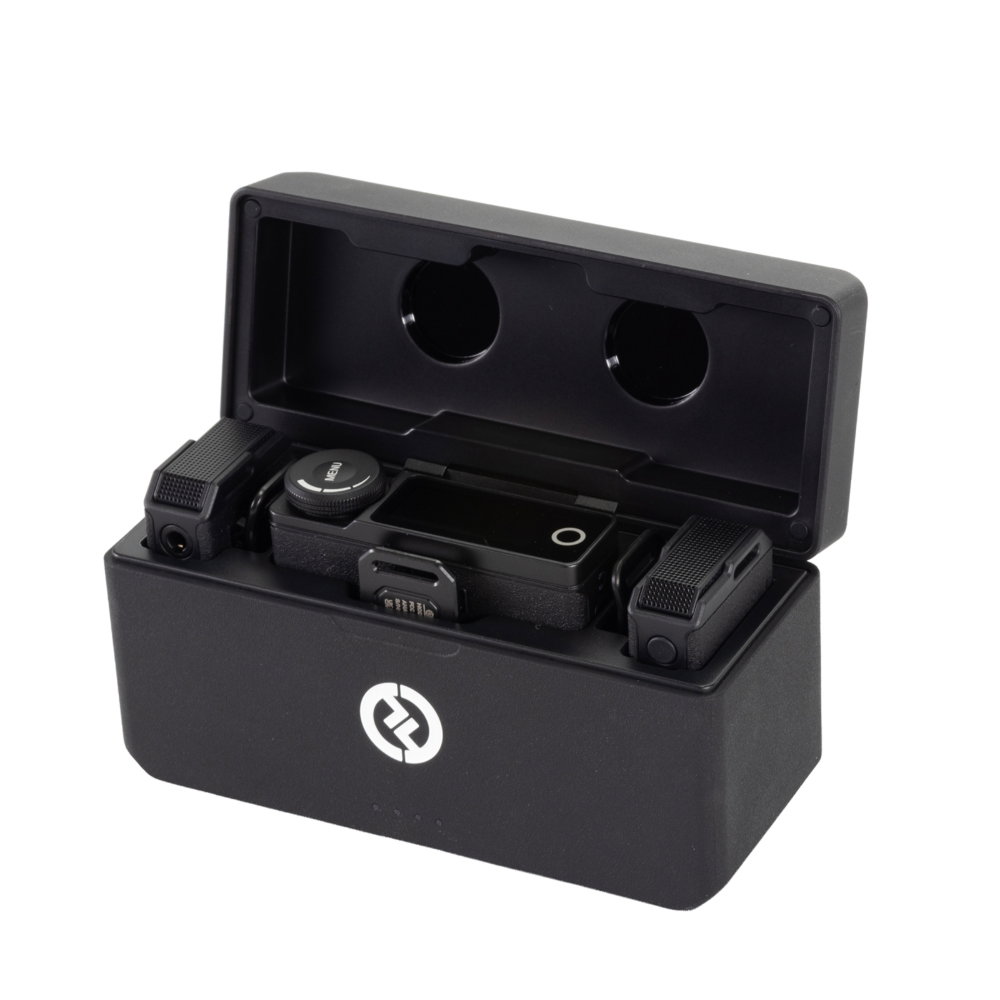
Buy the Hollyland Lark Max Duo if a dropout would cost you the take. Each Lark Max transmitter records its own backup to 8GB of internal storage (about 14 hours of 48kHz/24-bit WAV), the receiver has a touchscreen, a headphone socket for monitoring, and stereo, mono and safety-track modes, and the transmitter takes an external lavalier through a 3.5mm input. The trade-off is size: about 33g per transmitter and roughly 7.5 hours of run time.
On the lights, which is what most people search for: on both systems steady blue means the transmitter and receiver are connected, and steady green means noise cancellation is on (and still connected). On the Lark M2 camera receiver there is a second, separate volume/mode light where blue means stereo and green means mono. The full tables are below.
Both run on 2.4GHz, which is licence-exempt in the UK, so neither needs an Ofcom licence. If you are choosing between these and a conventional UHF system for stage or broadcast work, our wireless microphone buying guide covers the wider picture.
Lark M2 Combo vs Lark Max Duo side by side
All figures are Hollyland’s own, from the product pages and user manuals. Hollyland notes that battery figures are laboratory results and that range is measured outdoors, unobstructed and free of interference. Treat both as best cases.
| Lark M2 Combo | Lark Max Duo | |
|---|---|---|
| Wireless | 2.4GHz adaptive frequency hopping | 2.4GHz (2400–2483.5MHz) adaptive frequency hopping |
| Range, line of sight | Up to 300m (1,000ft) | Up to 250m (820ft) |
| Range, not line of sight | Up to 40m with the camera receiver; up to 60m with the phone receivers | Up to 60m |
| In the box | 2 transmitters, camera receiver, USB-C receiver, Lightning receiver, charging case | 2 transmitters, 1 receiver, charging case, USB-C, Lightning and 3.5mm cables |
| Transmitter weight | About 9g | About 33g |
| Receiver weight | Camera receiver about 14.8g; phone receivers about 6g | About 60g |
| Transmitter run time | About 10 hours | About 7.5 hours |
| Receiver run time | Camera receiver about 9 hours | About 9 hours |
| With the charging case | About 40 hours total (camera-version case) | Up to 22 hours |
| Onboard recording | Not listed | 8GB per transmitter, about 14 hours of 48kHz/24-bit WAV |
| Outputs | Camera receiver: 3.5mm TRS. Phone receivers plug straight into USB-C or Lightning | Receiver: 3.5mm TRS output, 3.5mm headphone socket, USB-C |
| External mic input | Not listed | 3.5mm input on the transmitter |
| Noise cancellation | ENC on/off at the transmitter or phone receiver; settings in the LarkSound app | ENC on/off at the transmitter or receiver |
| Output modes | Camera receiver: mono or stereo (stereo only into a camera) | Stereo, mono or safety track (safety track only into a camera) |
| Max SPL | 115dB SPL | 120dB SPL default, 128dB SPL max |
| Audio | 48kHz/24-bit, SNR above 70dB | 48kHz/24-bit, SNR 70dB |
| Controls | Buttons and LEDs; volume knob on camera receiver | 1.1in AMOLED touchscreen and control knob |
Hollyland does not publish a latency figure for either system on its product pages, so we have left it out of the comparison.
What the green, blue, red, orange and pink lights mean
These tables are taken from Hollyland’s official Lark M2 User Manual (V1.0) and Lark Max User Manual (V2.0.0), both downloadable from Hollyland’s support pages. The two systems use similar colours but not identical meanings, so check which one you have.
Lark M2 transmitter (the round clip-on mic)
| Light | Meaning |
|---|---|
| Blue, flashing | Transmitter and receiver not connected |
| Blue, flashing quickly | Pairing (after holding the pairing button for 6 seconds with the transmitter off) |
| Blue, steady | Transmitter and receiver connected |
| Green, steady (in use) | Noise cancellation on |
| Pink, steady | Transmitter updating |
| Orange, steady | Transmitter charging |
| Green, steady (while charging) | Transmitter fully charged |
| Red, flashing slowly | Transmitter low battery |
Lark M2 phone receiver (USB-C or Lightning plug)
| Light | Meaning |
|---|---|
| Blue, flashing | Not connected |
| Blue, steady | Connected |
| Green, steady (in use) | Noise cancellation on |
| Pink, steady | Receiver updating |
| Red, flashing slowly | Transmitter low battery |
Lark M2 camera receiver
The camera receiver has two sets of lights: a status indicator, and a separate volume/mode indicator by the knob. This is where most of the “green or blue” confusion comes from.
| Light | Meaning |
|---|---|
| Status: blue, flashing | Not connected |
| Status: blue, steady | Connected |
| Status: green, steady (in use) | Noise cancellation on |
| Status: pink, steady | Receiver updating |
| Status: orange, steady | Receiver charging |
| Status: green, steady (while charging) | Receiver fully charged |
| Status: red, flashing slowly | Transmitter low battery |
| Status: two red, flashing quickly | Receiver low battery |
| Volume/mode: blue, steady | Stereo |
| Volume/mode: green, steady | Mono |
| Volume/mode: one, two or three lit | Low, medium or high volume |
The manual adds that when the camera receiver is connected to a phone, the green light stays on because only mono is supported; connected to a camera, you switch between stereo (blue) and mono (green) with the mode button. When charging with the cable rather than the case, the green “fully charged” light goes off 30 minutes later.
Lark M2 charging case
| Light | Meaning |
|---|---|
| One, two, three or four LEDs on | 25%, 50%, 75% or 100% battery |
| One LED on, steady red | Case battery low; cannot charge the transmitters or receiver |
| One LED flashing, connected via USB | Case charging |
| Four LEDs lighting in sequence | Case updated |
Lark Max transmitter
The Lark Max transmitter has a status light and a separate REC light. Note two differences from the M2: steady red means muted, and steady orange (not green) means fully charged while switched off.
| Light | Meaning |
|---|---|
| Blue, flashing quickly | Pairing |
| Blue, flashing slowly | Disconnected from the receiver |
| Blue, steady | Connected to the receiver |
| Green, steady | ENC (noise cancellation) on and connected |
| Pink, steady | Upgrading firmware |
| Red, steady | Mute on (double-press the power button to mute) |
| Red, breathing | Low battery |
| Orange, breathing then back to previous state after 5 seconds | Powered on and charging |
| Orange, breathing | Powered off and charging |
| Orange, steady | Powered off and fully charged |
| REC light red, steady | Recording internally |
| REC light off | Not recording |
On the Lark Max charging case, one flashing light outside means the case is charging over USB and four steady lights mean it is full; a breathing light inside a slot means that transmitter or receiver is charging and a steady light means it is fully charged. One LED flashing red means the case is too low to charge anything. The Lark Max receiver shows its status on the touchscreen rather than with coloured lights.
Cameras, iPhone and Android: what plugs into what
Into a camera
Both systems connect to a camera’s 3.5mm mic input with the supplied 3.5mm TRS to TRS cable, and both receivers mount on the hot or cold shoe with their back clip. Both manuals give the same level advice: set the camera’s recording level to its minimum and the receiver’s output to medium.
With two transmitters you can choose stereo or mono on either system; the Lark Max adds a safety track mode, which Hollyland says is only supported when a camera is connected. For the Lark Max, Hollyland lists DSLR, mirrorless and action cameras and camcorders as compatible through the 3.5mm output.
Into an iPhone
For a Lightning iPhone, the M2 Combo’s Lightning plug-in receiver has an MFi-certified Apple chip, according to Hollyland. For a USB-C iPhone, Hollyland says the USB-C plug-in receiver works with “Apple 15” as well as Android phones. The Lark Max connects with its included MFi-certified USB-C to Lightning cable or a USB-C to USB-C cable, and the manual recommends using the original cables to avoid distortion or other compatibility problems.
Into an Android phone or a computer
Use the USB-C plug-in receiver (M2) or the USB-C to USB-C cable (Max). Both receivers support USB Audio Class, so they connect straight to a computer without an external sound card. The M2 phone receivers are mono only.
Two phone extras work on both: playback through the phone speaker without unplugging the receiver (not available with the M2 camera receiver on a camera; on the Max it is a menu setting), and starting or stopping phone video from the transmitter button. Hollyland notes the second only works with phones whose camera app starts and stops recording on a single volume-button press.
The features that actually decide it
Backup recording (Lark Max only)
This is the main reason to pay more for the Max. Press REC on the transmitter, or turn on Auto Record from the receiver, and each transmitter records lossless 48kHz/24-bit mono WAV internally while also sending audio to the receiver. If the radio link drops, someone walks behind a wall or the camera’s input clips, you still have a clean file to sync in the edit. Files are split every 30 minutes, and when the 8GB is full the oldest recordings are overwritten, so offload after each job. A REC Stop Lock setting stops the wearer ending the recording from the transmitter.
Size and wearability
The M2 transmitter is about 26mm across and 9.9mm deep, and attaches with the included magnets or necklace case (Hollyland notes the current M2 package does not include the back clip). That suits vlogging and interviews where the mic is on show. The Max transmitter is a larger box that attaches with its back clip or the supplied magnet. Hollyland recommends the collar as the first position for both, moving to the upper chest for a loud talker, and the furry windshield outdoors.
If the mic has to be hidden, the Max’s 3.5mm input lets you run a separate lavalier and keep the transmitter in a pocket or on a belt; the manual says it switches to the external mic automatically. Check the mic’s plug and wiring with the maker before you buy. Our headset and lavalier connectors guide explains why 3.5mm lavs are not all wired alike, and our microphone technique guide covers lapel placement.
Hollyland also notes that the M2 transmitter’s wearable design includes a magnetic disk that might interfere with implantable electronic devices, so keep it away from anyone with a pacemaker or similar.
Monitoring and control
The Max receiver has a 3.5mm headphone socket, a touchscreen showing both transmitters’ levels, battery and signal, and settings for gain, EQ (Hi-Fi, Low Cut, Vocal Boost) and transmitter LED brightness. The M2 has no headphone socket listed; you set the camera receiver’s output with a three-step knob and adjust noise cancellation and firmware from the LarkSound app.
Noise cancellation
Both use what Hollyland calls Environmental Noise Cancellation (ENC), switched on and off with a button, and the status light turns green when it is active. It is processing, not a substitute for good mic placement, so try it on and off and listen before you commit.
Battery
The M2 wins on paper: about 10 hours per transmitter against about 7.5 for the Max, and about 40 hours in total with the Combo’s case against up to 22 hours. The Max receiver can be charged and used at the same time, and the M2 phone receivers let you charge the phone through the receiver while you record.
Do you need a licence? 2.4GHz in the UK
No. Both systems work in the 2.4GHz band (Hollyland specifies the Lark Max at 2400–2483.5MHz), which Ofcom lists as licence-exempt for short range devices in UK Interface Requirement 2030. You do not need a PMSE licence or a coordinated frequency, which is a real advantage over UHF for small crews and one-off shoots.
One point to be aware of: the UK compliance notice in the Lark Max user manual (V2.0.0) states that the device may only be used indoors in Great Britain. Hollyland’s product page quotes outdoor range figures, so if you plan to use a Lark Max outdoors in the UK, check the current position with Hollyland first. The Lark M2 manual carries no such notice.
The catch is that 2.4GHz is the same band used by Wi-Fi, Bluetooth and plenty of other licence-exempt kit. Both Larks use adaptive frequency hopping to dodge busy channels, and the Max supports several systems in the same space. In a crowded venue or exhibition hall, keep the receiver within clear line of sight of the transmitters, and don’t expect the open-field range figures. UHF licensing is explained in our Ch38 and Ofcom licensing guide.
When a Lark is not the right tool
Both Larks are built for video, phones and computers. For a live PA, a theatre show or a long multi-channel shoot, a UHF system with a proper bodypack is the usual choice. For camera work, Sennheiser’s EW-DP range is a digital UHF system designed for cameras: the EW-DP ME 2 set pairs a bodypack and ME 2 lavalier with a camera-mount receiver, the EW-DP ENG set adds a plug-on transmitter for a handheld interview mic, and the EW-DP EK receiver is sold on its own and works with the EW-D SK bodypack, EW-D SKM-S handheld or EW-DP SKP plug-on transmitter. The S1-7 versions we list tune 606.2–662MHz, which takes in Ch38, and UHF in that range needs an Ofcom licence.
For dialogue on a camera without anything worn by the talent, a shotgun such as the Sennheiser MKE 600 is the other option. If you are also sending the picture wirelessly, Hollyland’s Pyro S handles HDMI and SDI, while the Pyro H is HDMI-only. Crew talkback is a different job again: see our Hollyland Solidcom intercom guide, which starts with small kits like the Solidcom SE-2S.
Popular picks from the shop
Hollyland Lark Max Duo Wireless Lavalier System, BlackView product → Hollyland Lark M2 Combo Wireless Lavalier System, Shine CharcoalView product → Sennheiser EW-DP ME 2 Portable Lavalier Set (S1-7)View product → Sennheiser EW-DP ENG Portable Set (S1-7)View product → Sennheiser MKE 600 Shotgun Camera MicrophoneView product → Hollyland Pyro S 4K HDMI/SDI Wireless Video SystemView product →
Frequently asked questions
Hollyland Lark M2: green light vs blue light, what is the difference?
On the transmitter and phone receiver, steady blue means connected and steady green means connected with noise cancellation switched on. Flashing blue means not connected. On the camera receiver’s separate volume/mode light, blue means stereo and green means mono. Green while charging means fully charged.
Is the Lark M2 compatible with my camera and iPhone?
The Combo covers both. The camera receiver plugs into a camera’s 3.5mm mic input with the supplied TRS to TRS cable. For a Lightning iPhone use the Lightning plug-in receiver, which Hollyland says has an MFi-certified chip; for a USB-C iPhone or Android phone use the USB-C plug-in receiver.
Does the Lark Max record onboard?
Yes. Each Lark Max transmitter has 8GB of storage for about 14 hours of 48kHz/24-bit WAV, recorded as a backup alongside the wireless signal. The Lark M2 does not list onboard recording.
Why is my Lark Max transmitter light red?
Steady red means the transmitter is muted. Mute is switched with a double press of the transmitter’s power button or from the receiver’s quick settings screen. A breathing red light means low battery. The separate REC light glows steady red while it is recording internally.
Do I need a licence for a Hollyland Lark in the UK?
No. Both systems use the 2.4GHz band (2400–2483.5MHz), which is licence-exempt in the UK under Ofcom’s IR 2030. UHF systems in Ch38 do need a licence. Note that the Lark Max manual’s UK compliance notice says the device may only be used indoors in Great Britain.
Is the Lark M2S the same as the Lark M2?
No, it is a separate model. Hollyland lists the M2S with a titanium clip-on transmitter of about 7g, two noise-cancellation levels (Strong and Weak) set in the LarkSound app, and the same 300m line-of-sight range. Hollyland also now lists a LARK MAX 2, which is a separate, newer model rather than a firmware update; the Lark Max figures in this guide are for the original Lark Max. This guide covers the M2 Combo and Lark Max Duo, which are the Lark systems we list.
Shop this guide
Wireless lavalier systems, camera mics and wireless video. Tell us what you are filming on and we will help you pick the right receiver.
Wireless Microphone Systems Lavalier & Headset Microphones Wireless Video Wireless Intercom Video



