

Home » Guides » Microphones »
Phantom Power and DI Boxes Explained
The 48 V that feeds a condenser microphone, and the box that turns a bass or a laptop into something a mic input can use. What phantom power can and cannot damage, and how to choose a DI.
~9 min read · Updated July 2026 · By the Stage Supply team
In this guide: What phantom power is · P12, P24 and P48 · Which mics need it · The real risks · Plug-in power and T-power · What a DI box does · Active vs passive · Where the DI sits · What needs a DI · Powering a DI · Fault-finding · Mistakes · FAQ
What phantom power actually is
Phantom power is a DC supply that travels down the same conductors as the audio. On a balanced XLR input the positive side is fed to pin 2 and pin 3 through a pair of matched resistors, one per pin, and the negative side returns through pin 1, the screen. Both signal pins therefore sit at the same DC potential relative to ground.
That is the whole trick. A balanced input responds only to the difference between pins 2 and 3, so feeding both the same DC makes the supply invisible to the audio. The microphone taps the voltage between the signal pair and pin 1 and runs its impedance converter and preamp from it.
The matching matters: any mismatch imbalances the two legs and degrades the input’s common-mode rejection, the very thing that makes a balanced connection quiet. Published guidance puts the requirement at better than 0.5 per cent. Note also how little power is on offer, at up to about 10 mA on P48.
The P12, P24 and P48 standards
The variants are defined in IEC 61938 and differ in voltage, feed resistor value and available current. P48 is what you meet on every modern mixer, interface and preamp.
| Standard | Nominal voltage | Feed resistor per pin | Current | Where |
|---|---|---|---|---|
| P48 | 48 V, ±4 V (44 to 52 V) | 6.8 kΩ, often the 6.81 kΩ precision value | Up to 10 mA, about 170 mW | Modern desks and interfaces |
| P24 | 24 V | 1.2 kΩ | Up to 10 mA | Rare, older equipment |
| P12 | 12 V | 680 Ω | Up to 15 mA, about 100 mW | Battery and broadcast gear |
For DC the two feed resistors sit in parallel, so P48’s 6.8 kΩ pair behaves like 3.4 k&Omega: short it to ground and you get roughly 14 mA. That worst case is why the resistors are called current-limiting.
Not every input labelled 48 V delivers it. Compact mixers, recorders and bodypack inputs often supply less voltage, less current, or both, which is why serious makers publish a minimum: Schoeps specify their CMC 1 as needing 30 V and 2 mA on P48. Our gain staging guide covers the rest of the chain.
Which microphones need it, and which do not
Condensers: yes, always. A condenser microphone measures changing capacitance between a moving diaphragm and a fixed backplate, which has a very high output impedance and almost no output current. It cannot drive a cable unaided, so every condenser contains an impedance converter and usually a small preamp. True condensers also need a polarising voltage across the capsule; electrets carry a permanent charge but still need powering.
Dynamics: no, and it does no harm. A dynamic microphone is a coil moving in a magnetic field, so it generates its own voltage. Shure state it plainly: a balanced dynamic microphone is not affected by phantom power, although an unbalanced dynamic microphone will be. The coil sits between pins 2 and 3, and with both at the same DC potential there is no voltage across it and no DC current through it.
Unbalanced sources are the exception
Feed an unbalanced source into a phantom-powered input on a TS jack to XLR lead and pin 3 gets tied to pin 1. The feed is no longer balanced and one resistor is shorted to ground, so the result ranges from “sounds wrong” to a real risk to whatever is downstream. Switch phantom off on unbalanced channels and use a DI, not an adaptor lead.
Ribbons: it depends which kind. A passive ribbon microphone needs no power. An active ribbon has a phantom-powered head amplifier and will not work without it, as do active DI boxes and inline mic preamps.
The real risks: bad cables, patch bays, hot patching
Phantom power on a correctly wired balanced connection is benign, and almost every failure traces back to something else being wrong at the moment of connection. Damaged or miswired cables are the big one. Royer Labs, who make ribbon microphones for a living, are explicit: their ribbons are not usually affected by the presence of phantom power, but if ground (pin 1) is accidentally miswired or shorted to pin 2 or pin 3, damaging phantom power can reach the ribbon element. A strand of screen touching a signal pin does exactly that, invisibly. Our cable care guide covers testing.
Patch bays come next: Royer describe cross-patching a live bay as the leading cause of blown ribbons in professional studios, because a jack sliding in momentarily shorts phantom to the wrong conductors.
Transients happen even with good cables, because the feed resistors and cable capacitance form a charged network that can deliver a substantial peak current at the instant of contact. The Institute of Professional Sound notes that transients from inserting or removing a plug can easily damage equipment downstream, loudspeakers in particular. What is not risky, per Royer, is switching phantom on or off with the mic already connected: the danger is the connection itself.
The mute rule
Mute the channel before you make or break any XLR, and turn phantom off before unplugging a mic you are not plugging straight back in. On desks with one phantom switch per block of channels, keep unbalanced and delicate sources outside that block.
Two things that are not phantom power
Plug-in power, or bias power, is the supply on 3.5 mm mic inputs on laptops, cameras, field recorders and consumer gear: typically 3 to 5 V on the unbalanced signal connections in the minijack, tip for mono or tip and ring for stereo, returning on the sleeve. It runs a small electret capsule and nothing more. It is not interchangeable with phantom power in either direction, and an adaptor lead cannot bridge the gap.
T-power, or A-B powering, is an older film and broadcast scheme applying 12 V through 180 Ω resistors between pin 2 and pin 3, so the DC sits across the signal pair rather than in common mode. A differential voltage does not cancel at a balanced input, so it passes through a dynamic mic’s coil or a ribbon’s foil and can destroy either. Worth knowing so “12 V microphone powering” is not mistaken for P12.
What a DI box actually does
DI stands for direct injection, and the job is short: take an unbalanced, high-impedance, instrument-level signal on a jack and turn it into a balanced, low-impedance, mic-level signal on an XLR. A good DI box does three things at once.
- Impedance conversion. A high input impedance so it does not load the source. Pickups, piezos especially, have a high source impedance, and loading them drains top end and level.
- Balancing. Two conductors become three, so the signal travels as a difference between two wires inside a screen. That is what lets it run 30 m down a multicore or stage box without collecting hum and buzz.
- Level and drive. A low output impedance at roughly mic level, which is what the desk’s preamp expects.
A very long jack lead is no substitute: a high-impedance source driving cable capacitance forms a low-pass filter, so the longer the unbalanced run the duller it sounds, and an unbalanced screen has no common-mode rejection. Put the DI within a metre or two of the instrument. Our audio connectors guide covers balanced wiring.
Active vs passive DI boxes
Active is not better than passive, just different. A well-equipped stage carries both.
Passive: a transformer in a box
A passive DI is essentially an audio transformer: the instrument feeds the primary and the secondary drives the balanced XLR, the turns ratio handling both the impedance and the level change. Input and output share no electrical connection, which makes it the most reliable cure there is for a hum loop, and with no supply rail it saturates gradually rather than clipping hard.
Choose passive for an active bass, whose onboard preamp can overload a sensitive active DI, for line-level sources such as keyboards and DJ mixers, and when you want isolation and nothing to power.
Active: powered circuitry before the output
An active DI puts a powered buffer in front of a transformer-coupled or electronically balanced output. That stage can present a far higher input impedance than a transformer, typically around a megohm, and it can add gain. The cost is that it needs power and has a headroom ceiling set by its supply rail.
Choose active for passive magnetic pickups, meaning a passive bass or electric guitar going direct, where the high input impedance preserves top end and level. And above all for a passive piezo or under-saddle pickup: piezos have an extremely high source impedance, and loading them is what makes an acoustic sound thin and brittle through a PA.
Input pads and speaker-level DI
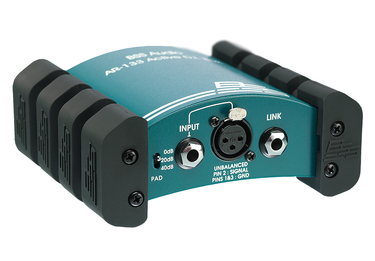
A pad attenuates the input so the box can take a hotter source. On the BSS AR-133 the published figures are 1 MΩ and +9 dBu maximum input with the pad at 0 dB, 47 kΩ and +29 dBu at -20 dB, and 47 kΩ and +49 dBu at -40 dB. So the pad changes input impedance as well as level, and the deepest setting is what makes a speaker-level tap possible.
Speaker-level taps
A speaker output carries tens of volts, so never put an unpadded instrument DI across one. Use only a box specified for speaker-level input, and leave the cabinet connected: a valve amplifier must always see its load.
The ground lift switch
A hum loop happens when a signal screen is grounded at both ends and those grounds sit at slightly different potentials, pushing current along the screen. Because the screen is also the audio reference, you hear it as 50 Hz hum. The ground lift breaks the loop: on the AR-133 it is labelled earth lift and disconnects output pin 1 from the unit’s ground, leaving the signal path intact. Try it with the channel muted.
A ground lift is an audio screen, never a mains earth
The lift switch on a DI disconnects an audio screen and nothing else. Never lift, cut, tape or adapt away a mains protective earth to cure a hum: it is lethal and it will fail any inspection in a UK venue. If lifting the screen does not fix it, get the whole audio system on one supply.
Where the DI sits in the signal path
With no backline it is instrument lead into the DI, XLR out to the stage box. With an amp, use the second jack labelled thru, link or parallel out: wired in parallel with the input, unbalanced, passing the signal straight on. The standard bass rig is instrument into the DI, DI link out to the amp, DI XLR out to the stage box, so front of house gets a clean feed whatever the amp does. Because the link is a parallel tap, keep that run short.
A player already running a preamp, modeller or pedalboard with a balanced XLR output may not need a DI at all. If their last output is an unbalanced jack it still earns its place, and if that output is line level, use a passive DI or engage the pad: line level into an unpadded active DI is the classic distortion no gain trimming will fix.
Blending a DI feed with a mic on the same bass cab is standard practice: check polarity between the channels, flip whichever sounds wrong, and lift the DI ground. Our guide to choosing live microphones covers what to put on the cab.
What actually needs a DI
- Electric bass. The default. Passive bass into an active DI; active bass into a passive DI, or an active one with the pad in.
- Acoustic guitar with a piezo pickup. Active DI with a high input impedance, or the instrument’s own preamp output into a passive DI.
- Keyboards, synths and drum machines. Line level and usually stereo. Passive is normally right.
- Laptops, playback, click tracks and DJ feeds. Unbalanced minijack or RCA, a long way from the desk, often with charger hum. A passive transformer isolation box fixes the format and the noise in one move, and is worth wiring permanently into the rack. See our DJ setup guide.
- Electric guitar direct, and AV sources. A DI plus amp simulation works on small stages, and a projector feed is the same problem as a DJ feed.
Anything with two outputs needs two DI channels or a stereo box. If the PA is mono, or effectively mono because the room is wide and shallow, sum at the box rather than panning two channels centre: most stereo isolation boxes have a mono switch for it.
Phantom and DI together: how active DIs get power
- Phantom powered. The neatest option and what most active DIs on a live stage use. The BSS AR-133 is specified to run from +20 V to +48 V DC phantom, so it works even where the rail is not a full 48 V.
- Battery powered. Typically a 9 V PP3, alkaline preferred. Useful where there is no phantom supply, but batteries go flat mid-set, and a DI left switched on in a flightcase flattens in storage.
- External PSU. Rackmount and multi-channel units usually take mains power.
- Passive. Nothing to supply, nothing to forget.
If the DI is active and the channel’s phantom power is off, you get nothing. That is the most common “the bass DI is dead” call at soundcheck, so check the phantom indicator and the DI’s power LED before you swap a cable. Phantom on a passive DI channel is harmless: a transformer does not care.
Fault-finding
| Symptom | Likely cause | What to do |
|---|---|---|
| Steady mains hum | Ground loop between the source’s earth and the desk’s | Engage the DI ground lift, or get both ends on one supply |
| Harsh buzz, worse when the lights move | Dimmer or LED driver noise in an unbalanced run | Shorten the unbalanced lead; keep audio away from mains and DMX |
| No signal, active DI | Phantom off on that channel, or a flat battery | Switch phantom on; check the indicator; replace the PP3 |
| Distortion no gain trim will fix | Active bass, keys or line level into an unpadded active DI | Engage the input pad, or move the source to a passive DI |
| Thin, brittle acoustic guitar | Piezo pickup loaded by too low an input impedance | Use an active DI with a megohm-class input |
Common mistakes
- Phantom power into a ribbon on an unknown cable. The phantom is rarely the problem; the cable is. A short from pin 1 to a signal pin sends the whole supply into the ribbon.
- Plugging in with the faders up. Mute first, every time, and kill phantom before repatching a live bay.
- Using a long guitar lead instead of a DI. High source impedance plus cable capacitance costs top end, and an unbalanced screen collects everything going.
- No ground lift on a hum loop, or lifting the wrong thing. Never touch a mains earth.
- Forgetting the DI needs power. Active DI plus phantom off equals silence.
- Buying the wrong type. An active DI on a hot active bass distorts; a passive DI on a piezo acoustic sounds thin.
Popular picks from the shop
BSS AR-133 Active DI Box, Phantom or 9V PP3 Battery PoweredView product → Interspace Industries PCBB4 Balance Box Hum EliminatorView product → Interspace Industries USB-C BB3 USB-C to Balanced XLR InterfaceView product → Audio Technica AT4053B Hypercardioid Condenser MicrophoneView product →
Frequently asked questions
What is phantom power, and why 48 V?
A DC supply sent to a mic down the same cable as the audio: positive to pins 2 and 3 through matched resistors, returning on pin 1. P48 is the IEC 61938 variant using a nominal 48 V, plus or minus 4 V, through 6.8 kΩ resistors, offering up to about 10 mA. The standard also defines P24 at 24 V through 1.2 kΩ and P12 at 12 V through 680 &Omega.
Does phantom power damage dynamic or ribbon microphones?
Not a modern balanced dynamic: Shure state that a balanced dynamic microphone is not affected by phantom power, although an unbalanced one will be. Royer Labs say their ribbons are not usually affected either. What blows ribbons is a fault at the moment of connection, such as a cable with pin 1 shorted to pin 2 or 3, or cross-patching a live bay. Active ribbons need phantom power.
Do I need a DI box?
If the source has an unbalanced jack or minijack output and has to reach a mixer more than a few metres away, yes: bass, acoustic guitar with a pickup, keyboards, laptops, DJ mixers and click tracks all need one. If it already has a balanced XLR output, take that straight to the stage box.
Active or passive DI for bass?
A passive bass suits an active DI, whose very high input impedance keeps the top end and level intact. An active bass suits a passive DI, because its onboard preamp can overload a sensitive active input. A passive DI needs no power; an active one gives no signal without phantom, a battery or a PSU.
Shop this guide
DI boxes, isolation boxes, condensers, dynamics and the cabling to connect them.
DI Boxes Condenser Microphones Dynamic Microphones XLR Connectors Stage Boxes



