

Home » Guides » Mixers & PA Systems »
Analogue vs Digital Mixers for Small Venues, Churches and Bands: Which Should You Buy?
What you actually gain and give up moving from an analogue desk like the Allen & Heath ZED to a compact digital mixer like the CQ or Qu: channel counts, EQ, effects, monitor sends, recording, scenes, app control and feedback tools, then which suits which room and which team.
~10 min read · Updated October 2026 · By the Stage Supply team
In this guide: The short answer · What actually differs · Side-by-side table · The analogue range · The digital range · Trade-offs in practice · Who should buy which · Popular picks · FAQ
Both kinds of mixer do the same basic job: take microphones and instruments, set their level and tone, and send a balanced mix to the speakers and the monitors. The difference is what else the mixer can do, how much of it you can see at once, and whether it can remember how it was set last time.
This guide sticks to that choice. If you are still deciding whether you need a mixer at all, start with mixer or powered speakers. To count inputs first, see how many mixer channels do I need.
The short answer
- Buy analogue if the job is simple and the same every time: a few mics, a stereo playback source, one or two monitor sends, operated by people who want every control on the front panel. A ZED-6FX or ZEDi-10FX covers a duo, a small function act or a speech-only meeting room.
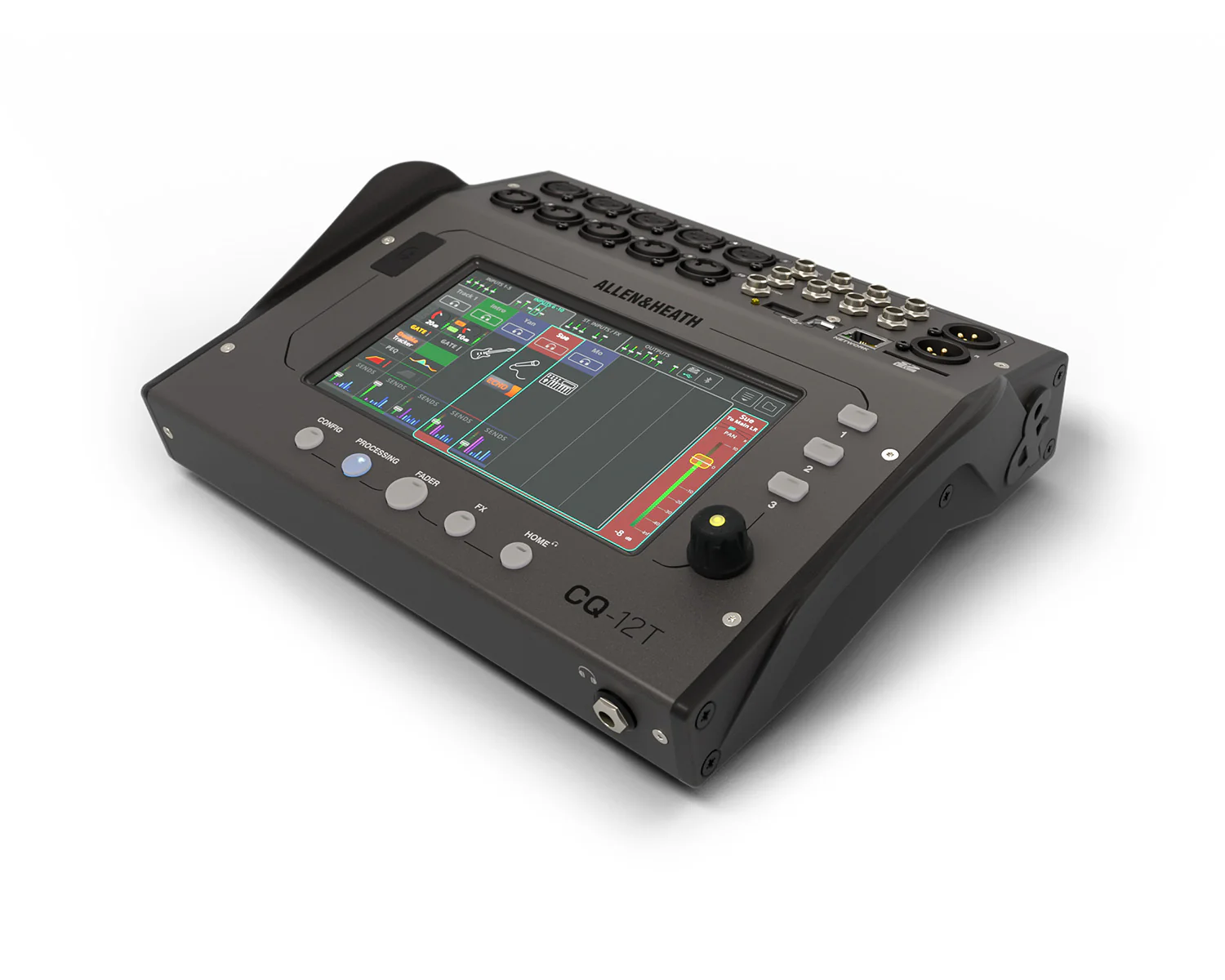
- Buy digital if more than one person operates the desk, if setups change week to week, if you need several monitor mixes, or if you want to fix feedback, record multitrack or mix from the room on a tablet. Allen & Heath's CQ-12T, CQ-18T and CQ-20B are the entry point; the Qu-5 and its larger siblings add physical faders and expansion.
- The deciding question for churches and venues with volunteer teams is usually recall. A digital mixer can store the whole setup as a scene and bring it back in one press; an analogue mixer has to be reset by hand and checked knob by knob.
What actually differs
Channel processing
On an analogue ZED, each mono channel gives you gain, a low-cut filter and a 2- or 3-band EQ, depending on the model. ZED Mini and ZED Mid desks have a 3-band EQ with a swept mid, and ZED Mid adds an insert point on every mono channel so you can patch in an outboard compressor. Allen & Heath's ZED specifications do not list onboard compressors or gates.
On a CQ, every input channel in Complete mode has a high-pass filter, gate, 4-band parametric EQ and compressor, and the outputs get a graphic or parametric EQ, compressor and limiter. CQ also has Quick Channels, which set a whole channel of processing from one knob for a chosen instrument or application. Qu offers the same core set of input processing: high-pass filter, gate, 4-band PEQ and compressor. For what each of these does, see mixer EQ explained and compressors, gates and limiters.
Monitor and aux sends
Small analogue desks have few sends. The ZED-6 has none, the ZED-6FX has a single post-fade FX send, and the ZEDi-10 and ZEDi-10FX have one pre-fade aux plus one post-fade FX send. The ZED Mid range goes further: 3 aux sends plus an internal FX bus on the FX models, and 4 aux sends on the ZED-14, ZED-18 and ZED-24.
Every CQ has 6 monitor outputs alongside the main pair. The current Qu-5, Qu-6 and Qu-7 have 12 mixes (6 mono or linkable, 6 stereo) plus the main LR and 4 matrix outputs. For the difference between aux, group and matrix, see aux, group and matrix explained.
Effects
ZED FX models carry one built-in effects processor fed from the FX send. The ZED-6FX and ZEDi-10FX have 61 presets; the ZED Mini and ZED Mid FX models have 16 reverb, delay and modulation effects. Digital mixers have several independent engines: 2 on the CQ-12T, 4 on the CQ-18T and CQ-20B, and 6 stereo engines with dedicated returns on Qu-5/6/7. That means you can run, say, a vocal reverb and a separate delay at once.
Feedback tools
Allen & Heath's ZED and MixWizard specifications list no built-in feedback suppression. On ZED Mini and ZED Mid desks, the main outputs have insert points where an external graphic EQ can go. CQ and Qu have a Feedback Assistant that can run on each output or mix as an alternative to the graphic EQ, using up to 16 narrow filters, in Fixed mode for ringing out before the service or gig and Live mode for catching feedback during it. It helps, but it does not replace good mic and speaker placement: see how to stop feedback.
Recording and streaming
ZED Mini and ZED Mid models have a 2-in, 2-out USB interface, so you record two channels at a time (a stereo mix), not separate tracks. The ZEDi-10 and ZEDi-10FX record 4 channels. The ZED-6 and ZED-6FX have no USB. The CQ-12T has a 16×16 USB interface and multitrack SD recording; the CQ-18T is 24×22 and the CQ-20B 24×24 over USB. Qu-5/6/7 have a 32×32 USB-C interface. CQ and Qu also have an SD card slot for multitrack recording without a computer. Multitrack recording lets you mix the stream or recording separately from the room, which is covered in livestream audio from a mixer.
Scenes, recall and remote control
An analogue mixer has no memory. Digital mixers store scenes: CQ holds 100 scenes per show, covering preamps, names, processing, send levels and FX; Qu holds 300 scene memories per show, with channel safes and recall filters. All CQ models can be controlled from the free CQ MixPad app, and the CQ4You app lets each musician adjust only their own monitor mix. The CQ-18T and CQ-20B have built-in Wi-Fi; the CQ-12T needs a router or access point. Qu has a network port for its Qu-MixPad and Qu4You apps.
Expansion
What you buy with an analogue desk is what you have. Qu-5/6/7 have an SLink port for Allen & Heath's Everything I/O stage boxes and expanders, and the D versions, such as the Qu-5D, add a 16×16 Dante port. Allen & Heath's list of CQ connections includes no SLink or other audio expansion port (its network port is for control only), so plan the CQ around its own sockets.
Side-by-side table
Representative models from each family, from Allen & Heath's published specifications. “Mic/line” counts the mono mic inputs; stereo inputs are listed separately.
| Model | Type | Mic/line in | Stereo in | Sends/mixes | Input EQ | FX | USB | Scenes / app |
|---|---|---|---|---|---|---|---|---|
| ZED-6 | Analogue | 2 | 2 | None | 2-band | No | No | No / no |
| ZED-6FX | Analogue | 2 | 2 | 1 FX (post) | 2-band | 61 presets | No | No / no |
| ZEDi-10FX | Analogue | 4 | 2 | 1 aux (pre) + 1 FX | 3-band | Yes | 4 in / 4 out | No / no |
| ZED-12FX | Analogue | 6 | 3 | 3 aux + FX bus | 3-band, swept mid | 16 effects | 2 in / 2 out | No / no |
| ZED-18 | Analogue | 10 | 4 | 4 aux | 3-band, swept mid | No | 2 in / 2 out | No / no |
| CQ-12T | Digital | 10 | 1 | 6 monitor outs | 4-band PEQ + gate, comp | 2 engines | 16 x 16 | 100 per show / app via router |
| CQ-18T | Digital | 16 | 1 | 6 monitor outs | 4-band PEQ + gate, comp | 4 engines | 24 x 22 | 100 per show / built-in Wi-Fi |
| CQ-20B | Digital | 16 | 2 | 6 monitor outs | 4-band PEQ + gate, comp | 4 engines | 24 x 24 | 100 per show / app only, built-in Wi-Fi |
| Qu-5 | Digital | 16+1 preamps | 3 stereo channels | 12 mixes + 4 matrix | 4-band PEQ + gate, comp | 6 stereo engines | 32 x 32 | 300 per show / network port |
The analogue range we stock
Our analogue desks are Allen & Heath ZED and MixWizard models.
- ZED Compact and ZEDi. The ZED-6 and ZED-6FX have 2 mic/line and 2 stereo inputs, 2 Hi-Z guitar inputs and a 2-band EQ. The ZEDi-8 adds a 2-in, 2-out USB interface. The ZEDi-10 and ZEDi-10FX step up to 4 mic/line channels with 3-band EQ and a 4-in, 4-out, 24-bit/96kHz interface, which is why they suit podcasting and simple streaming.
- ZED Mini. The ZED-10 and ZED-10FX use rotary channel levels to save space; the ZED60-10FX and ZED60-14FX have 60mm faders on all channels. All have a 3-band EQ with swept mid, a 2-in, 2-out USB interface and onboard FX on the FX models, with 4 or 8 mic/line inputs.
- ZED Mid. 100mm faders, an insert on every mono channel, 3-band EQ with swept mid and up to 69dB of preamp gain. The ZED-12FX and ZED-14 have 6 mic/line channels, the ZED-16FX and ZED-18 have 10, and the ZED-22FX and ZED-24 have 16.
- MixWizard4. Rack-mountable analogue desks used by rental companies, live venues and houses of worship. The MixWizard WZ4 16:2 has 16 mic/line inputs, each with an insert and direct output, a 4-band EQ with two swept mids, 6 aux sends and two FX engines.
The entry digital range
Allen & Heath CQ and Qu are the two compact digital families we point most small-venue, church and band customers to. We compare them in detail in Allen & Heath CQ vs Qu, so here is just the outline.
- CQ-12T: 10 mic/line inputs, a stereo input, 6 monitor outputs, a 7-inch touchscreen and 3 SoftKeys. It runs from an external 12V supply.
- CQ-18T: 16 mic/line inputs, the same 6 monitor outputs, 3 assignable rotaries, two headphone outputs and built-in dual-band Wi-Fi.
- CQ-20B: 16 mic/line inputs, two stereo inputs, 6 monitor outputs on XLR, and no control surface. You mix it from the CQ MixPad app on a tablet or computer.
- Qu-5, Qu-6 and Qu-7: 16, 24 or 32 onboard preamps with 17, 25 or 33 motorised 100mm faders, a 7-inch touchscreen, 38 inputs to mix and SLink expansion. The Qu-5 can be rack-mounted with the optional Qu-5 rack kit.
Above Qu sits the SQ range, covered in SQ5+ vs SQ6+ vs SQ7+.
Trade-offs in practice
Learning curve
On an analogue desk every control has one job and is always in view, so what you see is what you hear. On a digital desk, most controls are on screens and pages, and you select a channel before adjusting it. That takes some learning. Allen & Heath has designed CQ to cut it down with Quick Channels, a Gain Assistant that sets and monitors input gain, and an Automatic Mic Mixer for speech. Getting gain staging right matters on either type.
Recall and rotas
This is where digital earns its place in churches and multi-use venues. A Sunday service, a midweek group and a hired-in band can each have their own scene, and a volunteer recalls the right one instead of rebuilding the mix. CQ and Qu also let you store libraries of channel settings. On analogue, the usual answer is a marked-up photo or a strip of tape and pen, and it relies on nobody touching anything in between.
Size and where you mix from
Digital mixers pack more channels into a smaller frame because the controls are shared. The CQ-20B has no touchscreen or faders at all. With app control you can stand in the audience to set the mix, then leave the mixer by the stage. An analogue desk has to sit where the operator is, so the multicore or cables have to reach it.
Monitors
If more than two people on stage want their own mix, small analogue desks run out of sends quickly. On CQ and Qu each monitor output has its own EQ, with the Feedback Assistant available in place of the graphic EQ, and with CQ4You or Qu4You performers can adjust their own mix from a phone. For more on monitor mixes, see stage monitors and mixes.
Who should buy which
| Scenario | Our suggestion | Why |
|---|---|---|
| Solo act or duo, 1 or 2 vocals plus guitar and backing tracks | ZED-6FX or ZEDi-10FX | Few inputs, built-in reverb, Hi-Z guitar inputs; ZEDi-10FX adds 4-track USB and an aux for a wedge |
| Small meeting room or talks, speech only | ZEDi-10, or CQ-12T for several mics | Analogue is simplest for one or two mics; CQ adds the Automatic Mic Mixer and scenes |
| Church with a volunteer rota and a livestream | CQ-18T or Qu-5 | Scenes for each service type, Feedback Assistant, multitrack USB for a separate stream mix |
| Gigging band with 4 to 6 monitor mixes | CQ-18T or CQ-20B | 6 monitor outputs, musicians adjust their own mix in CQ4You, compact to carry |
| Venue with changing acts and a resident engineer | Qu-5 or Qu-6 | Physical faders, 12 mixes, SLink stage boxes to grow |
| Rehearsal room or install where the settings rarely change | ZED Mid or MixWizard | Every control visible, channel inserts, no menus |
Popular picks from the shop
Allen & Heath ZED-6FX Analogue MixerView product → Allen & Heath ZEDi-10FX Mixer and USB InterfaceView product → Allen & Heath ZED60-10FX Analogue MixerView product → Allen & Heath ZED-12FX Analogue MixerView product → Allen & Heath CQ-12T Digital MixerView product → Allen & Heath CQ-18T Digital MixerView product → Allen & Heath CQ-20B Digital MixerView product → Allen & Heath Qu-5 Digital MixerView product →
Frequently asked questions
Is a digital mixer harder to use than an analogue one?
At first, usually yes, because controls are spread across screens rather than laid out one knob per job. Once set up, a digital mixer can be easier for occasional operators, since they recall a saved scene instead of setting every control. CQ adds Quick Channels and a Gain Assistant to shorten setup.
Does an analogue mixer sound better than digital?
Neither type is automatically better. In a small room the result depends far more on the speakers, mic choice, placement and gain structure than on the mixer type. Choose on features and workflow.
What is the best small mixer for a church?
For a volunteer team, a digital mixer with scene recall and a Feedback Assistant, such as the CQ-18T or Qu-5, is the usual choice. For a single lectern mic and music playback, a small analogue desk such as the ZEDi-10 is enough. Our church AV upgrade guide covers the wider system.
Can I record a multitrack from an analogue mixer?
Not from most ZED models: ZED Mini and ZED Mid record a 2-channel stereo feed over USB, and the ZEDi-10 and ZEDi-10FX record 4 channels. CQ and Qu mixers record multitrack over USB, and both can also record multitrack to an SD card.
Can I control a mixer from an iPad?
Not the analogue ZED or MixWizard desks covered here; they are controlled from their own front panel only. All CQ models work with the CQ MixPad app, the CQ-18T and CQ-20B through their own Wi-Fi, the CQ-12T through a router or access point. Qu connects to a network for the Qu-MixPad app.
How many monitor mixes can a small mixer do?
The ZED-6 has no aux sends, the ZEDi-10 has one, ZED Mid desks have 3 or 4, and the MixWizard WZ4 16:2 has 6. Each CQ has 6 monitor outputs; Qu-5/6/7 have 12 mixes.
Shop this guide
Analogue and digital mixers from Allen & Heath. Tell us your inputs, monitor mixes and who will be operating, and we will help you choose.
Analogue Mixing Desks Compact Digital Mixers Digital Mixing Desks Mixer Accessories Stage Boxes & Dante I/O



