

Home » Guides » Power, Cabling & Connectors »
Hum Eliminators, Balance Boxes and Ground Lifts: Fixing Hum Without Lifting the Mains Earth
What a balance box, a hum eliminator, a DI box and an inline ground loop isolator each do, how the models we stock compare on connectors, pads and ground lift, and which one suits a laptop, a phone, a keyboard or a hi-fi lead. Plus the one fix you must never use.
~8 min read · Updated October 2026 · By the Stage Supply team
In this guide: The short answer · Why it hums · Never lift the mains earth · Three kinds of box · Comparison table · Which box for which job · Checks before you buy · Popular picks · FAQ
The short answer
A hum that appears the moment you plug a laptop, phone or keyboard into a PA is usually a ground loop on the audio side. The usual fix is a box that converts the unbalanced output to balanced XLR and lets you break the audio ground with a lift switch: a balance box for computers, or a DI box for instruments and line sources. For a pair of RCA leads between two pieces of consumer kit there is also the inline ground loop isolator.
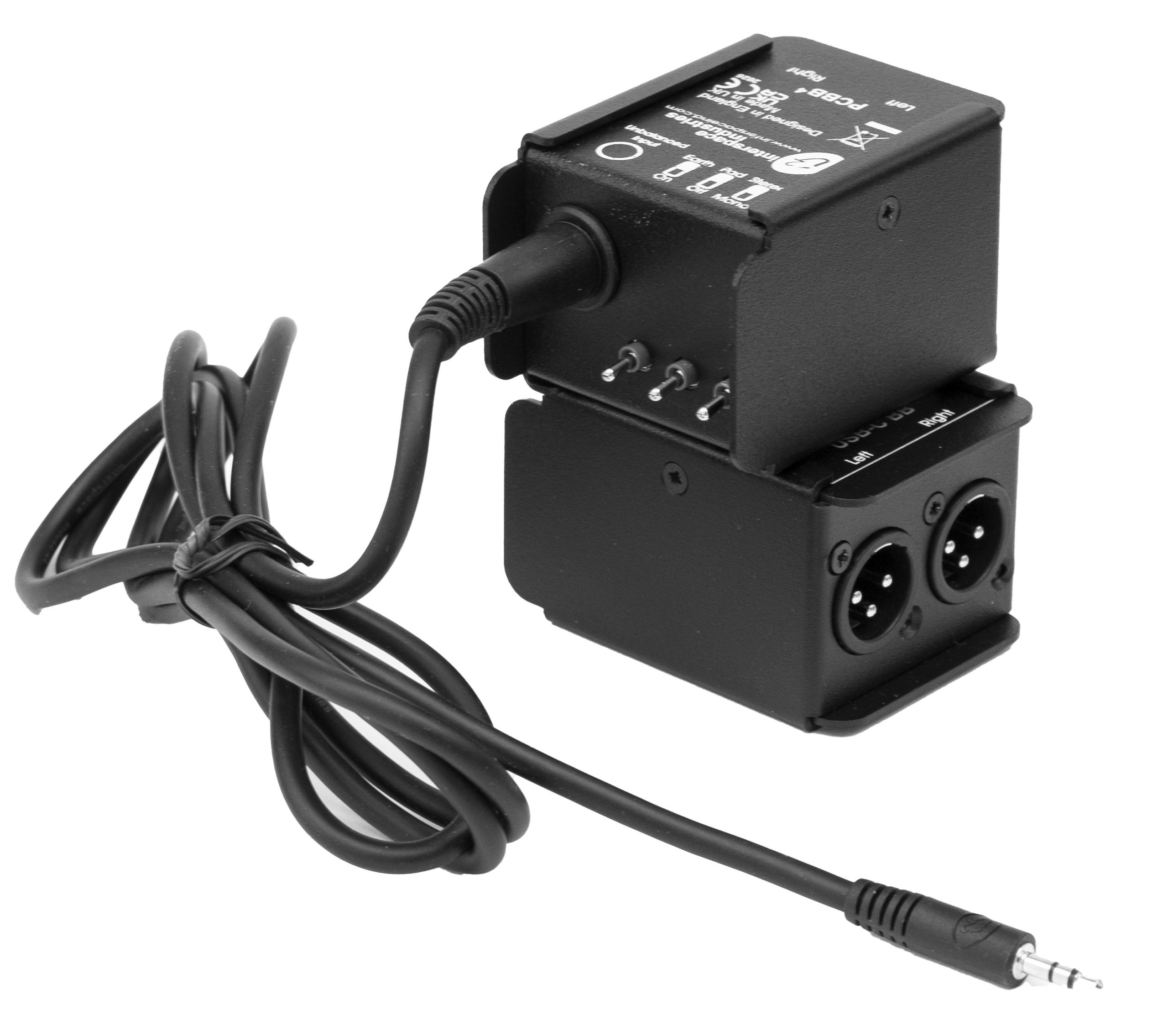
- Laptop or presentation PC with a 3.5mm output: a passive balance box such as the Interspace Industries PCBB4.
- Computer or phone over USB: a USB-powered balance box such as the Interspace Industries USB-C BB3, which also replaces the headphone socket.
- Keyboard, bass, guitar or other jack-output source: a DI box with a ground lift, such as the Palmer PAN 01 (passive), Palmer PAN 02 (active) or BSS AR-133 (active).
- Two pieces of consumer kit joined by RCA leads: an inline isolator such as the AV:Link ground loop isolator.
Whatever you buy, the mains protective earth stays connected. Every product here works on the audio signal. None of them, and nothing else, makes it acceptable to remove an earth from a mains plug or lead.
Why it hums: the short version
The HSE’s guidance on electrical safety at places of entertainment (GS50) notes that when several items of audio equipment are used close together or interconnected, problems such as “mains hum” can occur, often caused by multiple earth paths. Put simply, two mains-powered devices are each earthed through their own power lead, and the screen of the audio cable between them joins those earths a second time. The loop that forms picks up a little current, and because the screen of an unbalanced lead is also half of the audio circuit, you hear it.
Balanced connections reject most of this, which is why the cure is to balance the signal as close to the source as possible and then break the loop on the audio screen. The full explanation of balanced and unbalanced wiring, and why a balanced cable alone does not always fix it, is in our balanced vs unbalanced audio guide. How DI boxes work, including active versus passive and phantom power, is covered in phantom power and DI boxes explained. This guide is about choosing the box.
Not every buzz is a ground loop. A damaged cable, a lead run alongside mains or dimmer cables, or a faulty power supply can all sound similar, so do the quick checks further down before you spend money.
Never lift the mains earth
Breaking the earth on the mains side, by cutting the earth wire in a plug, using a “cheater” adaptor, taping over a pin or using an unearthed extension, will often stop the hum. That is exactly why it is dangerous: it works, and it removes the protection that matters on the day something fails.
What HSE guidance says
GS50 is explicit: if a buzzing noise (“mains hum”) occurs on a sound system, do not remove protective earth connections. It also explains why: with Class I equipment the metal panels are earthed so that the fuse blows if a fault puts mains onto them, and if the earth is removed or disconnected the panels may become live, so anyone touching them could receive a serious electric shock.
The same guidance points to the safe alternatives: properly designed equipment, in some cases disconnecting the screen at one end only of an interconnecting audio cable, and equipment with a facility for disconnecting the signal earth from the protective earth without affecting safety. The ground lift switch on a DI or balance box is designed to work on that signal earth, not on the mains protective earth.
If you suspect the problem is the mains itself, such as a missing or poor earth on a socket, a circuit that trips, or equipment that gives a tingle, stop using it. Mains supplies, earthing and fixed wiring are for a competent electrician, and portable equipment should be inspected and tested by a competent person; see our PAT testing guide for event equipment. GS50 adds that if there is any doubt about the mains connections of equipment, consult a competent person.
Three kinds of box, and what each is for
Balance boxes for computers
Interspace Industries makes boxes specifically for presentation and event computers. The PCBB4 is passive, so it needs no power. Interspace describes it as eliminating hum problems when connecting audio from a presentation PC: a 3.5mm stereo jack on a 1.8m captive lead goes in, and left and right come out on two male XLRs. It has an earth (ground) lift, a stereo-to-mono switch, an output pad so the feed can go into either a line or a mic input on the desk, and DC blocking on the output to protect it from DC voltages.
The USB-C BB3 is the USB version of the same idea. Interspace calls the USB BalBox 3 a self-contained sound card: it is powered from the USB port (5V), takes the audio digitally, and gives balanced left and right outputs on XLR with an earth lift and DC blocking capacitors. Interspace also notes it can work as a phone audio output via USB OTG. Because the audio leaves the computer as data, the computer’s own headphone socket is not in the signal path at all.
DI boxes with a ground lift
A DI box turns a single unbalanced jack signal into a balanced mic-level XLR, and many have a ground lift. The three we list here all have transformer-balanced outputs, according to their makers:
- Palmer PAN 01: passive, 10:1 transformer, 0 or -30 dB input pad, ground lift and a parallel THRU jack. Palmer describes it as handling line-level and speaker-level signals.
- Palmer PAN 02: active, runs from a 9V battery or 48V phantom power, 1:1 transformer, 0 or -30 dB pad and a THRU jack. Palmer says its floating ground circuitry allows the ground lift to work even under phantom power.
- BSS AR-133: active, runs from phantom power or an internal 9V battery and switches to the battery automatically if phantom fails. It has jack and XLR inputs, a parallel link jack, a 0, -20 or -40 dB pad (BSS: instrument, line or amplifier levels) and a ground-lift switch that BSS describes as a quick solution to ground-loop problems.
A DI box is mono. For a stereo source such as a laptop or DJ mixer you need two channels, which is one reason the two-output Interspace boxes are popular for computer playback. Which kind of DI suits which instrument is covered in our DI box guide.
Inline ground loop isolators
The AV:Link ground loop isolator is a 60cm lead with two RCA plugs at one end and two RCA sockets at the other. AV:Link describes it as designed to eliminate earth hum by isolating the ground between two pieces of audio equipment. It suits consumer and hi-fi style connections where both ends are already RCA. AV:Link lists no balanced output, pad or switch for it, so it is not a substitute for a DI or balance box on a long run into a stage desk.
Comparison table
Taken from each manufacturer’s published specifications. “Not stated” means the maker does not say, not that the feature is missing.
| Model | Type | Channels | Input | Output | Power | Pad | Lift / isolation | Transformer output |
|---|---|---|---|---|---|---|---|---|
| Interspace PCBB4 | Passive balance box | 2 (L/R), stereo-to-mono switch | 3.5mm stereo jack, 1.8m captive lead | 2 x male XLR | None needed | Yes, for line or mic inputs | Earth (ground) lift | Not stated |
| Interspace USB-C BB3 | USB balance box (sound card) | 2 (L/R) | USB-C | 2 x XLR | USB bus, 5V | Not stated | Earth (ground) lift | Not stated |
| BSS AR-133 | Active DI | 1 | 1/4″ jack or XLR, plus link jack | XLR | Phantom or 9V battery, auto switchover | 0 / -20 / -40 dB | Ground lift | Yes |
| Palmer PAN 01 | Passive DI | 1 | 6.3mm jack, plus THRU jack | XLR | None needed | 0 / -30 dB | Ground lift | Yes, 10:1 |
| Palmer PAN 02 | Active DI | 1 | 6.3mm jack, plus THRU jack | XLR | 9V battery or 48V phantom | 0 / -30 dB | Ground lift, works under phantom | Yes, 1:1 |
| AV:Link isolator | Inline isolator lead | 2 (stereo pair) | 2 x RCA plug | 2 x RCA socket | Not stated | None listed | Isolates the ground between the two units | Not stated |
For a refresher on what each connector carries, see pro audio connectors explained.
Which box for which job
A laptop or presentation PC into a PA
This is the job the Interspace boxes are designed around. Choose the PCBB4 if the laptop’s headphone output is what you will use: nothing to power, a captive lead that is hard to lose, and a pad that lets it feed a mic input if that is all the desk has free. Choose the USB-C BB3 if the machine has USB-C, if you want to bypass the headphone socket entirely, or if the same box will also serve a phone.
A DJ mixer or keyboard into a stage desk
A pair of DI boxes, one per side, is the usual approach. A passive PAN 01 needs no power and suits line-level outputs. Where a source has a weak output or the desk end needs more level, an active box such as the PAN 02 or AR-133 is the alternative; check each box’s maximum input level against the source before you buy. Start with the pad engaged on line-level sources and back it off if needed.
Instruments
Bass, acoustic guitar and keyboards are DI territory, and the choice between active and passive matters more for tone than for hum. Our DI box guide goes through it. All three DIs here have a ground lift, and the PAN 02 keeps its lift working when the desk is supplying phantom power.
Consumer kit joined by RCA
A media player, TV or hi-fi amp humming when connected to another unit by RCA leads is the case for the AV:Link isolator. If the RCA output is going on to a stage desk or a long run, a balance box or DI is the better tool because it gives a balanced XLR output.
Checks before you buy anything
- Unplug the audio lead at the desk end. If the hum stops, it is coming in on that lead. If it carries on, the problem is elsewhere in the system.
- Swap the lead. A broken screen or a damaged connector can cause noise on its own. A tester such as the Palmer MCT XLV 2 will find it quickly; see looking after your cables.
- Move audio leads away from mains, dimmer and lighting cables.
- Power the audio system from one supply where you can. GS50 also advises keeping lighting circuits separate from circuits used for audio. Our stage power checklist has more on planning this.
- Try the ground lift on the box with the channel muted or turned down, then bring it back up.
- If the hum remains, or anything suggests a mains fault, stop and involve a competent electrician. Do not experiment with mains earths.
Popular picks from the shop
Interspace Industries PCBB4 Balance Box Hum EliminatorView product → Interspace Industries USB-C BB3 USB-C to Balanced XLRView product → Palmer PAN 01 Passive DI BoxView product → Palmer PAN 02 Active DI BoxView product → BSS AR-133 Active DI BoxView product → AV:Link Ground Loop Isolator, RCA, 60cmView product →
Frequently asked questions
What is a hum eliminator?
A box that sits between an unbalanced source, usually a computer, and a sound system. It converts the signal to balanced XLR and lets you break the audio ground with a lift switch, which cures most ground-loop hum. Interspace Industries describes its PCBB4 Balance Box as eliminating hum problems when connecting audio from a presentation PC.
Is it safe to use a ground lift switch?
Yes, on a properly designed DI or balance box. The lift switch disconnects the audio signal ground, not the mains protective earth. HSE guidance recognises equipment with a facility for disconnecting the signal earth from the protective earth without affecting safety. What is never safe is removing the earth from a mains plug or lead.
Why does my laptop hum when plugged into the PA?
Usually it is a ground loop: once the audio lead is connected there is more than one path between the grounds of the laptop setup and the PA. A balance box with an earth lift, such as the PCBB4 or USB-C BB3, is designed for exactly this connection. If the hum persists, check the cable and the mains supply as described above.
Do I need a balance box or a DI box?
For a computer or phone, a balance box: it is stereo, has the right input and is built for that job. For a single instrument or one side of a mixer, a DI box. For a stereo line source into a stage desk, either two DIs or a two-channel balance box will work.
Will a ground loop isolator reduce sound quality?
Manufacturers publish the bandwidth of their boxes: Interspace quotes 20Hz to 20kHz for the PCBB4 and USB BalBox 3, Palmer 20Hz to 20kHz for the PAN 01 and BSS 30Hz to 20kHz (+0/-1 dB) for the AR-133. Check the specification of any box against your use.
Can I just cut the earth wire in the plug to stop the hum?
No. HSE guidance says not to remove protective earth connections to cure hum, because the metal case of the equipment may then become live under a fault. Fix the hum on the audio side, and get a competent electrician to look at the mains if you think the supply is at fault.
Shop this guide
DI boxes, balance boxes and the cables to go with them. Tell us the source and the desk and we will help you pick the right box.
DI Boxes Microphones & DI Boxes Audio Cables XLR Cables Cable Testers



