

Home » Guides » Wireless Mics & In-Ear Monitoring »
Wireless Guitar and Bass Systems: Pedalboard Receivers, Bands and Why They Drop Out
Which guitar and bass wireless systems put the receiver on your pedalboard, which run licence-free in the UK and which need an Ofcom licence, and what Shure, Sennheiser and Audio-Technica say actually causes dropouts. Covers the instrument systems we sell, with the makers' own figures side by side.
~10 min read · Updated October 2026 · By the Stage Supply team
In this guide: The short answer · 2.4 GHz or UHF · The systems · Comparison table · UK licensing · Why they drop out · Cables and the bodypack · Popular picks · FAQ
The short answer
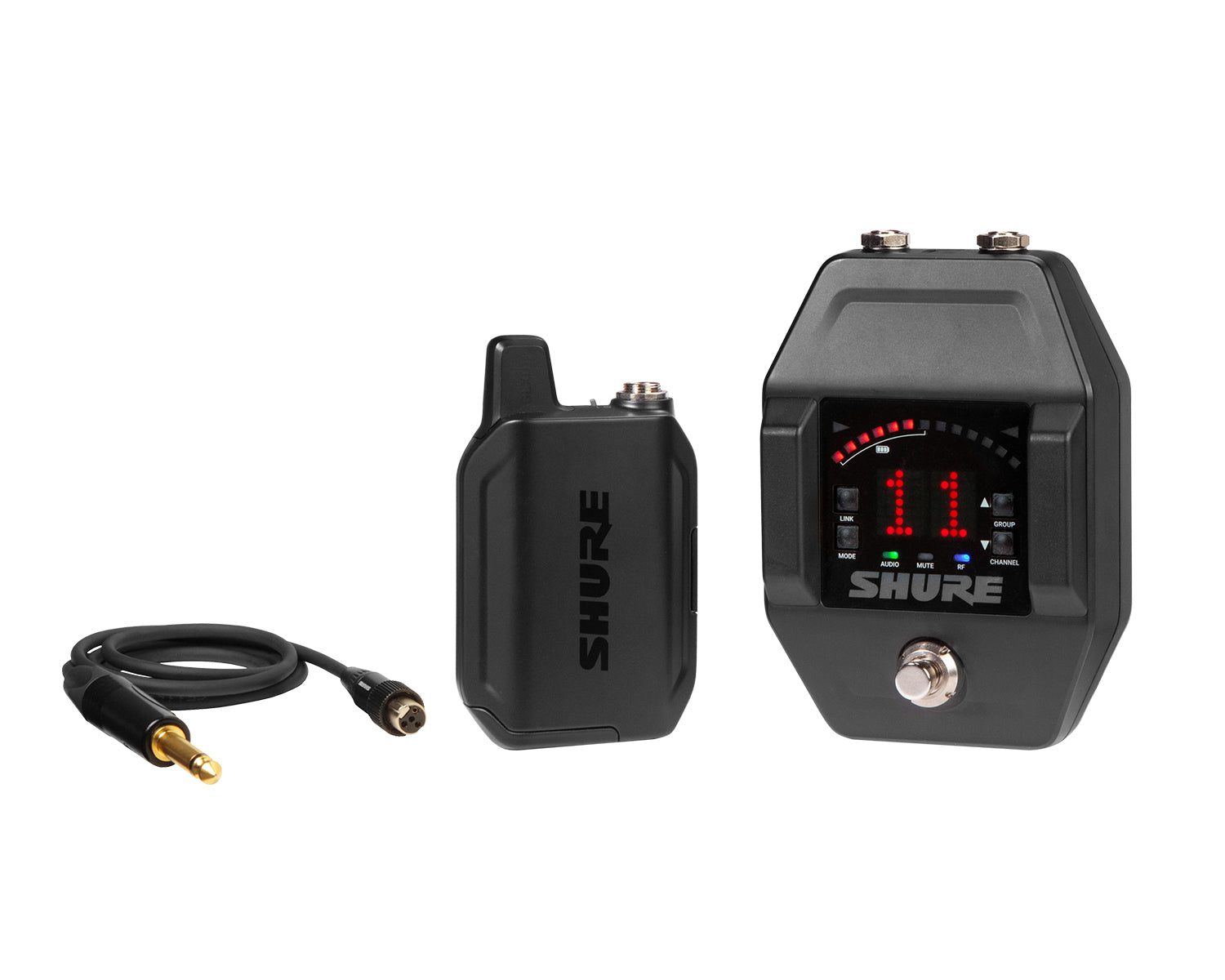
- Want the receiver on your pedalboard? Of the systems we sell, the Shure GLXD16+ is the one built as a pedal: a metal stompbox receiver with a built-in tuner, running on 2.4 and 5.8 GHz, licence-free, with a rechargeable bodypack.
- Want licence-free and simple, with the receiver on the amp or a shelf? The Audio-Technica System 10 ATW-1101 works in the 2.4 GHz band. Add the AT-GcW guitar cable to the bodypack.
- Bigger stages, venues full of Wi-Fi, or several systems at once? Look at UHF: the Shure BLX14, the Sennheiser XSW 1 Ci1 and XSW 2 Ci1, or the Sennheiser EW-D Ci1. In the UK these need an Ofcom licence; the low-cost Channel 38 shared licence covers them if you set them to a Channel 38 frequency.
- Dropping out? All three manufacturers say much the same thing: keep a clear line of sight, keep the receiver away from Wi-Fi gear and metal, use fresh or fully charged batteries, and scan for a clean channel before the show.
If you also need vocal mics or want the wider background on wireless, start with our wireless microphone buying guide. This guide stays on instruments.
2.4 GHz or UHF: the choice that matters most
2.4 GHz (and 5.8 GHz)
Ofcom lists 2400 to 2483.5 MHz as a range wireless microphones can use without a licence. The catch is in Ofcom's own wording: these licence-exempt ranges are also used by other low-power equipment, so they can be subject to interference. That means Wi-Fi, Bluetooth and every phone in the room.
Manufacturers deal with that in different ways. Shure's GLX-D+ runs in both 2.4 and 5.8 GHz, which Shure says more than doubles the available bandwidth, and it automatically moves away from interference without interrupting the audio. Audio-Technica's System 10 sends the signal on two dynamically allocated frequencies, in multiple time slots and through two antennas on each transmitter and receiver (A-T calls this frequency, time and space diversity), and changes frequency on the fly if it meets interference.
UHF
The UHF systems here work between roughly 606 and 662 MHz, well away from Wi-Fi. Sennheiser says UHF transmission enhances range, reliability and scalability. The trade-off in the UK is licensing: these frequencies need an Ofcom licence, covered below.
The systems, one by one
Shure GLXD16+: the pedalboard receiver
The GLXD16+ pairs the GLXD6+ guitar pedal receiver with a GLXD1+ bodypack. The UK version is the Z4 band, which Shure lists as 2400 to 2483.5 MHz and 5725 to 5875 MHz. By default it runs in best-band mode across both, or you can lock it to 2.4 GHz only or 5.8 GHz only.
- Pedalboard power: 9 to 15 V DC at 400 mA minimum. If you use a pedalboard supply with isolated outputs, Shure says to use an outlet rated at 400 mA or more.
- Tuner: needle or strobe display, ±1 cent accuracy, reference pitch adjustable from 432 to 447 Hz, and a choice of whether the output stays live or mutes while tuning.
- Wired input: a ¼” true bypass input lets you switch between a wired and a wireless instrument with the footswitch. Shure notes the wired input passes signal even if the pedal loses power; wireless use obviously needs power.
- Battery: an SB904 lithium-ion battery, rated up to 12 hours on the product page (the user guide's spec table says up to 11.5 hours). Shure quotes 1.5 hours of use from a 15 minute quick charge, and it charges over USB-C in the bodypack. The transmitter will not pass audio while the charging cable is connected.
- Latency: Shure's user guide lists 4.53 ms in Groups 1 and 3 and 8 ms in Group 2.
Audio-Technica System 10 ATW-1101: licence-free, tabletop receiver
The ATW-1101 is an ATW-R1100 receiver with an ATW-T1001 UniPak bodypack. The bodypack has a high-impedance instrument input as well as a mic input, and A-T says its guitar cable, the AT-GcW, is pre-terminated to fit any ATW-1101. A-T's guitar package is the ATW-1101/G; with the plain ATW-1101 listed here, add the AT-GcW for guitar or bass.
A-T quotes an operating range of 30 m typical, in an open-range environment with no interfering signals. The bodypack runs on two AA batteries for more than 7 hours on alkalines, and up to eight systems can run together with no frequency coordination. The receiver has both a balanced XLR and an unbalanced ¼” output, so it can feed an amp or a desk. It is a desktop unit, not a pedal.
Shure BLX14 and BLX14R: UHF on AA batteries
The BLX14 comes with a tabletop receiver, a BLX1 bodypack and a WA302 guitar cable; the BLX14R is the same idea with a rack-mount receiver. The UK K3E band is 606 to 630 MHz. Shure lists a working range of 91 m line of sight, adding that actual range depends on RF signal absorption, reflection and interference. Two AA batteries give up to 14 hours on alkalines.
One instrument-specific tip from Shure's manual: for instruments, turn the bodypack's gain to its minimum setting.
Sennheiser XSW 1 Ci1 and XSW 2 Ci1
Both sets include a stationary receiver, the SK-XSW bodypack, a CI 1 instrument cable and a power supply, and both run on the GB band of 606 to 630 MHz with about 10 hours from two AA batteries. The differences are in the receiver. The XSW 1 gives up to 10 compatible channels, with antenna-switching diversity from integrated antennas. The XSW 2 gives 12 compatible channels, a true diversity receiver in a metal housing, an LCD display, and a rack-mount kit in the box.
Sennheiser EW-D Ci1 (S1-7): digital UHF
The EW-D Ci1 set includes the EW-D EM rack receiver, the metal-bodied EW-D SK bodypack, a CI 1 instrument cable, two rod antennas and a rack-mount set. The S1-7 range is 606.2 to 662 MHz. Sennheiser specifies 1.9 ms system latency and up to 100 m range in an ideal environment without obstacles. The bodypack runs up to 8 hours on two AA batteries or up to 12 hours on the BA 70 rechargeable pack, which is sold separately; the EW-D charging set includes two packs and a USB charger. Setup and pairing can be done from the Smart Assist app over Bluetooth Low Energy.
Already on EW-DX? Sennheiser says the EW-DX SK bodypack adds three-step cable emulation (Off, Type 1, Type 2, Type 3) for guitarists and bassists who miss the sound of a cable. The EW-DX SK 3-pin version takes the CI 1-4 guitar cable. Our EW-D vs EW-DX guide covers the differences between the two ranges.
Comparison table
Figures are each manufacturer's own. A dash means the maker does not publish that figure in the documents we checked, not that the figure is poor. Range figures are not comparable with each other because each is measured under different conditions.
| System | Band | Receiver | Bodypack power | Stated battery life | Stated range | Stated latency | UK licence |
|---|---|---|---|---|---|---|---|
| Shure GLXD16+ (Z4) | 2.4 and 5.8 GHz | Pedal with tuner | SB904 lithium-ion | Up to 12 hours | — | 4.53 ms or 8 ms by group | Not required |
| A-T System 10 ATW-1101 | 2.4 GHz | Tabletop | 2 x AA | More than 7 hours (alkaline) | 30 m typical, open area, no interference | — | Not required |
| Shure BLX14 / BLX14R (K3E) | UHF 606–630 MHz | Tabletop / rack | 2 x AA | Up to 14 hours (alkaline) | 91 m line of sight | — | Ofcom licence |
| Sennheiser XSW 1 Ci1 (GB) | UHF 606–630 MHz | Stationary | 2 x AA | About 10 hours | — | — | Ofcom licence |
| Sennheiser XSW 2 Ci1 (GB) | UHF 606–630 MHz | Stationary, rack kit included | 2 x AA | About 10 hours | — | — | Ofcom licence |
| Sennheiser EW-D Ci1 (S1-7) | UHF 606.2–662 MHz | Rack, rack-mount set included | 2 x AA or BA 70 | 8 hours (AA), 12 hours (BA 70) | Up to 100 m, ideal environment | 1.9 ms | Ofcom licence |
UK licensing: what you need
- 2.4 GHz: Ofcom lists 2400 to 2483.5 MHz as usable without a licence. That covers the System 10 and the 2.4 GHz side of the GLX-D+.
- 5.8 GHz: Ofcom's wireless microphone page does not list 5.8 GHz, but Ofcom's licence-exempt short range devices rules (IR 2030, published 7 April 2026) include 5725 to 5875 MHz for non-specific short range devices at up to 25 mW e.i.r.p. Shure rates the GLX-D+ at 10 mW e.i.r.p. maximum, describes its frequency range as licence-free (noting that this is region dependent), and the Z4 is the version Shure sells for the UK.
- Channel 38: Ofcom offers UK-wide shared access to 606.5 to 613.5 MHz, indoors or outdoors, on a non-protected basis, with a one- or two-year licence. All three UHF ranges here include Channel 38, so set the system to a frequency inside it and the shared licence covers you.
- Elsewhere in UHF: outside Channel 38, Ofcom issues standard licences for frequencies coordinated with other users.
- Channel 70: Ofcom's wireless microphone pages list 863.1 to 864.9 MHz as licence-exempt. None of the instrument sets in this guide tune there.
How to apply, what it costs and how Channel 38 works in practice are covered in our Ch38 and Ofcom licensing guide, with coordinated and event licences in licensing beyond Channel 38.
Why guitar wireless drops out, and what helps
These points come from the troubleshooting sections of the Shure GLX-D+ and BLX user guides and the Audio-Technica System 10 manual. They overlap a lot, which tells you where the problems usually are.
Line of sight
Shure's advice is to position the receiver so nothing obstructs the line of sight to the transmitter, including the audience, and to make sure people do not block it. Audio-Technica says line of sight is best and, if the signal is marginal, to experiment with different transmitter positions on your body or instrument, or reposition the receiver. During soundcheck, Shure suggests marking trouble spots and asking performers to avoid them.
Wi-Fi and other wireless gear
For the GLX-D+, Shure says to place the receiver at least 3 m (10 ft) from Wi-Fi access points, computers and other active 2.4 and 5.8 GHz sources, to avoid heavy Wi-Fi traffic such as large downloads or streaming video, and to turn on any Wi-Fi before turning on receivers and scanning for the best channel. It also says to use the GLX-D+'s Group 3 only in controlled Wi-Fi environments, because that group has no backup frequencies. Audio-Technica says some routers and Wi-Fi systems may need to be up to 30 ft (9 m) from System 10 receivers. Shure's BLX guide lists phones, two-way radios, computers, media players, Wi-Fi devices and digital signal processors as sources to remove.
Metal, height and distance
- Keep transmitters and receivers away from metal and other dense materials (Shure). A-T says to keep receiver antennas away from metal, and to site the receiver at least 1 m above the ground and 1 m from a wall or metal surface.
- On a rack receiver, Shure suggests moving it to the top of the rack. For antenna options on UHF rack receivers, see our antennas and RF distribution guide.
- Too close can also be a problem: Shure's BLX guide says to keep transmitter and receiver more than 5 m apart, and A-T says not less than 2 m for System 10.
- With more than one system, keep transmitters more than 2 m apart (Shure GLX-D+ and BLX).
Batteries
Every troubleshooting list includes the battery: charge or replace it. Audio-Technica puts fresh alkaline or fully charged batteries first in its tips. Shure's BLX gives roughly 60 minutes' warning when the LED turns red, and the GLX-D+ shows the bodypack's remaining life on the pedal's segment display. A spare SB904 or a set of fresh AAs costs less than a lost song. Our radio mic batteries guide covers alkaline versus rechargeable.
Things that are not RF dropouts
- Audio-Technica warns that some guitar pickups are sensitive to magnetic interference, and says to keep the bodypack at least 1 ft (30 cm) away from them.
- Distortion is usually gain, not signal loss. On the GLX-D+, an OL indicator on the pedal means reduce transmitter gain.
- A GLX-D+ bodypack switches itself off after about an hour if it cannot find its receiver, to save battery.
Cables, the bodypack and the rest of the rig
Each maker uses its own connector on the bodypack, so the short guitar lead that comes with the system is not interchangeable. Shure's bodypacks take a 4-pin mini (TA4F) cable such as the WA302. Sennheiser's EW-D SK and SK-XSW use the CI 1, a 6.3 mm jack to a lockable 3.5 mm jack; the CI 1-N is the spare listed for evolution wireless bodypacks. Sennheiser's 3-pin bodypacks take the CI 1-4, and Audio-Technica's UniPak takes the AT-GcW. A spare lead is the cheapest insurance in the case.
On the other side of the receiver you still need a normal shielded instrument lead to the amp or first pedal. Do not grab a speaker cable for that job; instrument cable vs speaker cable explains why. Shure's BLX manual also shows threading the guitar strap through the bodypack's belt clip, and if you are rethinking straps or tuners at the same time, see tuners, capos and straps. With a GLXD16+ on the board, the built-in tuner may let you free up a pedal slot.
Comparing Shure's whole wireless range, vocal systems included? See Shure wireless ranges compared.
Popular picks from the shop
Shure GLXD16+ Wireless Guitar Pedal System (Z4)View product → Shure BLX14 Wireless Guitar System (K3E)View product → Sennheiser EW-D Ci1 Wireless Instrument Set (S1-7)View product → Sennheiser XSW 2 Ci1 Wireless Instrument Set (GB)View product → Sennheiser XSW 1 Ci1 Wireless Instrument Set (GB)View product → Audio-Technica ATW-1101 System 10 Bodypack SystemView product → Shure SB904 Rechargeable Battery for GLX-D+View product → Sennheiser CI 1-4 Guitar Cable, 1/4″ to 3-PinView product →
Frequently asked questions
Do I need a licence for a wireless guitar system in the UK?
Not for 2.4 GHz systems: Ofcom lists 2400 to 2483.5 MHz as licence-exempt, and Shure describes the GLX-D+ dual-band system as licence-free; its 5.8 GHz band falls within a range Ofcom lists as licence-exempt for short range devices. UHF systems such as the Shure BLX14 and the Sennheiser XSW and EW-D instrument sets need an Ofcom licence; set them to Channel 38 (606.5 to 613.5 MHz) and the shared licence covers them.
Will a 2.4 GHz guitar wireless work in a pub or club with Wi-Fi?
Usually, but Wi-Fi shares the band, and Ofcom notes that licence-exempt bands can suffer interference. Follow the makers' advice: keep the receiver at least 3 m from access points (Shure) or up to 9 m from routers (Audio-Technica), switch Wi-Fi on before you scan for a channel, and keep a clear line of sight. If the room is packed with wireless gear, UHF avoids the Wi-Fi band altogether.
Why does my guitar wireless cut out when I turn round?
Usually because something, often you, is blocking the line of sight between bodypack and receiver. Shure says to keep the line of sight clear of people, and Audio-Technica says to try different transmitter positions on your body or instrument, or move the receiver. Check the battery too: it appears in every manufacturer's dropout advice.
Does a wireless system change my guitar tone or add latency?
Some makers publish latency: Sennheiser quotes 1.9 ms for EW-D, and Shure lists 4.53 ms or 8 ms for the GLX-D+ depending on the group. Sennheiser's EW-DX bodypack has three-step cable emulation for players who miss the sound of a lead.
Can I use a guitar wireless system for bass?
Yes. These instrument sets are sold for guitar and bass. Shure describes the GLXD16+ wired input as switching between a wired and a wireless guitar or bass, and Sennheiser pitches the XSW Ci1 at guitarists and bassists.
How many guitar wireless systems can I run at once?
It depends on the system. Shure's GLXD6+ specification lists up to 4 typical and 8 optimal, or up to 4 typical and 5 optimal in 2.4 GHz-only mode. System 10 runs up to eight together. The XSW 1 offers up to 10 compatible channels and the XSW 2 offers 12, while EW-D allows up to 90 channels in its 56 MHz bandwidth.
Shop this guide
Guitar and bass wireless systems, spare bodypacks, batteries and cables. Tell us your rig and venue and we will help you choose between 2.4 GHz and UHF.
Wireless Microphone Systems Bodypack Transmitters Wireless Mic Receivers Wireless Mic Accessories Guitar Cables Guitar Accessories



