

Home » Guides » Microphones »
Podcast and Streaming Microphones: Shure SM7B vs SM7dB vs Audio-Technica BP40, and USB Options
Whether to go USB or XLR, why the Shure SM7B needs so much gain and what the SM7dB changes, how the Audio-Technica BP40 and AT2040 compare, when a headset mic makes more sense, where USB mics such as Shure’s MV7+ fit in, and what a multi-host podcast desk such as the Tascam Mixcast 4 adds.
~10 min read · Updated October 2026 · By the Stage Supply team
In this guide: The short answer · USB or XLR · Dynamic or condenser · Comparison table · The SM7B gain question · The mics one by one · Headset mics · Two or more hosts · Monitoring · Popular picks · FAQ
Most podcast and streaming mic questions come down to two decisions: does the mic plug straight into a computer over USB, or into an interface or mixer over XLR; and is the gain chain strong enough for the mic you choose. Get those right and almost any of the mics below will sound good on a voice.
This guide sticks to talking-head mics for podcasts, streams, voiceover and radio-style shows. Choosing mics for a live stage is covered in our live microphone guide and our live vocal mic comparison.
The short answer
- One person, one computer, no interface: a USB mic is the simplest route. Shure’s MV7+ does both USB-C and XLR, so it can move to an interface later. Note that its onboard processing applies to the USB signal only.
- You already have, or want, an interface or mixer: go XLR. The Shure SM7B is the classic broadcast choice, but Shure advises a preamp with at least 60 dB of gain, or an inline booster.
- You want the SM7B sound without the gain problem: the Shure SM7dB builds in a +18 or +28 dB preamp, powered by 48V phantom power.
- A hotter XLR dynamic that most interfaces drive easily: the Audio-Technica BP40, or its podcast-focused relative the AT2040. Both are hypercardioid and, on Audio-Technica’s figures, give more output than an SM7B.
- Presenters who move about, or gaming streams: a headset mic such as the Audio-Technica BPHS1 keeps the mic at a fixed distance from the mouth.
- Two to four people round a table: XLR mics into a podcast desk such as the Tascam Mixcast 4, which has four mic inputs, four headphone outputs and records to SD card.
USB or XLR?
Audio-Technica puts the difference simply. An XLR mic is an analogue device: an XLR cable carries its signal to an audio interface, which converts it to digital for the computer. A USB mic does the analogue-to-digital conversion inside the mic, so no interface is needed.
| USB mic | XLR mic | |
|---|---|---|
| What else you need | A cable and a computer, phone or tablet | An interface, mixer or podcast desk with a mic preamp |
| Where gain and processing live | In the mic and its app | In the preamp and whatever follows it |
| Several hosts | Awkward: each mic is its own audio device | Natural: one multi-input interface or desk takes every mic |
| Into a PA or livestream mixer | Not directly | Yes, like any other mic |
| Upgrade path | Replace the mic | Change the mic or the preamp independently |
Hybrid mics blur the line. Shure’s MV7+ has both USB-C and XLR outputs plus a 3.5mm headphone jack for latency-free monitoring. Over USB it runs Auto Level Mode, a real-time Denoiser, Digital Popper Stopper, compressor, limiter, high-pass filter and reverb, set up in the MOTIV Mix app. Shure’s user guide is clear that its XLR output is passive and “not affected by software settings”, so that processing does not reach a mixer over XLR.
Sennheiser’s Profile USB is the USB-only alternative: a cardioid condenser with a 3.5mm headphone output, gain and mix controls, a mute button and a table stand in the box.
If the show already runs through a mixing desk, for a church service, a panel or a hybrid event, XLR mics are the way to go. Our guide to getting the mixing desk into your livestream covers the desk-to-computer side.
Dynamic or condenser for a voice at home
Audio-Technica’s own summary: dynamic mics minimise room noise and suit untreated rooms, have a warm broadcast sound and need no external power; condensers are far more sensitive, pick up subtle detail and need phantom or battery power. In a spare bedroom with hard walls and a computer fan, that sensitivity works against you, which is why every desk-mounted XLR mic in this guide is a dynamic.
Pickup pattern matters too. The SM7B, SM7dB and MV7+ are cardioid. The BP40 and AT2040 are hypercardioid, which Audio-Technica says reduces pickup from the sides and rear. Whatever the pattern, work close: Shure recommends speaking 1 to 6 inches (about 2.5 to 15cm) from the SM7B, with more bass as you move in.
For more on how phantom power works, see phantom power and DI boxes explained.
Comparison table
All figures from the manufacturers’ datasheets and user guides. Sensitivity is open-circuit output at 1 Pa (94 dB SPL): the less negative the number, the hotter the mic and the less preamp gain it needs.
| Mic | Connection | Element and pattern | Sensitivity | Built in | In the box |
|---|---|---|---|---|---|
| Shure SM7B | XLR | Dynamic, cardioid, 50 Hz–20 kHz | −59 dBV/Pa (1.12 mV) | Bass roll-off and presence boost switches; shielding against hum from monitors and lighting | Standard and A7WS close-talk windscreens, switch cover plate, 5/8″ to 3/8″ adapter |
| Shure SM7dB | XLR (48V phantom for the preamp) | Dynamic, cardioid, 50 Hz–20 kHz | −59 bypassed, −41 at +18 dB, −31 dBV/Pa at +28 dB | +18/+28 dB preamp with bypass; same roll-off and presence switches | Standard and A7WS windscreens, 5/8″ to 3/8″ adapter |
| Audio-Technica BP40 | XLR | Large-diaphragm dynamic, hypercardioid, 50 Hz–16 kHz | −48 dB (3.9 mV) | Switchable 100 Hz high-pass; humbucking coil; multistage internal pop filter | AT8483 clamp, 5/8″ to 3/8″ adapter, pouch |
| Audio-Technica AT2040 | XLR | Dynamic, hypercardioid, 80 Hz–16 kHz | −53 dB (2.2 mV) | Integrated shock mount; multistage windscreen with nonwoven filter | AT8487 clamp, 5/8″ to 3/8″ adapter, pouch |
| Shure MV7+ | USB-C and XLR | Dynamic, cardioid, 50 Hz–16 kHz | −55 dBV/Pa over XLR | 0 to +36 dB gain and DSP (USB only); 3.5mm headphone jack; LED touch panel | 3m USB-C to USB-C cable |
| Sennheiser Profile USB | USB-C | Condenser, cardioid | n/a (digital) | Gain, mix and headphone controls, mute button, 3.5mm headphone output | Table stand, 1.2m USB-C cable |
The SM7B gain question
The SM7B’s reputation for being “hard to drive” is Shure’s own advice, not forum folklore. Its user guide says the mic “requires more gain than what most entry-level or mid-tier preamplifiers can deliver” and to use an inline boost amplifier or a stronger preamp if yours does not offer more than 60 dB of gain.
Shure’s knowledge base shows the arithmetic. At 84 dB SPL, typical speech at 3 inches, the SM7 puts out about −69 dBV. Add 60 dB of gain and you reach −9 dBV, close to line level. Shure adds that many modern preamps and interfaces offer only 40 to 50 dB, because they assume a hotter condenser mic.
Three ways to solve it:
- A preamp with enough clean gain. Check the interface or mixer’s published maximum gain, not just the marketing.
- An inline booster. The sE Electronics DM1 Dynamite sits inline between the mic and the preamp and adds +28 dB, powered by 48V phantom from the interface. sE says it is for dynamic and passive ribbon mics only, not condensers or active ribbons.
- The SM7dB. Shure says it gives the classic SM7B sound in bypass, with the same EQ switches and the booster built in.
The Audio-Technica mics need less help. On paper, the BP40 is 11 dB hotter than an SM7B and the AT2040 6 dB hotter; the MV7+ over XLR is 4 dB hotter.
The mics one by one
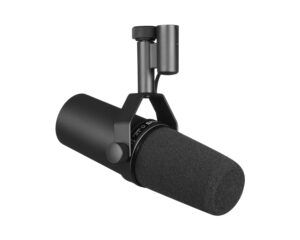
Shure SM7B
Shure lists radio announcing, narration, talk shows and studio vocals among its uses. Its practical strengths for a home studio are the electromagnetic shielding against hum from computer monitors and other devices, and the larger A7WS windscreen supplied for close talking. Two rear switches give flat, bass roll-off (useful for air-con and traffic rumble, says Shure) or presence boost for clarity.
It ships set up for a boom arm. Turning it round for a desk or floor stand means re-seating the yoke, which the user guide walks through, and the supplied adapter takes it from 5/8″ to 3/8″ threads. Our mic stand threads guide explains the difference.
Shure SM7dB
An SM7B with an active preamp inside. Shure quotes up to +28 dB of low-noise gain, with the bottom switches selecting bypass, +18 dB or +28 dB. Shure suggests +28 dB for podcasting and quieter voices and +18 dB for louder talkers and singers, and recommends setting the mic’s gain before the interface’s.
The preamp needs 48V phantom power. Without it, the mic still works in bypass, behaving like an SM7B. The SM7dB comes in black rather than the SM7B’s dark grey.
Audio-Technica BP40
Audio-Technica’s large-diaphragm broadcast dynamic, which it describes as delivering a “condenser-like” sound. A humbucking voice coil rejects electromagnetic interference, and a multistage windscreen plus a switchable 100 Hz high-pass filter deal with plosives. Audio-Technica says the hypercardioid pattern improves isolation, which helps where two presenters sit close together.
It comes with a clamp. Audio-Technica lists the AT8484 shock mount as its optional isolating mount.
Audio-Technica AT2040
Audio-Technica calls the AT2040 a podcasting mic based on the BP40. It keeps the hypercardioid pattern and multistage windscreen, has an integrated shock mount, and has no switches in its spec sheet (the BP40 has a flat/roll-off switch). It is a little lighter and shorter than the BP40, and its quoted response starts at 80 Hz rather than 50 Hz.
Shure MV7+ and Sennheiser Profile USB
The two USB options in the table. The MV7+ is the one to pick if a move to XLR is likely; Shure describes it as inspired by the SM7B. The Profile is a straightforward USB-C condenser for one voice at a desk, and the condenser caution above applies in a noisy or echoey room.
Headset mics for presenters and streamers
A desk mic only works if the presenter stays put. Headsets keep the capsule at a constant distance from the mouth and put the headphones on at the same time.
- Audio-Technica BPHS1. A broadcast headset designed for news, sports, announcing and interviews. It has a cardioid dynamic boom mic that can be worn on either side, closed-back ear cups with 40mm drivers, and a 3.3m replaceable cable ending in an XLR for the mic and a 1/4″ jack for the headphones. Three windscreens are included.
- Audio-Technica ATH-M50xSTS StreamSet (XLR). ATH-M50x headphones with a cardioid condenser boom mic that flips up to mute and two sets of earpads. This analogue version ends in an XLR for the mic and a 3.5mm plug, with 1/4″ adapter, for the headphones. Being a condenser, the mic needs phantom power (11 to 52V) from the interface or mixer.
Two or more hosts
Once a second person joins, XLR mics into a single multi-input device is the tidy answer. Tascam’s Mixcast 4 is built for exactly this:
- Four XLR/TRS combo mic inputs with auto-mix, and four individual headphone outputs.
- 48V phantom power per input, switched on by setting that input’s mic type to “Condenser”. Tascam warns that this setting could damage a dynamic mic, so leave dynamics on “Dynamic”. The exceptions are items whose makers say they need 48V: an SM7dB with its preamp engaged, a DM1 booster, or the StreamSet’s condenser mic.
- Tascam quotes a 66.5 dB gain range on the mic inputs. For the SM7B, Shure’s guidance is a preamp with more than 60 dB of gain.
- Voice processing: tone EQ, compressor, de-esser, noise suppressor and ducking, plus reverb and a voice changer.
- Recording of up to 14 tracks (12 plus a stereo mix) direct to SD card, and a 14-in/2-out USB audio interface for the computer.
- Callers via Bluetooth, USB or a 3.5mm TRRS line input, with mix-minus so they do not hear themselves back. Customisable sound pads for jingles and effects.
If you already run a digital mixer, it can do the same job. Our livestream audio guide covers sending a mix to the computer.
Headphone monitoring
Every host should wear closed-back headphones, so the mic does not pick up what is playing in them. A USB mic with a headphone jack, such as the MV7+ or Profile, lets you monitor without delay. With XLR mics, plug headphones into the interface or desk instead. The Mixcast 4 gives every guest their own headphone output.
Audio-Technica’s M-series are all closed-back: the ATH-M50x for the main host, say, and the lower-cost ATH-M20x to give every guest a pair. Our ATH-M series comparison covers the range.
Popular picks from the shop
Shure SM7B Cardioid Dynamic Broadcast MicrophoneView product → Shure SM7dB Dynamic Microphone with Built-in PreampView product → Audio-Technica BP40 Broadcast Dynamic MicrophoneView product → Audio-Technica AT2040 Podcast MicrophoneView product → Audio-Technica BPHS1 Broadcast HeadsetView product → Tascam Mixcast 4 Podcast Recording ConsoleView product → sE Electronics DM1 Dynamite Inline PreampView product → Audio-Technica ATH-M50xSTS StreamSet (XLR)View product →
Frequently asked questions
Is the Shure SM7B good for podcasting?
Yes, Shure lists radio announcing and narration among its main uses, and its shielding and close-talk windscreen suit a home setup. The catch is gain. Shure recommends a preamp with at least 60 dB of gain, or an inline booster. If your interface falls short, look at the SM7dB or a DM1 Dynamite.
Do I need a Cloudlifter or booster for the SM7B?
Only if your preamp cannot provide about 60 dB of clean gain, which Shure says is common with interfaces designed around condenser mics. An inline booster such as the sE DM1 Dynamite adds +28 dB from phantom power. The SM7dB builds the same idea into the mic.
SM7B or SM7dB: which should I buy?
Shure says the SM7dB in bypass gives the classic SM7B sound, and both have the same bass roll-off and presence switches. Choose the SM7dB if your interface or mixer is short of gain and has 48V phantom power. Choose the SM7B if your preamp already has plenty of clean gain, or you plan to use a separate booster.
Is a USB or XLR microphone better for podcasting?
USB is simpler for one person on one computer. XLR is better for more than one host, for connecting to a mixer or PA, and for upgrading mic and preamp separately. The MV7+ has both outputs, though its processing only applies over USB.
Does the MV7+ noise reduction work over XLR?
No. Shure describes the MV7+ XLR output as passive and “not affected by software settings”, so Auto Level, the Denoiser and Popper Stopper apply to the USB-C signal only.
What do I need to record a podcast with four people?
Four XLR mics, four pairs of closed-back headphones and something with four mic inputs and four headphone outputs. A podcast desk such as the Tascam Mixcast 4 provides all of those inputs and outputs, records each mic to SD card and works as a USB interface. Dynamic mics like the BP40 or AT2040 help keep each voice off the other mics.
Shop this guide
Broadcast and podcast mics, headsets, interfaces and headphones. Tell us how many hosts you have and what you record into, and we will help match the mics to the preamps.
Dynamic Microphones Audio Interfaces & Recorders Broadcast Headsets Studio Headphones Microphone Accessories



