

Home » Guides » Lighting & Effects »
ChamSys MagicQ Range Explained: Connect Interfaces, Compact, MQ50, MQ70 and Stadium
What the free MagicQ software does on its own, what a Mini Connect, Compact Connect or Stadium Connect adds, how many universes each MagicQ console outputs, and where the simpler QuickQ consoles fit. Finished with a plain guide to choosing between a laptop with a Connect and a standalone console.
~11 min read · Updated October 2026 · By the Stage Supply team
In this guide: The short answer · MagicQ software and unlock levels · Connect interfaces · MQ50 and MQ70 · Stadium consoles · QuickQ · Rack, DIN and dongle · Comparison table · How to choose · Popular picks · FAQ
ChamSys builds everything around one piece of software, MagicQ. The same show file runs on a free laptop install, on a USB control surface, on a compact console and on the flagship Stadium desks. What you are really paying for as you move up the range is physical control, universes output directly from the hardware, and resilience (screens, UPS, network ports) for when a laptop is not good enough.
This guide sticks to the ChamSys range and what separates each model. How a lighting desk thinks about patching, cues and playbacks is covered in our lighting desk basics guide, and universes, addressing and Art-Net in DMX explained. If you are weighing ChamSys against Avolites, read this alongside our Avolites Titan console guide.
The short answer
- MagicQ PC/Mac software is free on Windows, macOS and Linux, and outputs 64 universes of Art-Net/sACN with programming and playback fully enabled. You only need hardware for physical faders, direct DMX ports and a handful of remote and automation features.
- A Connect is a control surface for a laptop. The Compact Mini Connect (10 playbacks, 1 DMX port), Compact Connect (10 playbacks, 8 encoders, 2 DMX ports) and Stadium Connect (motorised faders, 4 DMX ports) all fully unlock MagicQ PC. They do not raise the 64-universe network output.
- A console runs MagicQ on its own. The MQ50 outputs 8 universes, the MQ70 24 (expandable to 48), the MQ250M Stadium 64 (expandable to 128) and the MQ500M+ 400.
- QuickQ is the simpler range for schools, churches and volunteer operators: 1 to 6 universes depending on model, a fixture-fader layout and a phone-style touchscreen. QuickQ shows load onto MagicQ if you move up later.
Rule of thumb: if you already carry a decent laptop and run up to 64 universes, a Connect is the cheapest way to a proper ChamSys surface. If the desk must boot without a laptop or sit at front of house night after night, buy a console, and if it must ride through a mains blip, pick one with an inbuilt UPS (MQ70 and both Stadium consoles).
MagicQ software and the three unlock levels
MagicQ PC is a free download for Windows, macOS and Linux. With no ChamSys hardware connected it runs in what ChamSys calls Demo Mode, which sounds worse than it is: programming and playback are fully enabled and 64 universes of Art-Net/sACN go out and come in. ChamSys states that the restrictions “do not affect show programming or playback”. MagicVis, the built-in visualiser, is included free.
What changes with hardware is a set of remote, automation and show-control features. The ChamSys manual sorts them into three levels:
| Level | What you get | Hardware that gives it |
|---|---|---|
| Demo Mode | Programming and playback, 64 universes Art-Net/sACN in and out, MagicDMX, RDM | Nothing connected, or only devices that do not unlock (MagicDMX, 10Scene plates and gateway, GeNetix switches and splitters, GN8, TouchScenes) |
| Core Mode | Adds full-screen start-up, auto-starting playbacks, full-screen Execute window, scheduled events and automations, the iOS/Android remote app, web server editing, 10Scene Gateway and TouchScenes | GeNetix GN2 and GN4IP nodes, Dual DMX and Audio interfaces, legacy SnakeSys B4, T2, R4, R8 |
| Unlocked Mode | Adds multi-programming and net sessions, playback synchronisation, remote control from other MagicQ systems, audio input, timecode (Art-Net, MIDI, LTC), MIDI and OSC control, ChamSys Remote protocol, external tracker support, mouse pan/tilt control and DMX-input triggering of PB1 to PB10 | Mini Connect, Compact Connect, Stadium Connect, Compact Wing, Rack Mount Dongle, and GeNetix GN5 and GN10 nodes |
Two details matter when planning. First, on an unlocked MagicQ PC only the first 10 playbacks (PB1 to PB10) can be controlled by the ChamSys remote protocol, MIDI and automations; playbacks 11 to 202 can only be controlled from ChamSys Playback, Execute or Extra Wings. On consoles, all 202 playbacks can be controlled this way. Second, GeNetix and SnakeSys nodes only unlock MagicQ PC over a network in certain conditions (for example two or fewer MagicQ systems on the network), so one node cannot unlock a room full of laptops.
MagicQ PC also supports up to 400 universes for pre-visualisation, so you can pre-program a large rig on a laptop. Full output for real lighting stays at 64 universes; when universes 65 to 400 are sent to external visualisers, ChamSys introduces occasional breaks in the DMX so they cannot be used to run a real rig.
The Connect interfaces: a console surface for your laptop
All three Connects plug into a Windows, Mac or Linux computer running MagicQ. The computer does the processing; the Connect adds hands-on control, direct DMX ports and the full unlock. All three list 64 universes over Art-Net/sACN, the same network output as the free software, so you are buying control and the unlock rather than extra universes.
Compact Mini Connect
The MagicQ Compact Mini Connect is the smallest. It is powered from the computer over USB-C, has 10 playbacks and one RDM-capable DMX output, plus a network port. It suits a small rig run from a laptop, a venue where most fixtures are on one universe, or a programmer who wants real faders in a laptop bag.
Compact Connect
The MagicQ Compact Connect adds 8 attribute encoders to the 10 playbacks (each with Flash, Go and Select buttons), two RDM-capable DMX outputs, a network port, a 10Scene input port, a working-light socket and a 7-band audio input for sound-to-light. That encoder bank is what makes busking moving heads practical without reaching for the mouse.
Pair it with a MagicQ Compact Wing for another 20 playbacks (10 fader and 10 executor) and a colour touchscreen for attributes and playback legends. ChamSys allows up to two Compact Wings per system, and the Wing also works alongside MQ50, MQ70 and Stadium consoles. We also list a Compact Connect, Compact Wing and case bundle.
Stadium Connect
The MagicQ Stadium Connect brings the Stadium console control layout to a PC system: 10 motorised fader playbacks, 10 encoder playbacks, dual 100mm manual crossfaders, an intensity wheel, four DMX outputs, MIDI in/out and LTC timecode in/out. ChamSys lists 64 universes direct and 400 universes for visualisation and pre-programming. It also brings one feature the smaller Connects do not: MagicQ PC with a Stadium Connect supports multiple NDI live feeds in the media window, where a PC without it supports only one.
It is the natural choice for a programmer who already owns a powerful laptop and external touchscreens, works up to 64 universes, and wants motorised faders and timecode without buying a full Stadium console.
MQ50 and MQ70 compact consoles
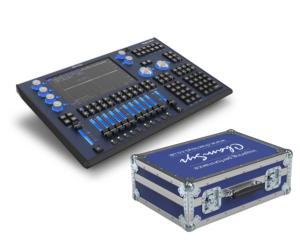
The compact consoles run MagicQ internally, so they need no computer. Both have 10 playbacks, 8 attribute encoders, an inbuilt 10.1-inch multi-touch display with HDMI for an external monitor, four RDM-capable DMX outputs, MIDI in/out, audio in for sound-to-light, and built-in Wi-Fi.
The difference is mostly scale and resilience:
- MQ50: 8 universes direct from the console, one network port, no timecode input. A self-contained desk for small venues, schools, bands and corporate work where 8 universes covers the rig.
- MQ70: 24 universes (expandable to 48), three network ports, an LTC timecode input and an inbuilt UPS on a 12V lead-acid battery that keeps both the console and its built-in Ethernet switch alive through a power loss. Fanless, so it is silent in a theatre control room.
If you are moving from a Connect to a standalone desk, the UPS and timecode input are the main reasons to choose the MQ70 over the MQ50. It is also available as an MQ70 and flight case bundle, and the MQ50/MQ70 flight case is sold separately.
Stadium consoles: MQ250M and MQ500M+
The Stadium consoles are the touring and large-venue end of the range.
- MQ250M: 64 universes direct, expandable to 128. 10 motorised fader playbacks and 10 encoder playbacks, 8 attribute encoders, an intensity wheel, dual 100mm crossfaders, an inbuilt 15-inch multi-touch screen plus a dedicated 5-inch encoder touchscreen, four DMX outputs, four network ports, MIDI and LTC in/out, and an inbuilt UPS.
- MQ500M+: 400 universes direct. 15 motorised fader playbacks, 15 encoder playbacks and 12 macro/execute keys, dual inbuilt 15-inch multi-touch screens with support for two external DisplayPort monitors, four DMX ports, four Gigabit network ports, MIDI and LTC, Wi-Fi and an inbuilt UPS.
ChamSys now lists the earlier 256-universe MQ500M under its discontinued products, with the MQ500M+ as the current flagship. Show files move between all of them, which is the point of the single MagicQ platform.
QuickQ: the simpler alternative
QuickQ is ChamSys’s other software platform, aimed by ChamSys at “students, volunteers, or part-time operators”. Instead of MagicQ’s programming syntax, it offers a phone-style touchscreen, fixture faders that switch between Fixture, Group and Cue modes, RDM auto-patching and a large fixture library. QuickQ shows can be loaded onto any MagicQ system, so a school or church can move up later without starting again.
ChamSys currently lists both the original QuickQ models and newer “+” versions. The QuickQ 20+ and 30+ output more universes than the originals; the QuickQ 10+ stays at one. The QuickQ 10, 20 and 30 we stock are the original models (ChamSys codes CS100710, CS100720 and CS100730):
| Model | Universes | Direct DMX outputs | Fixture faders |
|---|---|---|---|
| QuickQ 10 | 1 | 1 | 20 |
| QuickQ 20 | 2 | 2 | 20 |
| QuickQ 30 | 4 | 3 | 40 |
| QuickQ 10+ | 1 | 1 | 20 |
| QuickQ 20+ | 4 | 2 | 20 |
| QuickQ 30+ | 6 | 4 | 20 |
| QuickQ Rack | 4 | 2 | None (install unit, 10 buttons, 10Scene wall plates) |
Choose QuickQ when the operator changes every week and the rig is mostly static washes, LED pars and a few moving heads. Choose MagicQ when someone will program busking pages, effects, pixel mapping or timecoded shows.
Installation units and the USB dongle
For fixed installs with no operator, ChamSys makes the MagicQ Rack (1U, 24 universes expandable to 48, two DMX outputs, Wi-Fi, HDMI for a monitor) and the MagicQ DIN (DIN-rail mount, 24 universes expandable to 48, two DMX outputs on Phoenix terminals). Both take up to forty 10Scene wall plates. The QuickQ Rack above is the 4-universe QuickQ equivalent.
Where a PC runs MagicQ in a rack and you do not want a Connect on the desk, ChamSys makes the MagicQ Rack Mount Dongle: a USB dongle that unlocks MagicQ PC from Demo Mode, doing the same job as a wing or USB interface in a small form factor. The ChamSys manual lists it among the hardware that gives Unlocked Mode. ChamSys also says it can unlock all 8 layers of MagicHD stand-alone, but MagicHD is now legacy: it is no longer in development and was last included with MagicQ in v1.9.8.4. MagicVis needs no dongle. If you are looking at our ChamSys MagicHD USB dongle listing to unlock MagicQ PC, ask us to confirm it against the current Rack Mount Dongle before ordering.
MagicQ range at a glance
| Product | Needs a computer | Universes direct | DMX ports | Physical playbacks | Unlocks MagicQ PC |
|---|---|---|---|---|---|
| MagicQ PC (free) | Yes | 64 (network) | None | None | Demo Mode |
| Compact Mini Connect | Yes | 64 (network) | 1 | 10 | Fully |
| Compact Connect | Yes | 64 (network) | 2 | 10, plus 8 encoders | Fully |
| Stadium Connect | Yes | 64 (network) | 4 | 10 motorised + 10 encoder | Fully |
| MQ50 | No | 8 | 4 | 10 | Console |
| MQ70 | No | 24 (to 48) | 4 | 10 | Console |
| MQ250M | No | 64 (to 128) | 4 | 10 motorised + 10 encoder | Console |
| MQ500M+ | No | 400 | 4 | 15 motorised + 15 encoder + 12 keys | Console |
How to choose
1. Count universes first
Add up the DMX footprint of every fixture, divide by 512 and round up, then allow headroom for the rig you will have in two years. Pixel tape and LED battens in multi-cell modes eat universes fast. Our DMX explained guide walks through it. Up to 8 universes, every MagicQ option works. Over 24, you are into MQ70 with the upgrade, a Connect on a laptop (up to 64), or a Stadium console.
2. Laptop plus Connect, or a console?
- Laptop plus Connect: the lowest cost to 64 universes and full features, easy to carry, and you can program at home on the same software. The weak points are the laptop: OS updates, power management, sleep, a dropped connection. Use a machine that does nothing else.
- Console: boots straight into MagicQ, has its screens and ports built in, and on the MQ70, MQ250M and MQ500M+ an inbuilt UPS. Better for permanent venues, shared desks and any show where a crash is not an option.
3. Programming or playback?
If someone programs a show once and volunteers press Go, the operator’s surface matters more than the programming power: QuickQ, or a MagicQ console with clearly labelled playbacks. If you are busking a gig with moving heads, you need encoders, so skip the Mini Connect and look at the Compact Connect or above. If you run to timecode, the MQ70 has LTC in, and the Stadium Connect and Stadium consoles have LTC in and out.
4. Distribution
Above two or four universes you will be sending Art-Net or sACN to nodes rather than relying on direct DMX ports. ChamSys GeNetix nodes such as the GN5 and GN10 also fully unlock MagicQ PC over the network (subject to the conditions above), which can make a separate Connect unnecessary in an installed PC system. For cable-free runs to trusses, see our wireless DMX guide. Building a whole rig from scratch? Start with your first lighting rig.
Popular picks from the shop
ChamSys MagicQ MQ70 Console and Flight Case BundleView product → ChamSys MagicQ Compact Connect with CaseView product → ChamSys MagicQ Compact Mini Connect with CaseView product → ChamSys MagicQ Stadium ConnectView product → ChamSys MagicQ MQ50 Compact ConsoleView product → ChamSys MagicQ MQ250M Stadium ConsoleView product → ChamSys QuickQ 20 Lighting ConsoleView product → ChamSys GeNetix GN5 5-Port Art-Net/sACN NodeView product →
Frequently asked questions
Is ChamSys MagicQ software really free?
Yes. MagicQ PC is a free download for Windows, macOS and Linux, and ChamSys enables programming, playback and 64 universes of Art-Net/sACN output without any hardware. Connecting ChamSys hardware unlocks a set of remote, automation, timecode and multi-programming features, not the core desk.
What does the MagicQ Compact Connect unlock?
It puts MagicQ PC into Unlocked Mode, which adds multi-programming, playback synchronisation, audio input, Art-Net, MIDI and LTC timecode, MIDI and OSC control, remote control and external tracker support. It also gives you 10 playbacks, 8 encoders and two DMX outputs. It does not increase the 64-universe network output.
How many universes does a Stadium Connect give?
ChamSys lists 64 universes direct from MagicQ over Art-Net/sACN/Pathport, plus 400 universes for visualisation and pre-programming, and four direct DMX outputs. For more than 64 live universes you need a Stadium console: the MQ250M is expandable to 128 and the MQ500M+ outputs 400.
What is the difference between the MQ50 and MQ70?
Both are standalone consoles with 10 playbacks, 8 encoders, a 10.1-inch touchscreen and four DMX outputs. The MQ70 outputs 24 universes (expandable to 48) against the MQ50’s 8, and adds three network ports, an LTC timecode input and an inbuilt UPS.
Should I buy QuickQ or MagicQ?
QuickQ if the people operating it are students, volunteers or occasional users and the show is mostly static looks. MagicQ if anyone will program moving heads in depth, busk, pixel map or run timecode. QuickQ shows load onto MagicQ, so starting with QuickQ does not lock you in.
Do I need a dongle for MagicVis or MagicHD?
Not for MagicVis, which is a free part of MagicQ. ChamSys’s MagicQ Rack Mount Dongle unlocks MagicQ PC to the same level as a Connect, which is useful in installed systems with no surface on the desk, and can also unlock MagicHD stand-alone. MagicHD itself is no longer developed by ChamSys.
Shop this guide
ChamSys consoles, Connect interfaces, GeNetix nodes and the cables to run them. Tell us your fixture list and universe count and we will help pick the right MagicQ setup.
Lighting Desks & Consoles Art-Net Nodes & Switches DMX Controllers Lighting Console Cases DMX Cables



