

Home » Guides » DJ & Events »
Mobile DJ Lighting Control: Sound-Active, Remotes, Apps, Wireless DMX and Simple Controllers
The five ways a mobile DJ can run their lights, from a fixture listening to the music on its own to a proper DMX controller, what each one needs, where each one runs out, and which kit we stock for each.
~10 min read · Updated October 2026 · By the Stage Supply team
In this guide: The short answer · The five methods compared · Sound-active and auto · IR and RF remotes · Apps and Bluetooth · Wireless DMX · Simple DMX controllers · Stepping up · Mixing methods · Popular picks · FAQ
The short answer
Most mobile DJs need far less control than they think. Lights running their own sound-active programs, plus a remote to pick a colour for the first dance, covers most weddings and parties. Add a simple DMX controller when you want every fixture doing the same thing at the same time, and wireless DMX when the cable run to the far side of the dance floor becomes the problem.
The real decision is the ecosystem. Chauvet DJ fixtures talk D-Fi and ILS, many Equinox and LEDJ fixtures talk W-DMX, and remotes are matched to a maker and often to a fixture family. Pick the control method first and buy fixtures that fit it, not the other way round.
If DMX itself is new to you, read DMX explained first. For the wider kit list, see the mobile DJ starter setup guide.
The five methods compared
| Method | What you need | Good at | Runs out when | Examples we stock |
|---|---|---|---|---|
| Sound-active / auto | Nothing extra: the fixture’s own built-in programs | Instant movement with zero setup | You want lights to match each other, or hold still for speeches | Most DJ fixtures, e.g. Chauvet GigBAR 3 ILS, Equinox Colour Raider Lithium |
| IR or RF remote | A remote that matches the fixture | Static colours, quick changes, first dance | You need several groups doing different things, or IR loses line of sight | Chauvet RFC-XL, ADJ UC-IR24, LEDJ IR remotes |
| App / Bluetooth | A phone or tablet, plus Bluetooth fixtures or a Wi-Fi interface | Scenes and chases from a screen you already own | Fixtures are the wrong brand, or the phone is also your music source | Chauvet EZLink Par Q4BT ILS, FlareCON Air 2, ADJ mydmx GO |
| Wireless DMX | A transmitter at the controller and receivers (or built-in receivers) at the lights | Removing cable runs across the room | The fixtures speak a different wireless system | Chauvet D-Fi Hub 2, LEDJ Mini Box G3 |
| DMX controller | A desk, DMX cables or wireless, fixtures in DMX mode | Everything in sync, scenes and chases you built | You run out of channels, or want moving-head effects without hand-programming | Chauvet Obey 40, Transcension SDC 6, ADJ LINK |
Sound-active and auto modes: the free option
Almost every DJ fixture can run without a controller. In auto mode it steps through built-in programs at a set speed. In sound-active mode a built-in microphone listens to the room and steps the program on the beat. Typical settings are a program choice, a speed and a sensitivity: the Equinox Colour Raider manual, for example, lists two auto modes, two sound modes and nine sensitivity steps.
Multi-effect bars lean hardest on this. Chauvet describes the GigBAR 3 ILS as driven by built-in automated and sound-activated programs, and ships it with a wireless footswitch and an RF remote so you can switch shows from the booth.
Two limits to know. First, a fixture’s microphone hears the room, so in quiet speeches or a slow first dance sound-active programs stall or wander. Second, separate fixtures running sound-active do not stay in step with each other. Master/slave fixes that: one fixture leads and the rest follow over a DMX cable or, on fixtures that support it, wirelessly. The Colour Raider manual covers both cabled and wireless master/slave, and Chauvet’s D-Fi USB adds wireless master/slave to compatible Chauvet DJ fixtures. The Colour Raider manual asks for every slave to be set to the same channel mode as the master.
IR and RF remotes
A handheld remote is the cheapest real control: pick a static colour, change program, dim, black out. The difference between the two types is practical.
- Infrared (IR) needs a clear line from the remote to each fixture’s sensor, like a TV remote. Fine for a pair of pars on a T-bar in front of you, awkward for uplighters spread round a room. The Equinox Colour Raider Lithium pack, for example, is supplied with an IR remote. Other examples: the ADJ UC-IR24, which ADJ includes with its Element H6 and Mirage Q6 battery Paks, and LEDJ’s range of IR remotes.
- Radio (RF) does not need line of sight. Chauvet’s RFC-XL is a 433 MHz handheld with a quoted 30 m unobstructed range that controls up to four fixture groups at once, with a colour wheel and backlit buttons.
Remotes are not universal. LEDJ makes separate IR remotes for different fixture families, so a remote for quad-colour fixtures such as the LEDJ quad IR remote is not the one for hex fixtures. Chauvet’s IRC-6 remote is the optional remote for fixtures such as the SlimPAR T6BT ILS and EZLink Par Q4BT ILS, and comes with some, such as the EZBar battery pin spot bar. Check the fixture’s manual for the exact remote before you buy.
App and Bluetooth control
There are two routes onto a phone or tablet, and they are not the same thing.
Bluetooth fixtures
Chauvet DJ’s BT fixtures have Bluetooth built in and pair directly with its free BTAir app on iOS and Android, with no extra hardware. Chauvet says the app controls fades, chases, strobes and colour, and lets you save your own scenes. Fixtures Chauvet lists for BTAir include the EZLink Par Q4BT and COLORband Q3BT (we stock the COLORband Q3BT ILS). The EZLink Par Q4BT ILS is a battery par that also has sound-activated and automated programs, IRC-6 remote control, D-Fi USB compatibility and DMX, so it does not lock you into the app. The mains-powered SlimPAR T6BT ILS has Bluetooth too, and Chauvet notes that joining the ILS system needs a D-Fi USB, sold separately.
Wi-Fi interfaces that output DMX
These put any DMX fixture on a tablet. The ADJ mydmx GO connects to an iPad, Android or Amazon Fire tablet and outputs DMX on a 3-pin XLR. ADJ quotes 256 channels as standard, a library of over 15,000 fixtures and 21 automatic effects, and pitches it as needing no programming. Chauvet’s FlareCON Air 2 makes its own Wi-Fi network for the FlareCON app on Apple and Android devices, and is also a D-Fi transmitter with a built-in battery, so it can control D-Fi fixtures with no cable at all.
One working tip: if your phone or laptop is also playing the music, keep lighting control on a separate device. A notification or a dropped connection should never be able to stop the music.
Wireless DMX: losing the cable, not the controller
Wireless DMX does not replace a controller. It replaces the DMX cable between controller and fixtures, which matters most for mobile DJs with uplighters round the room or a T-bar on the far side of the floor. Systems that DJs meet most:
- Chauvet D-Fi. The D-Fi Hub 2 is a transmitter and receiver in one, plugged in at the controller, and Chauvet quotes 200 m unobstructed. The D-Fi USB 2 is a finger-sized transceiver that powers from a fixture’s USB port, with a 50 m quoted range. For non-wireless fixtures, the D-Fi XLR Pack gives one battery transmitter, three battery receivers that plug into any DMX fixture, and a multi-charger.
- W-DMX. Used by many LEDJ and Equinox fixtures. The LEDJ Mini Box G3 is a single-universe W-DMX transceiver. The Equinox Colour Raider Lithium uplighters have a W-DMX transceiver built in, and their manual states: “The Wireless DMX Transmitter must be in G4 2.4GHz Mode.” The Mini Box G3 manual describes it as W-DMX G3, so check the W-DMX generation your fixtures need before pairing a transmitter with them.
- ADJ’s own system. ADJ lists the Aria X2 Wireless Management System on its Element H6 Pak and Mirage Q6 Pak battery uplighter kits.
These systems do not talk to each other. A D-Fi transmitter will not control W-DMX uplighters. Compatibility, range, Wi-Fi interference and pairing are covered in depth in Wireless DMX: CRMX, W-DMX and when to cut the cable, and which uplighter range ties you to which system is in battery uplighter ecosystems.
Simple DMX controllers
A DMX controller gets every fixture doing the same thing at the same moment: one colour across the room for the first dance, a programmed chase for the party. There are two styles.
Fader desks for a few channels
One fader per DMX channel. Prolight’s user manual describes the Transcension SDC 6 as a six-channel controller with six channel faders, a master fader and a 3-pin XLR output, powered by the supplied 9V adaptor or a PP3 battery. The ADJ SDC24 has 24 channels across eight faders and a master, 3-pin and 5-pin outputs, and also takes a 9V battery. Handy for a few dimmers or a smoke machine, but slow with multi-channel LED fixtures.
Scene-and-chase controllers
The classic DJ desk: up to 12 fixtures each on its own button, scenes stored in banks, chases that run to the beat. Chauvet’s Obey 40 gives 192 channels, 12 fixtures of up to 16 channels each, 240 scenes, six chases, beat activation, tap-sync, auto run, fog and strobe control and MIDI. The Obey 70 doubles that to 384 channels (12 fixtures of up to 32 channels) and adds a joystick for moving heads.
Rule of thumb
Count your fixtures and their channel modes before choosing. Twelve fixtures in a 4- or 8-channel mode fit comfortably on a 192-channel desk. Moving heads in their larger channel modes are where the 32-channel-per-fixture desks earn their keep.
Plug a D-Fi Hub 2 or W-DMX transmitter into the desk’s DMX output and the same controller drives the wireless fixtures too.
Stepping up: ILS, app-driven consoles and QuickQ
Past a dozen fixtures, or once moving heads are part of the show, button-per-fixture desks get slow. Three ways forward:
- Chauvet ILS. The ILS Command has a built-in D-Fi transmitter and controls ILS-enabled Chauvet DJ fixtures without DMX addressing. Chauvet lists six programmable presets, nine quick colour buttons, a follow-spot mode for entrances and an audio input for beat-triggering. ILS fixtures include the ILS versions of the GigBAR, and the GigBAR Move + ILS comes with an RF remote and a footswitch for when you are not using the desk.
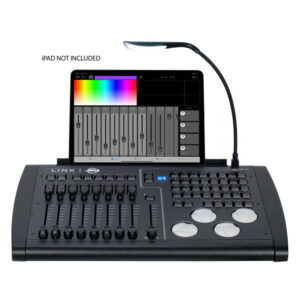
- ADJ LINK. The ADJ LINK is a 4-universe controller with four 5-pin DMX outputs, physical faders and buttons, driven by ADJ’s Airstream DMX LINK app on an iPad (iPad only, not included). It makes its own 2.4 or 5 GHz Wi-Fi network, so you can undock the iPad and program or run the show from the floor.
- ChamSys QuickQ. ChamSys aims QuickQ at novice users, with a smartphone-style touchscreen, a large fixture library, colour picker and built-in effects generator. The QuickQ 10 controls one universe with 20 fixture faders. The full range is in ChamSys MagicQ range explained.
Mixing methods: the catches
- DMX usually takes over. A fixture in DMX mode follows the controller, not its own sound programs or the remote. Decide per fixture which method is in charge for the night.
- Wireless and IR can exclude each other. The Equinox Colour Raider Lithium manual is explicit: “Please note: Wireless DMX must be switched to OFF for the IR function to work.” So on those uplighters it is the IR remote or wireless DMX, not both at once. Check this on your fixtures before the gig, not at it.
- Remotes and ecosystems are maker-specific. Mixing brands in one room usually means two remotes or a DMX controller over both.
- Master/slave needs matching settings. Follow each fixture’s manual; the Colour Raider, for one, needs every slave in the same channel mode as the master.
- Effects go with the lights. If you add strobes or pixel bars, see strobes, blinders and pixel bars for how they are controlled. For a full first rig in buying order, see your first lighting rig.
Popular picks from the shop
ADJ LINK 4-Universe DMX ControllerView product → Transcension SDC 6 DMX ControllerView product → Chauvet DJ Obey 40 DMX ControllerView product → Chauvet DJ D-Fi Hub 2View product → LEDJ Mini Box G3 W-DMX TransceiverView product → ADJ mydmx GO Wireless DMX InterfaceView product → Equinox Colour Raider Lithium Uplighter PackView product → Chauvet DJ ILS CommandView product →
Frequently asked questions
Do I need a DMX controller as a mobile DJ?
Not to start. Sound-active and auto programs plus a matching remote cover most weddings and parties. A controller becomes worth it when you want all fixtures in sync, a steady single colour across the room, or programmed chases you control.
Can I control my disco lights from my phone?
Yes, two ways. Bluetooth fixtures such as Chauvet DJ’s BT range pair directly with the free BTAir app. Or a Wi-Fi interface such as the ADJ mydmx GO or Chauvet FlareCON Air 2 turns a phone or tablet app into DMX for any DMX fixture.
What is the difference between an IR and an RF remote?
IR needs line of sight to each fixture’s sensor, like a TV remote. RF is radio and does not: Chauvet says its RFC-XL works omnidirectionally without line of sight, up to 30 m unobstructed.
Will a Chauvet D-Fi transmitter work with Equinox or LEDJ uplighters?
No. D-Fi is Chauvet’s system, and many Equinox and LEDJ fixtures use W-DMX. Buy the transmitter that matches the fixtures, or see our wireless DMX guide for how the systems compare.
Is the Chauvet Obey 40 enough for moving heads?
It handles 12 fixtures of up to 16 channels each, which suits pars and simple effects. For moving heads with more channels, the Obey 70 allows 32 channels per fixture and adds a joystick, or step up to an app-driven controller such as the ADJ LINK or a ChamSys QuickQ.
Why do my sound-active lights not stay in time with each other?
Each fixture listens through its own microphone and runs its own program. Set one as master and the rest as slaves, using a DMX cable or wireless master/slave where the fixture supports it, or run them all from a DMX controller.
Shop this guide
Controllers, wireless DMX, remotes and the fixtures that work with them. Tell us which lights you already own and we will help match a control method that fits.
DMX Controllers Wireless DMX Lighting Desks & Consoles Uplighters Lighting Accessories DMX Cables



