

Home » Guides » Mixers & PA Systems »
Personal Monitor Mixing: Allen & Heath ME-1 and ME-500, Aviom, and Mixing From Your Phone
How to let each musician set their own in-ear or headphone mix without the engineer running back and forth. We compare hardware personal mixers (Allen & Heath ME-500 and ME-1, Aviom A320) with phone and tablet apps that drive the console's aux mixes, and explain how each one connects, what it costs you in console mixes and what feeds the ears.
~10 min read · Updated October 2026 · By the Stage Supply team
In this guide: The short answer · Comparison table · Allen & Heath ME · Aviom · Mixing from your phone · Wired or wireless in-ears · Worked example · Popular picks · FAQ
The short answer
There are two ways to give each performer control of their own monitor mix.
- A hardware personal mixer on a stand next to each player. The console sends a block of channels down a single Cat5 cable, and each musician builds their own mix from them. It uses no aux mixes on the console. Allen & Heath's ME-500 (16 keys) and ME-1 (up to 40 sources) are plug-and-play with the Allen & Heath consoles it lists as compatible: dLive, Avantis, SQ/SQ+ and Qu. Aviom's A320 works with almost any console through an Aviom input module, console card or Dante.
- An app on the musician's phone or tablet. Allen & Heath's free 4You apps (SQ4You, SQ+ 4You, Qu4You, CQ4You, plus dLive4You and Avantis4You) give each performer control of one aux mix over Wi-Fi. There is no extra hardware beyond a router, but every performer uses up one of the console's mixes.
Rule of thumb: if you have more performers than spare mixes, or players who want a lot of channels, buy hardware. If the band is small, the console has mixes to spare and everyone already has a phone, start with the app. Either way the output still goes to ears through wired earphones or a wireless IEM system, covered in our in-ear monitor systems guide.
If you are new to aux sends, read Aux, Group and Matrix explained first. For wedges and how monitor mixes are usually built, see Stage Monitors: Wedges, Mixes and Getting the Band to Hear Themselves.
Comparison table
| Option | Sources per performer | Connection and power | Uses console mixes? | Outputs at the performer | Works with |
|---|---|---|---|---|---|
| A&H ME-500 | 16 keys, each mono or stereo (up to 32 channels) | Cat5 from console, ME-U hub or PoE switch; PoE or supplied PSU | No | ¼" and 3.5mm stereo phones; ¼" mono out | dLive, Avantis, SQ/SQ+, Qu direct; others via ME-U with Dante or MADI; Aviom A-Net 16 |
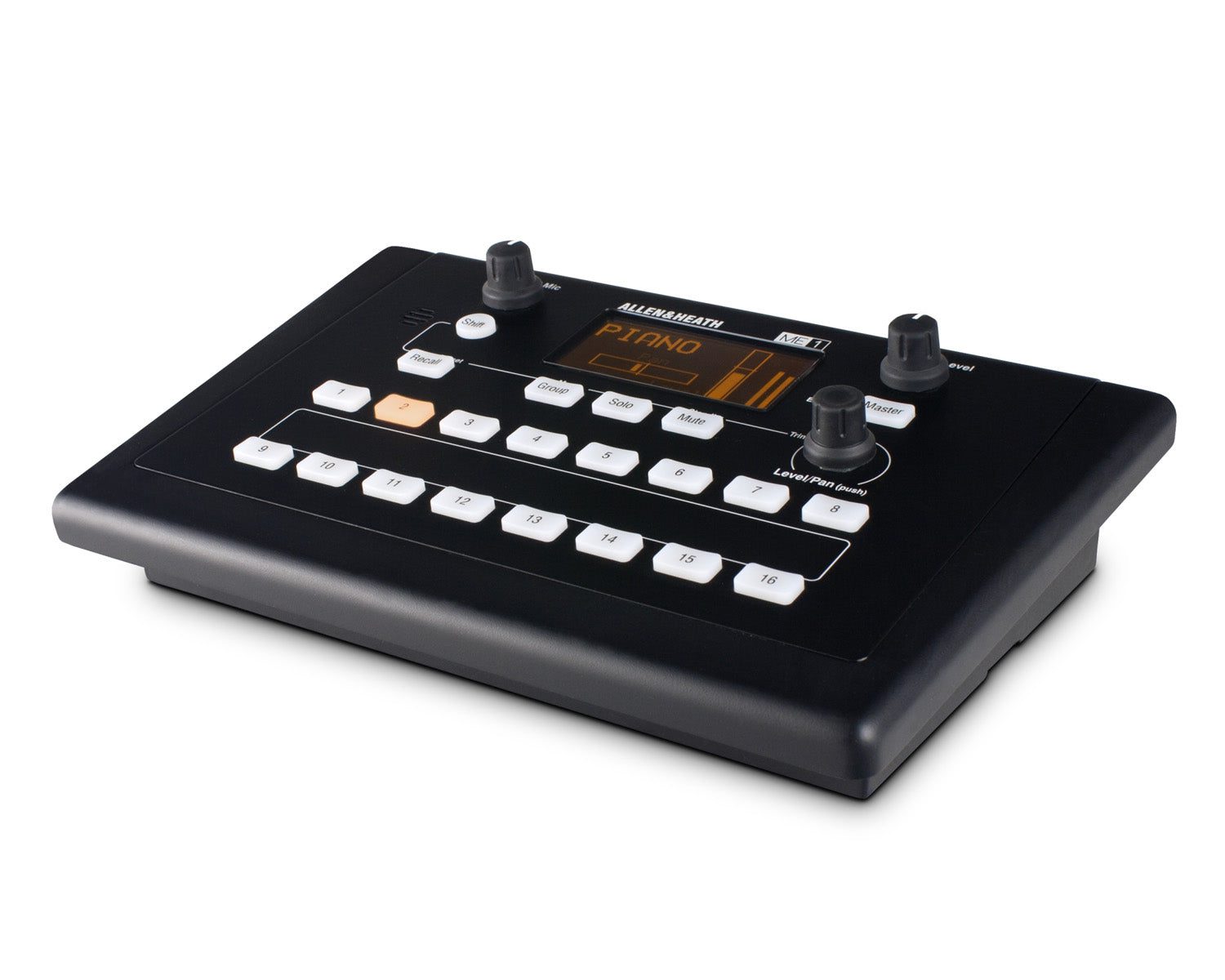
| A&H ME-1 | Up to 40 sources on 16 assignable keys, with groups | As ME-500 | No | ¼" and 3.5mm stereo phones; ¼" mono out; ambient mic and aux input | As ME-500 |
| Aviom A320 | 16 mono or stereo sources (32-channel mix engine) | Cat5e from an Aviom A-Net Distributor, which powers it (required) | No | ¼" TRS stereo, headphone or line level | Any console via Aviom input module, console card or Dante distributor |
| A&H 4You apps | Whatever the engineer assigns to that aux | Wi-Fi to the console's network via a router | Yes, one mix each | Wherever the console's mix output is patched (IEM transmitter, wedge, headphone amp) | dLive, Avantis, SQ, Qu, CQ (app varies by console) |
| A&H IP6 / IP8 | Hands-on control of a mix, configurable by the engineer | Network; PoE (IP6) or PoE+ (IP8), or supplied 12V PSU | Yes | As above | dLive, Avantis |
Specifications above are from Allen & Heath and Aviom product pages, datasheets and getting started guides.
Allen & Heath ME: ME-500, ME-1 and the ME-U hub
ME is Allen & Heath's personal mixing system. The console sends up to 40 channels of 48kHz audio, with stereo link information, down one Cat5 cable. Allen & Heath's ME brochure says ME mixers can be connected directly to any available ME, SLink, dSnake or Monitor port in an Allen & Heath digital mixing system, and the current product pages list dLive, Avantis, SQ/SQ+ and Qu as compatible. CQ is not on that list.
At the console you patch input channels, groups or mixes to the ME channels. Allen & Heath recommends feeding input channels from their direct outputs set post-EQ, post-mute and pre-fader, so the monitor feed follows the channel EQ and mutes but not the front-of-house faders.
ME-500: plug in and mix
The ME-500 has 16 select keys. The first 16 channels or stereo pairs from the console are mapped to the keys automatically, starting at channel 1, so there is no per-unit setup. That makes it the quick option for festivals and changeovers, and for players who just want "more me". It has a two-band master EQ, an output limiter adjustable from -24 to 0dB, solo and mute, and eight user presets that can be copied between units on a USB stick.
ME-1: more channels, groups and names
The ME-1 can draw on all 40 sources. Any of its 16 keys can hold a single mono or stereo source or a group, such as the whole drum kit, and grouping happens inside the ME-1, so different players can group differently without using console buses. It adds an OLED screen that picks up channel names from dLive, Avantis and SQ, 16 presets, a three-band master EQ and the same limiter. It also has a built-in ambient mic, so performers can hear the room and each other without pulling an earpiece, and a 3.5mm aux input for a click or a local source.
Allen & Heath's own advice: ME-1 for resident bands, high channel counts and shows with rehearsal time, where each unit can be set up for one player; ME-500 for low channel counts, tighter budgets and situations with little soundcheck time.
Cabling and power
- Use shielded Cat5e or better, up to 100m per run. Both models have locking EtherCON sockets.
- Each mixer has Link In and Link Out, so you can daisy-chain any number of them. Link Out does not carry power, so daisy-chained units each need their own supplied PSU, and removing power from one unit cuts audio to the units after it.
- For parallel connection with power over the cable, use a PoE switch. Allen & Heath specifies a Layer 2 unmanaged switch supporting 100Mbit/s, 802.3af or 802.3at PoE, and recommends allowing 15W per mixer.
- Or use the ME-U, a 2U, 10-port touring hub that powers ME-1 or ME-500 mixers over each port. Two hubs can be linked for more ports.
Using ME with other consoles
The ME-U is also the way in from other brands. Fit an M-DANTE or M-MADI card (each carries up to 64 channels at 48kHz) and it can feed up to 40 sources to ME-1s, or 16 to ME-500s, from a third-party console or audio interface. ME runs at 48kHz, so the source must too. Allen & Heath also says ME-1 and ME-500 can be drop-in replacements for older Aviom A-16II mixers on an Aviom A-Net 16 system. Aviom A-Net does not work through standard Ethernet switches.
Aviom: A320 and A-Net distributors
Aviom systems work with almost any console, analogue or digital. Audio gets into the system in one of three ways: an analogue input module fed from direct outs and submixes, a console card, or Dante. An A-Net Distributor then sends audio and DC power to up to eight personal mixers over Cat5e. If you need more mixers, add more distributors.
- The Aviom A320 is the simple, musician-friendly mixer: 16 mono or stereo sources, volume and stereo placement per channel, three-band master tone, solo and mute, and eight presets. Its output is a ¼" TRS stereo jack at headphone or line level. It must be connected to an A-Net Distributor to work, because it has no DC power input of its own.
- The D400-Dante takes 32 channels from a Dante network (44.1 or 48kHz only) and has eight powered A-Net ports for personal mixers, with front-panel DIP switches for stereo links. Any console or interface that can put those channels on a 44.1 or 48kHz Dante network can feed it; on an SQ that means fitting a Dante option card such as the SQ Dante card and running the network at a matching rate.
- The D800 also has eight powered ports. It takes A-Net in and, with the SB4 System Bridge and Pro16 console cards, Aviom says it can combine up to four 16-channel streams for up to 64 channels. Its Network Mix Back feature returns mixes from A640 and A360 mixers over the same cable. The A320 does not support Mix Back.
Aviom suits mixed-console venues, churches and studios that want the same personal mixers whatever is at front of house. If you already run an Allen & Heath console, ME is usually the simpler wiring.
Mixing from your phone: the 4You apps
Allen & Heath's personal mixing apps connect over Wi-Fi and control one aux mix on the console. Each performer works on their own aux mix, and the engineer can take control back if a performer gets into a mess. The default screen is a "four-wheel" layout, with up to four groups of sources on large wheels, plus master level and mute. Double-tapping a group reaches individual send levels and pan, and on SQ the app can also reach the mix's PEQ, GEQ and compressor.
| Console | App | Limits stated by Allen & Heath |
|---|---|---|
| SQ / SQ+ | SQ4You / SQ+ 4You (iOS and Android) | Up to 8 remote apps in total. On SQ, at most 2 can be SQ MixPad; on SQ+, up to 3 can be SQ+ MixPad. Choose from the console's 12 mono or stereo mixes |
| Qu | Qu4You (iOS and Android) | Qu4You page: up to 8 musicians at once. Qu-5/6/7 have 12 mixes plus LR |
| CQ | CQ4You (iOS and Android) | Free personal mixing app for CQ mixers |
| dLive / Avantis | dLive4You / Avantis4You (iOS and Android); OneMix (iPad) | Avantis OneMix locks each iPad to a single aux. Allen & Heath's combined 4You page (covering dLive, Avantis, SQ and CQ) says up to 40 musicians; the SQ4You page says 8 for SQ, so check the limit for your console |
The catch is mixes. Each performer needs their own aux, and stereo in-ears need a stereo mix, so a console's mix count sets a hard limit. Our SQ+ range guide, CQ vs Qu guide and Avantis vs dLive guide cover what each console has. The upside: the console's per-mix processing (EQ, compression) works on every in-ear mix, and you need nothing on stage except a decent router.
On dLive and Avantis, the IP6 (six push-and-turn encoders) and IP8 (eight motorised faders) can be set up as hands-on personal mix controllers. The IP6 runs on PoE and the IP8 on PoE+, or either on its supplied 12V PSU, and the engineer can change their configuration by scene.
The output side: wired or wireless in-ears
A personal mixer or app only makes the mix. Something still has to get it into ears.
- Wired, straight from the personal mixer. ME-1, ME-500 and A320 all have headphone amplifiers, so a drummer or keyboard player who stays put can plug earphones such as the Shure SE215 or Sennheiser IE 100 PRO straight in. Our IEM earphones compared guide covers the choice.
- Wireless, fed from the personal mixer. Allen & Heath notes that the ME-500's stereo headphone socket can feed line-level gear such as a wireless in-ear transmitter. The output is unbalanced and carries both channels on one TRS jack, so use a stereo Y-cable for a transmitter with separate left and right inputs. Systems such as the Shure PSM 300 or Sennheiser EW IEM G4 then carry it to the performer. For comparisons, see Shure PSM 300 vs Sennheiser EW IEM G4 and Shure PSM 300 vs PSM 900.
- Wireless, fed from the console. With the app approach, patch each aux to its IEM transmitter at the console, so no extra box is needed on stage.
- Wedges or drum fills. The ME-1 and ME-500 both have a ¼" mono line output. For the ME-500, Allen & Heath describes it as a balanced output for a powered speaker or drum throne.
- Shared headphone feeds. Where several people can share a mix, such as in rehearsal rooms or for backing vocalists, a rack headphone amplifier like the Tascam MH-8 is simpler. It has eight stereo outputs at 250mW per side, two shared stereo inputs and a direct input per channel.
Protect your hearing
Use the limiter. The ME-1 and ME-500 limiters can be set from -24 to 0dB to catch unexpected peaks before they reach the ears. Set it at soundcheck, not after something goes wrong. Our noise at work guide covers exposure for crew.
Worked example: five-piece band on an SQ5+
A covers band with drums, bass, guitar, keys and lead vocal, all on in-ears, mixed on an SQ5+.
- App route. Five stereo mixes for in-ears, five phones running SQ+ 4You, and wireless or wired IEMs patched from those mixes. That is five of the SQ5+'s 12 mixes, inside the app limit of 8 devices, and still leaves room for the engineer to use SQ+ MixPad. Cheapest, but every change a player makes is a change on the console, and the mixes are gone for other uses.
- ME route. Five ME-500s (or ME-1s for players who want more channels and groups). At the SQ, patch what the players need to the ME channels: drum subgroup, bass, guitar, keys in stereo, vocals, click. The ME-500s map the first 16 mono or stereo channels to their keys automatically; ME-1s can draw on up to 40. Power them from the ME-U or a suitable PoE switch, or daisy-chain them with their own PSUs. No console mixes are used, and the drummer can run wired earphones from their ME unit.
If the band also plays venues with other consoles, the Aviom route (a D400-Dante plus A320s) or an ME-U with a Dante card goes with them.
Popular picks from the shop
Allen & Heath ME-1 40-Source Personal MixerView product → Allen & Heath ME-500 16-Channel Personal MixerView product → Allen & Heath ME-U 10-Port PoE HubView product → Aviom A320 Personal Monitor MixerView product → Aviom D400-Dante A-Net DistributorView product → Allen & Heath SQ5+ Digital MixerView product → Shure PSM 300 Premium IEM System with SE215View product → Shure SE215 Pro In-Ear EarphonesView product →
Frequently asked questions
What is the difference between the ME-1 and ME-500?
The ME-500 has 16 keys that map automatically to the first 16 channels or stereo pairs from the console, so it works the moment it is plugged in. The ME-1 can use up to 40 sources on 16 assignable keys, groups channels internally, shows channel names on an OLED screen, has 16 presets rather than 8, a three-band rather than two-band EQ, and adds an ambient mic and aux input.
Can I use ME-1 or ME-500 with an Allen & Heath CQ?
Allen & Heath lists dLive, Avantis, SQ/SQ+ and Qu as compatible with ME, and CQ is not on the list. For personal mixing on CQ, use the free CQ4You app.
Can I use ME personal mixers with a Yamaha, Midas or other console?
Yes, if the console has a Dante or MADI output: connect it to the ME-U hub with an M-DANTE or M-MADI card fitted. Allen & Heath says this feeds up to 40 sources to ME-1s, or 16 to ME-500s, from a third-party console or interface running at 48kHz. Selected DiGiCo consoles can instead use DiGiCo's DMI-ME card, connected to the ME-U's standard interface card.
Do I need a PoE switch for ME mixers?
No. Each ME mixer comes with a mains PSU and can be daisy-chained from the one before it. A PoE switch or the ME-U hub lets you power them over the Cat5 cable and connect them in parallel, so losing one unit does not cut audio to the rest. Allen & Heath specifies a Layer 2 unmanaged 100Mbit/s switch with 802.3af or 802.3at PoE, allowing 15W per mixer.
How many musicians can mix from their phones on an SQ?
Up to 8 devices running the SQ apps can connect at once, including at most two copies of SQ MixPad on an original SQ, or up to three copies of SQ+ MixPad on an SQ+. Each performer controls one of the 12 mixes, so the practical limit is also how many mixes you can spare.
Can I plug in-ear earphones straight into a personal mixer?
Yes. ME-1, ME-500 and Aviom A320 all have stereo headphone outputs designed to drive earphones directly. This suits musicians who stay in one place. Anyone who moves around needs a wireless IEM system fed from the personal mixer or the console.
Shop this guide
Personal mixers, in-ear systems and the consoles and Dante I/O that feed them. Tell us your console and how many performers, and we will help work out the system.
Personal Mixers & Controllers Wireless IEM Systems IEM Earphones Digital Mixing Desks Stage Boxes & Dante I/O Mixer Option Cards



