

Home » Guides » Install & Commercial »
Zone Mixers Compared: Cloud, Optimal Audio, Apart and Ecler for Bars, Restaurants and Shops
How the install zone mixers and zone mixer-amplifiers we stock from Cloud, Optimal Audio, Biamp Apart and Ecler differ on zones, inputs, paging, built-in amplification, wall controllers and app control, and which one fits a two-zone bar, a four-zone restaurant or an eight-zone shop.
~13 min read · Updated October 2026 · By the Stage Supply team
In this guide: The short answer · Three ways to build it · Cloud · Optimal Audio · Biamp Apart · Ecler · Comparison table · Which suits which venue · Dante and bigger systems · Popular picks · FAQ
A zone mixer lets one system play different sources at different levels in different parts of a venue: quiet jazz in the dining room, the match in the bar, nothing in the toilets, and a paging mic that reaches all three. The four brands below cover most bars, restaurants, cafés and shops, but they solve the problem in quite different ways.
This guide compares the models, using the manufacturers’ own specifications. How 100V line distribution, taps and priority work in general is covered in our commercial and background audio guide, and speaker layout in install speakers: how many you need, so neither is repeated here.
The short answer
- Two zones, one box: the Cloud 24-120 or 24-240 combines a two-zone mixer with two amplifier channels that drive 4/8 ohm or 70/100V speakers.
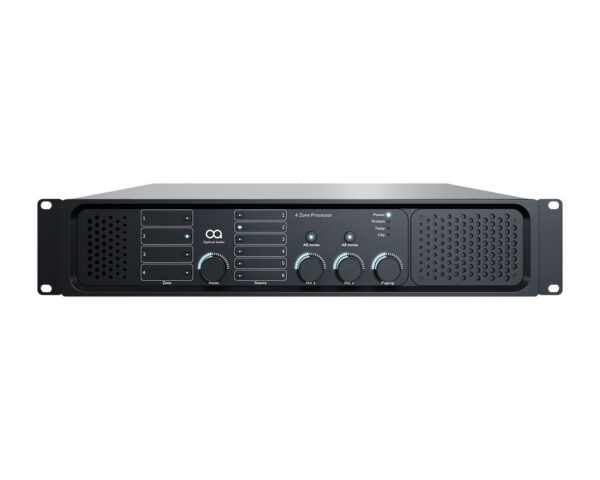
- Four zones, one box: the Cloud 46-120 MK2 (4 x 120W, 4/8 ohm or 70/100V, built-in digital paging port and Ethernet) or the Optimal Audio Zone 4P (4 x 100W, browser control, scheduling and two HDMI inputs).
- Four or eight zones with separate amplifiers: Cloud Z4 MK4 / Z8 MK4 for simple, knob-on-the-front analogue control; Cloud DCM1e or Optimal Audio Zone 8 when you want software control.
- Stereo zones without software: the Biamp Apart ZONE4 gives four stereo zones in 1U; the Ecler DAM614 gives four zones that can be paired as stereo.
- Eight to sixteen zones with app control: Ecler HUB1408 (8 outputs) or HUB1616 (16 mono or 8 stereo zones).
- Dante, echo cancelling or a big matrix: none of these zone mixers lists Dante. Look at the Allen & Heath AHM range instead.
Three ways to build a zoned system
Before comparing brands, decide which kind of box you want. It narrows the list quickly.
- Zone mixer plus separate amplifiers. The mixer gives line-level outputs, one per zone, into a multi-channel install amplifier. Most flexible: you choose amplifier power per zone and can mix 100V and low-impedance zones on different amp channels. Examples: Cloud CX and Z series, DCM1, Optimal Zone 4 and Zone 8, Apart ZONE4, Ecler DAM614 and HUB.
- Zone mixer-amplifier. Mixer and amplifier channels in one chassis. Fewer boxes and less wiring, ideal when the zones are all similar sizes. Examples: Cloud 24 and 46 series, Optimal Zone 4P and Zone 8P.
- Software-controlled zoner. Configured from a browser or app, with presets, DSP and wall panels on Cat5. Examples: Cloud DCM1e, Optimal Zone series, Ecler HUB. These sit between a traditional zone mixer and a full DSP matrix.
Cloud Electronics
Cloud is the widest range here and the most traditional: front-panel knobs, contact-closure priority, and a family of remote wall plates that work across most of the range. Every unit below has a music mute input intended for a fire alarm interface, and most give one line input priority over the others.
CX series: single and small zone mixers
- CX261: one stereo zone, six stereo line inputs plus a front 3.5mm jack, two mic inputs with phantom power, and a transformer-isolated mono aux output for music on hold. 1U.
- CX163: two stereo zones (switchable to mono) plus a fixed-level mono utility output, six stereo line inputs, one mic input with 12V phantom. 1U.
- CX263: three zones (one stereo, two mono), six stereo line inputs, two mic inputs with 12V phantom, optional CDI-S200 RS-232 card. 1U.
- CX462: not a zoner. One music output and a separate mic output with four mic inputs, for rooms where speech matters as much as music. 1U.
The CX models take Cloud PM paging mics through the mic input and access contacts (or voice-operated switching), not through the digital RJ45 paging interface.
Z4 MK4 and Z8 MK4: the analogue workhorses
Four or eight mono zones, six stereo line inputs, two mic inputs plus a separate paging mic input, all with 15V phantom. Each zone has its own ducking and its own Facility Port for a local input plate. The headline feature is the RJ45 digital paging interface for Cloud PM-series paging mics such as the PM-8, and a second mixer can be cascaded for up to 16 zones. No network control is listed. Both are 3U.
DCM1 and DCM1e: digital eight-zone
Eight zone outputs (two stereo, six mono), eight stereo line inputs, plus four RJ45 ports for Cloud ME-1 remote mic modules and four for LE-1 remote line modules, so mics and sources can live out in the venue on Cat5. Up to 100 CDR-1 remote controls are supported. Any input can be set as an emergency input that still gets through when music is muted. The DCM1 is set up from its own front panel or with Cloud’s free configuration software, and has RS-232 for third-party control systems; the DCM1e adds Ethernet with a built-in web server for control from a phone, tablet or PC browser. 2U.
46 and 24 series: zone mixer-amplifiers
- 46-120 MK2: four zones at 4 x 120W, 4/8 ohm or 70/100V. In 70/100V mode, power can be shared between zones 1 and 3, and between 2 and 4. Six stereo line inputs, two mic inputs, built-in RJ45 digital paging port, RS-232 and Ethernet. 2U.
- 46-240: the same with 4 x 240W, without power sharing. 2U.
- 46-80 and 46-80T: four zones at 4 x 80W. The 46-80 is low impedance; the 46-80T has factory-fitted 70/100V transformers (European versions come pre-wired for 100V). RJ45 paging port and RS-232; Ethernet is not listed. Fanless, 2U.
- 24-120 and 24-240: two zones at 2 x 120W or 2 x 240W, 4/8 ohm or 70/100V, four stereo line inputs and one mic input. No RJ45 digital paging port is listed: PM mics connect through the mic input and access contacts. Built-in pre-announcement chime, RS-232. 1U.
Optimal Audio Zone series
Optimal Audio’s Zone controllers are the most modern design here: everything is set up and run from WebApp, a browser interface built into the unit, with installer and PIN-locked operator access. All four models share the same inputs: two mic inputs with 48V phantom, four stereo line inputs (S/PDIF option on input 1) and two HDMI inputs, which is handy for taking TV audio in a sports bar. All are 2U.
- Zone 4: four zones, four line outputs to your own amplifier.
- Zone 4P: four zones with four amplifier channels at 100W into 4 or 8 ohms. Pairs bridge to 200W into 8 ohms, which Optimal specifies for 70V constant-voltage speakers. Optimal does not quote 100V line operation, so for a 100V system check your speakers’ 70V taps or use the Zone 4 with a 100V amplifier.
- Zone 8: eight balanced line outputs, each settable mono or stereo.
- Zone 8P: eight 100W channels; per output one 4 ohm, two 8 ohm or four 16 ohm speakers, with bridging for 70V as on the Zone 4P.
WebApp is where these pull ahead for unattended venues. Routines recall presets at set times on chosen days, so the music can change at lunch, drop in the evening and reset overnight. There is a per-zone ducker, mic compression, EQ and limiters on outputs, and minimum and maximum level limits so staff cannot push a zone too far. Optimal also lists integration with Bluesound Professional and Soundtrack Your Brand streaming.
Wall panels plug into dedicated RJ45 ZonePad sockets (four on a Zone 4/4P, eight on a Zone 8/8P), and a single Cat5 carries power, data and audio up to 300m. The ZonePad 1 controls one zone and has a local mic and music input; the ZonePad 4 controls four zones; the ZonePad 8 is an 8-inch touchscreen on the network, powered by PoE. The Talk 8 paging station pages up to eight zones, plays stored messages, and connects to one of two paging ports. An alarm override contact mutes all outputs.
Biamp Apart ZONE4
The ZONE4 is a 1U pre-amplifier with four stereo zone outputs and four stereo line sources; each zone picks a source and sets its own music level, mic level and bass and treble. There are three mic inputs (phantom on two). Mic 1 can be a priority mic or Apart’s MICPAT-4 four-zone paging mic. Biamp lists two priority levels and an emergency input, and no chime. Control is from the front panel, RS-232 or IR.
Local control comes from the ZONE4R: music level, source and mic level on one plate, connected by Cat5 up to 100m per zone and powered from the ZONE4, with up to eight per ZONE4. Biamp is clear that the ZONE4R works only with the ZONE4. No network, app or scheduling is listed, so this is the choice for a straightforward stereo four-zone system run by staff rather than software.
Ecler: DAM614 and HUB
DAM614
The DAM614 is a 1U digital zone mixer with four zone outputs that run as mono zones or are coupled as stereo pairs. It has two stereo RCA line inputs and four balanced mic/line inputs. There is a pager/ducker with two priority levels, plus a feedback suppressor and noise gate. A mute contact silences the selected zones, and Ecler gives an emergency and evacuation alarm system as the example use. Four 0-10V remote ports take up to four WPaVOL-SR wall panels for volume and source or preset selection. Control is from the front panel or RS-232; no Ethernet or app is listed.
HUB1408 and HUB1616
The HUB units are Ecler’s networked zoners. The HUB1408 has 14 inputs and 8 outputs; the HUB1616 has 16 and 16 (16 mono or 8 stereo zones). Both include eight RJ45 remote inputs, so sources such as a WPaMIX-T wall mixer can feed in from the floor, and mic/line inputs with 48V phantom. Up to two eMPAGE paging stations connect on RJ45, with four priority levels and chimes. Up to eight eMCONTROL1 wall controllers connect on Cat5 for volume, source and EQ.
Setup is through HANGAR, a web app built into the unit, and day-to-day control through any browser or the Ecler Pilot app for iOS and Android, which also drives the PULSO-4 touchscreen. There is a dry-contact mute input whose muted outputs are assigned in HANGAR. Both are 2U.
Comparison table
From each manufacturer’s product page or datasheet. “Not listed” means the manufacturer’s specification does not mention the feature.
| Model | Zones | Line inputs | Mic inputs | Paging | Built-in amp | Wall controls | Software control | Alarm / emergency |
|---|---|---|---|---|---|---|---|---|
| Cloud CX261 | 1 stereo | 6 stereo + 3.5mm | 2 | Via mic input | None | RL-1, RSL-6 | Not listed | Music mute |
| Cloud CX163 | 2 stereo + utility | 6 stereo | 1 | Via mic input | None | RL-1 | Not listed | Music mute |
| Cloud CX263 | 1 stereo + 2 mono | 6 stereo | 2 | Via mic input | None | RL-1, RSL-6 | RS-232 (card) | Music mute |
| Cloud 24-120 / 24-240 | 2 | 4 stereo | 1 | Via mic input, chime | 2 x 120W / 2 x 240W, 4/8Ω or 70/100V | RL-1, RSL-4/6, Facility Port | RS-232 | Music mute |
| Cloud 46-120 MK2 / 46-240 | 4 | 6 stereo | 2 | RJ45 digital (PM series) | 4 x 120W / 4 x 240W, 4/8Ω or 70/100V | RL-1, RSL-6, 2 Facility Ports | RS-232, Ethernet | Music mute |
| Cloud 46-80 / 46-80T | 4 | 6 stereo | 2 | RJ45 digital (PM series) | 4 x 80W, 4Ω (80T: 70/100V transformers) | RL-1, RSL-6, Facility Port (zone 1) | RS-232 | Music mute |
| Cloud Z4 MK4 / Z8 MK4 | 4 / 8 mono | 6 stereo | 2 + paging | RJ45 digital (PM series) | None | RL-1, RSL-6, Facility Port per zone | Not listed | Music mute |
| Cloud DCM1 / DCM1e | 8 (2 stereo + 6 mono) | 8 stereo + remote LE-1 | Remote ME-1 + paging | RJ45 digital (PM series) | None | CDR-1, up to 100 | RS-232; DCM1e web browser | Music mute, emergency input |
| Optimal Zone 4 / Zone 8 | 4 / 8 | 4 stereo + 2 HDMI | 2 (48V) | 2 ports, Talk 8 | None | ZonePad 1/4 (one per zone socket), ZonePad 8 | Browser WebApp | Alarm override |
| Optimal Zone 4P / Zone 8P | 4 / 8 | 4 stereo + 2 HDMI | 2 (48V) | 2 ports, Talk 8 | 4 / 8 x 100W, 4/8Ω; bridged 70V | As Zone 4 / Zone 8 | Browser WebApp | Alarm override |
| Apart ZONE4 | 4 stereo | 4 stereo | 3 | Mic 1, MICPAT-4 | None | ZONE4R, up to 8 | RS-232, IR | Emergency input |
| Ecler DAM614 | 4 (or 2 stereo) | 2 stereo + 4 mic/line | Up to 4 (mic/line) | Pager port (MPAGE4) | None | WPaVOL-SR, up to 4 | RS-232 | Mute contact |
| Ecler HUB1408 / HUB1616 | 8 / 16 (linkable stereo) | 2 or 4 line + 4 mic/line + 8 remote | Up to 4 (mic/line, 48V) | 2 x eMPAGE | None | eMCONTROL1, up to 8; PULSO via app | Browser (HANGAR), Pilot app | Mute contact |
Two columns are missing because almost everything would read the same. Dante: none of these models lists it. Scheduling: only the Optimal Audio Zone series lists built-in time-based events (Routines in WebApp).
Which suits which venue
Start with the number of zones you need, then decide whether you want amplification in the same box. Count a zone for every area that needs its own source or level: bar, dining, terrace, toilets, function room. If two areas will always play the same thing at the same level, they can share one.
One zone: café, small shop, salon
A CX261 into an install amplifier, or a single mixer-amplifier, does the job. The CX261’s second mic input and mono aux output for music on hold are useful at a shop counter.
Two zones: bar plus dining room, or inside plus garden
The Cloud 24-120 is the tidiest answer: one 1U box with both amplifier channels, and in 70/100V mode its 240W can be shared between the zones. Choose the 24-240 for larger spaces. If you would rather pick amplifiers separately, the CX163 or CX263 gives two or three zones at line level. Our pub and bar AV guide covers the rest of a bar system.
Four zones: restaurant, larger bar, shop with stockroom and office
- One box, staff-run: Cloud 46-120 MK2, with RJ45 digital paging and remote plates. The 46-80T suits smaller 100V zones without a fan.
- One box, scheduled and browser-run: Optimal Zone 4P, especially where TV audio arrives over HDMI. Check the 70V point above for 100V speakers.
- Separate amplifiers: Cloud Z4 MK4 for mono zones with digital paging; Apart ZONE4 for four stereo zones; Ecler DAM614 for four zones with mic/line inputs and a feedback suppressor; Optimal Zone 4 for the WebApp features.
Eight zones: multi-floor bar, department or larger store
Cloud Z8 MK4 for a simple analogue system, DCM1 or DCM1e when you need remote mic and line modules spread around the building, Optimal Zone 8P or Zone 8 for browser control and scheduling, or the Ecler HUB1408 for app control and eMPAGE paging.
Nine to sixteen zones
The Ecler HUB1616 runs 16 mono or 8 stereo zones from one 2U unit. Two cascaded Cloud Z8 MK4s also reach 16 zones. Beyond that, or when you need Dante, echo cancelling or meeting-room processing, step up to a DSP matrix.
Sizing amplifiers per zone
For 100V zones, add up the speaker taps on each zone and leave spare amplifier capacity. The method and worked examples are in our install speakers guide; low-impedance loads are covered in matching amplifiers and speakers.
Dante and bigger systems
None of the zone mixers in this guide lists Dante in the manufacturer’s specifications, and none lists acoustic echo cancelling for conferencing. If the venue needs Dante, many more inputs, or echo cancelling for meeting rooms, compare these with the Allen & Heath AHM install matrix range in our AHM-16 vs AHM-32 vs AHM-64 guide.
Fire alarm muting is a common requirement for licensed premises. The Cloud, Optimal Audio and Ecler units all list a contact input that mutes music or selected outputs, and the Apart ZONE4 lists an emergency input, but connecting it to the fire alarm system, and confirming how the system must behave, is a job for a competent person working with the fire alarm installer.
Popular picks from the shop
Optimal Audio Zone 4P 4-Zone Amplified Audio ControllerView product → Cloud 46-120 MK2 4-Zone Mixer Amplifier, 4 x 120WView product → Cloud 24-120 2-Zone Mixer Amplifier, 2 x 120WView product → Cloud Z8 MK4 8-Zone MixerView product → Cloud DCM1e Digital 8-Zone Mixer with Web ControlView product → Biamp Apart ZONE4 4-Zone Stereo MixerView product → Ecler DAM614 4-Zone Digital Zone MixerView product → Ecler HUB1408 14×8 Digital Zone MixerView product →
Frequently asked questions
What is the difference between a zone mixer and a mixer amplifier?
A zone mixer outputs line-level signals, one per zone, which then need an amplifier. A zone mixer-amplifier, such as the Cloud 46-120 MK2 or Optimal Zone 4P, has the amplifier channels built in. Separate amps give more freedom on power per zone; a combined unit means fewer boxes.
Is 100V line good enough for music?
For background and most foreground music in bars, restaurants and shops, yes, provided the speakers are good two-way 100V models and the amplifier has headroom. The transformers in small speakers limit deep bass, so music-led venues often add an install subwoofer or run a few higher-quality speakers on low impedance. See our commercial and background audio guide.
How many zones do I need for a bar or restaurant?
One for each area that needs its own source or volume. A typical pub is bar, dining room and garden, so three or four zones; a single-room café needs one. Allow a spare zone if you may add a function room or terrace later.
Can staff change the volume in each area without going to the rack?
Yes. Each brand has wall controllers: Cloud RL-1, RSL and CDR-1 plates, Optimal ZonePads, the Apart ZONE4R, and Ecler WPaVOL-SR (DAM614) or eMCONTROL1 (HUB). Some units, including the Optimal Zone series and Cloud DCM1/DCM1e, also let you set maximum levels so the wall plate cannot be turned up too far.
Can a zone mixer mute the music when the fire alarm sounds?
The Cloud, Optimal Audio and Ecler units in this guide all list a contact input that mutes music or selected zones; the Apart ZONE4 lists an emergency input. The connection to the fire alarm system and how it must behave should be designed and installed by a competent person with the fire alarm installer.
Do any of these zone mixers support Dante?
None of the Cloud, Optimal Audio, Apart or Ecler zone mixers in this guide lists Dante. If you need it, look at a DSP matrix such as the Allen & Heath AHM range, compared in our AHM guide.
Shop this guide
Zone mixers, mixer amplifiers, wall controllers and paging mics from Cloud, Optimal Audio, Apart and Ecler. Tell us how many areas you need to run and we will help match a zoner and amplifiers.
Zone & Install Mixers Install Amplifiers & Mixer Amps Install DSP & Control Paging Microphones Install Accessories Install Speakers



