

Home » Guides » Mixers & PA Systems »
Allen & Heath dLive Range Explained: Which Surface and MixRack?
C1500, C2500, C3500, CTi1500, S3000, S5000 or S7000, and which MixRack underneath. What actually changes as you go up the range, what stays identical, and how to spec a dLive system without paying for faders you will not use.
~10 min read · Updated August 2026 · By the Stage Supply team
In this guide: Short answer · How dLive works · MixRacks · C Class surfaces · S Class surfaces · Surface comparison · Which to buy · Picks · FAQ
dLive is Allen & Heath’s flagship digital mixing platform, and the range is confusing at first glance: seven control surfaces, seven MixRacks, and prices that span a family car. The confusion clears once you understand one thing: every dLive runs the same mix engine. A C1500 in a school hall and an S7000 on an arena tour are mixing through identical processing. What you pay for as you climb the range is physical control and local connectivity, not sound or channel count.
The short answer
Pick the MixRack by how many stage inputs you need locally (32, 48 or 64), then pick the surface by how many faders your engineer needs under their hands at once, and let go of the idea that the bigger desk mixes better: it does not. For most UK venues and rental stock the sweet spot is a CDM48U with a C2500 or C3500. Go S Class when the desk is an engineer’s workstation all day, every day (touring FOH, broadcast, theatre) and the extra screens and strips earn their keep.
How a dLive system fits together
A dLive system is two boxes. The MixRack is the actual mixer: it houses the XCVI FPGA core that does all the processing, 128 input channels at 96 kHz with full DEEP processing headroom, plus the stage I/O. The surface is a controller with faders, screens and its own handful of I/O; it connects to the MixRack over a gigaACE gigabit link (one Cat5e/Cat6 cable, or redundant pairs on the larger systems). Pull the surface away mid-show and audio keeps passing, the rack neither knows nor cares.
Three consequences follow. First, any surface pairs with any MixRack: there is no such thing as an incompatible combination, so you can put a compact surface on a big rack for a fly date and a big surface on the same rack at home. Second, you can mix without a surface at all: dLive Director on a laptop, or the IP controllers and tablet apps, drive the rack directly, common in installs where a full desk would be wasted. Third, upgrading later is cheap: keep the rack, change the surface, and nothing about your show files or processing changes.
MixRacks: DM vs CDM
The current UltraFX-equipped racks come in two families. The full-size DM racksDM32U (32 in / 16 out), DM48U (48 / 24) and DM64U (64 / 32), and the compact CDM racksCDM32UCDM48U and CDM64U, with the same input counts in shallower, lighter chassis. Both families run the identical 128-channel engine; the DM racks give you more audio option-card slots for Dante, Waves and the like, which is why touring and broadcast tend to spec them.
There is also the DM0: a 4U rack with the full engine and no local analogue I/O at all. It looks odd until you meet a distributed install or broadcast plant where every input arrives over Dante or DX expanders anyway. Then it is exactly the right amount of hardware. Speaking of which: local I/O is not a ceiling on any rack. DX expanders (DX168, DX32 and friends) add remote inputs and outputs over Cat5e, so a 48-input rack does not cap a 60-input festival stage.
Sizing advice from the quotes we do: count the channel list for your biggest realistic show, add a quarter for growth, and buy that rack. Buying a DM64U “to be safe” for a venue that has never patched more than 36 lines is the most common way to overspend on dLive.
C Class surfaces: C1500, C2500, C3500 and the CTi1500
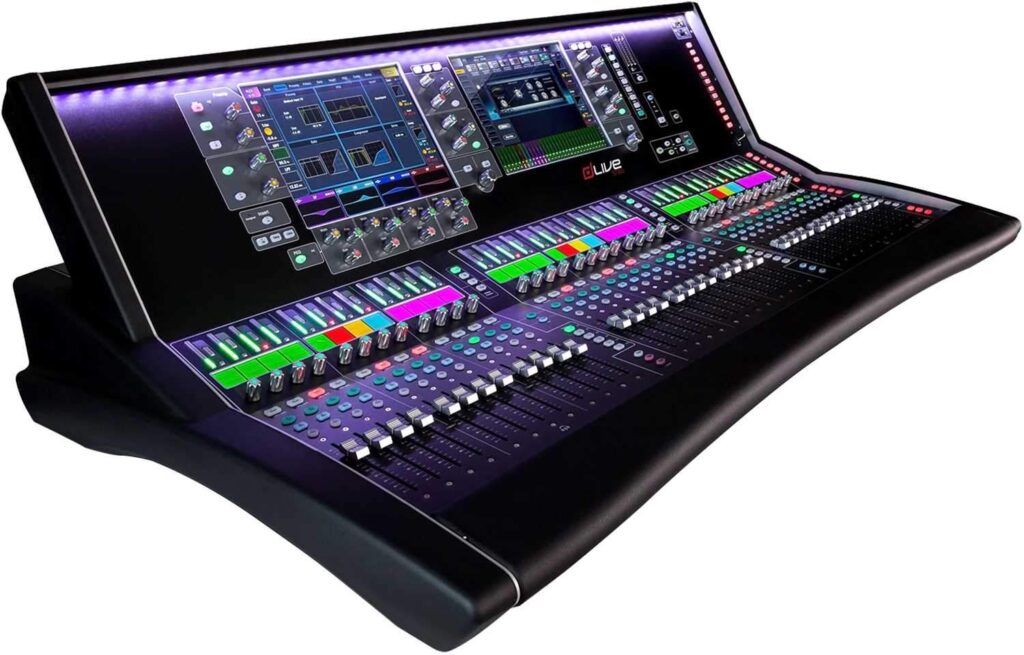
C Class is the value end of the surface range, and the compromise is purely physical, fewer faders, one screen on the smaller frames, lighter build. The C1500 is the compact anchor: 12 faders across 6 layers, a 12" capacitive touchscreen, built-in audio I/O, and it rack-mounts with the optional 19" kit, which is why it turns up in broadcast trucks and side-stage monitor positions. The C2500 steps to 20 faders in a frame that still fits a compact FOH position, and the C3500 tops the class with 24 faders and dual 12" touchscreens, the cheapest way into the two-screen workflow that makes a busy show manageable.
The CTi1500 deserves its own sentence: same 12-fader, 12" screen control set as the C1500 but in an ultra-portable frame with mic/line and AES3 on board, built for fly dates and remote broadcast positions where the surface travels as luggage.
S Class surfaces: S3000, S5000, S7000
S Class buys you the full-fat control experience: the Harmony UI with screens angled into the engineer’s eyeline, more assignable strips, heavier build for life on the road, and redundant gigaACE links to the rack. The S3000 is the compact option for tours and venues short on FOH real estate. The S5000 is the mid-size workhorse (28 faders, 168 assignable strips, dual 12" screens) and probably the most common S Class desk in UK rental stock. The S7000 is the flagship: 36 faders, 216 strips, and the desk you spec when a theatre or large-format tour wants everything on the surface at once with minimal layer-diving.
Surface comparison
| Surface | Faders | Screens | Best suited to |
|---|---|---|---|
| CTi1500 | 12 (6 layers) | 1 × 12" | Fly dates, remote broadcast, portable rigs |
| C1500 | 12 (6 layers) | 1 × 12" | Installs, broadcast, monitor positions; 19" rack-mountable |
| C2500 | 20 (6 layers) | 1 × 12" | Venues, houses of worship, compact FOH |
| C3500 | 24 (6 layers) | 2 × 12" | Cheapest dual-screen workflow; busy one-engineer shows |
| S3000 | Compact S frame | Harmony UI | Touring where FOH space is tight |
| S5000 | 28 / 168 strips | 2 × 12" | The standard touring and rental S Class desk |
| S7000 | 36 / 216 strips | 2 × 12" | Large-format touring, theatre, broadcast flagship |
Which should you buy?
Choose C Class if
- The desk is mixed by different people (volunteers, visiting engineers, staff) and nobody lives on it all day. The engine is identical; the missing faders cost seconds, not quality.
- It is going in an install. Balcony mix positions, corporate rooms and houses of worship rarely justify S Class money for control they will not touch.
- You need the desk to travel light or rack-mount: the C1500 and CTi1500 are the only rack-friendly ways into dLive.
Choose S Class if
- An engineer works the desk as their instrument (touring FOH or monitors, rep theatre, broadcast) where strips-on-surface and the angled Harmony screens genuinely speed a show up.
- You are a rental company. Riders ask for S Class by name; a C3500 does the same job but does not tick the box on an incoming tech spec.
- You need redundant everything, dual gigaACE links and hot-swap PSU options are S Class territory.
Popular picks from the shop
Allen & Heath dLive C1500 Control SurfaceView product → Allen & Heath dLive C3500 Control SurfaceView product → Allen & Heath dLive CDM48U MixRack with UltraFXView product → Allen & Heath dLive S Class S7000 Control SurfaceView product →
If dLive is more desk than the room needs, the step down is not a cut-price dLive: it is Avantis or SQ, and the comparison lives in our Qu vs SQ vs Avantis guide.
Frequently asked questions
What is the difference between dLive C Class and S Class?
Control hardware, not audio. Both classes drive the same 96 kHz, 128-channel XCVI engine in the MixRack. S Class adds more faders and assignable strips, the Harmony UI with angled screens, heavier touring build and redundant links. If two desks are attached to the same rack, they sound identical.
Does the C1500 have fewer channels than the S7000?
No. Channel count lives in the MixRack, 128 inputs on every current rack from CDM32U to DM64U. The C1500 gives you 12 physical faders across 6 layers to reach those channels; the S7000 gives you 36 faders. It is a difference in how much is under your hands at once, not in what the system can mix.
Can I mix a dLive without a surface?
Yes. dLive Director on a Mac or PC gives full control of a MixRack over a network, and the IP1/IP4/IP6/IP8 remote controllers and tablet apps cover installed rooms. Plenty of corporate and house-of-worship systems run rack-only, with a surface hired in for big events.
Which MixRack size do I need?
Count the inputs on your biggest realistic patch list and add headroom of about a quarter. 32 local inputs covers most bands and conference rooms; 48 covers busy venues and small festivals; 64 is large-format territory. Remember DX expanders can add remote I/O later, so buy for the shows you actually do.
Is dLive overkill for my venue?
If your channel count never passes 48 and no rider demands dLive, an Avantis or SQ delivers the same family workflow for much less. dLive earns its price on channel count, processing headroom, option-card ecosystems and rider acceptance, when none of those apply, spend less. Call us on 0330 043 8650 and we will spec it honestly.



